How to Choose Between Docs and Blog Layouts
Hinto allows you to present your published content in two distinct formats: a structured knowledge base or a modern blog. This guide shows you how to choose the layout that best fits your project's needs. You will need to have an active project to configure its publishing settings.
-
From your project dashboard, click the Settings button.
-
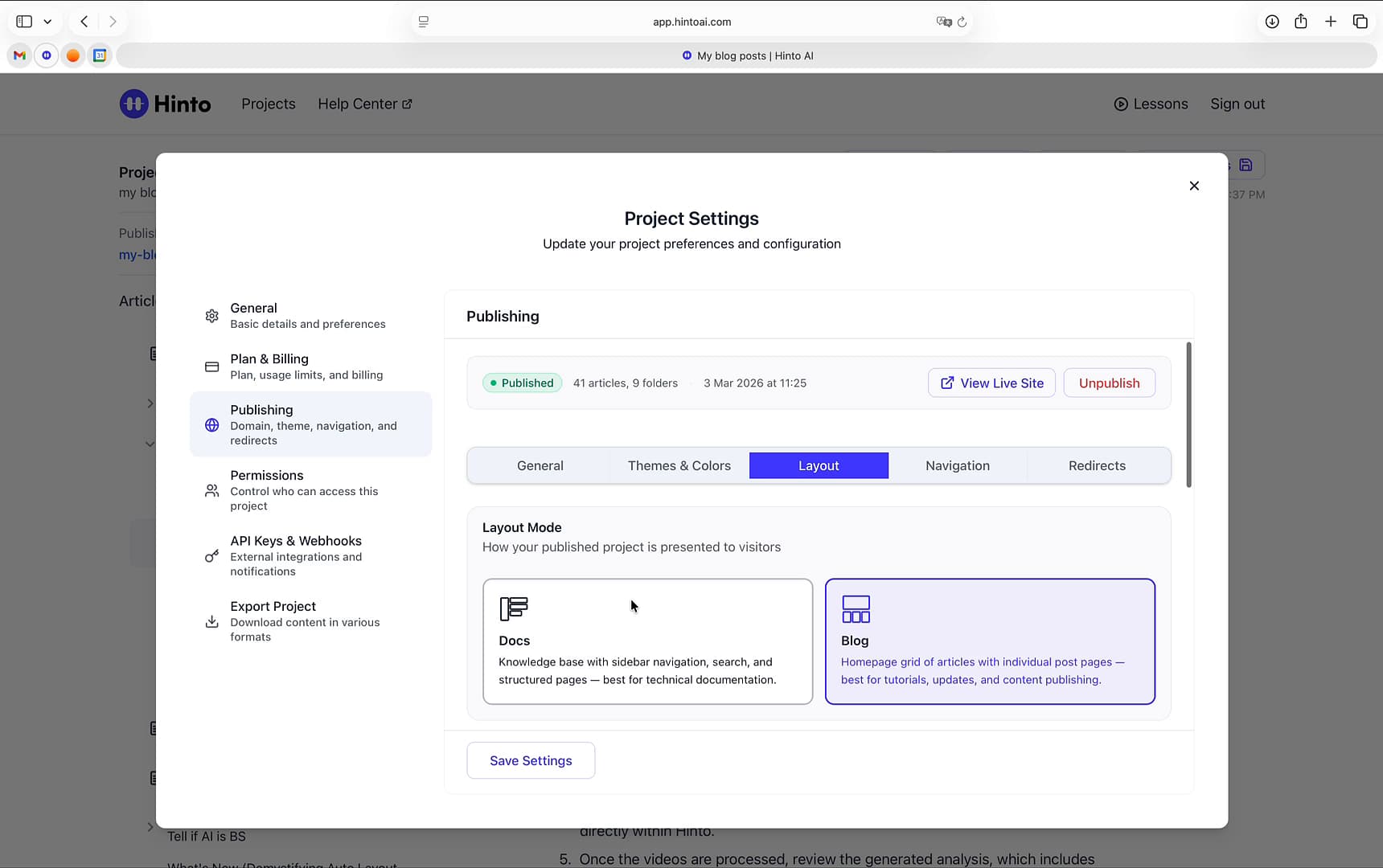
In the Project Settings window that appears, navigate to the Publishing section in the left-hand menu.
-
Click the Layout tab to view layout options.
-
Under the Layout Mode section, select your desired layout:Docs: A traditional knowledge base with sidebar navigation and search, best for technical documentation.Blog: A homepage grid of articles with individual post pages, best for tutorials, updates, and content publishing.
-
If you chose the Blog layout, scroll down to the Hero Section Configuration to customize the Title, Subtitle, and Description for your homepage.
-
Click Save Settings to confirm your changes. The new layout will be applied the next time you publish or update your site.
Summary
This article explains how to switch your project's published appearance between the 'Docs' layout for knowledge bases and the 'Blog' layout for a grid-style homepage. It also covers how to customize the hero section for the blog layout, giving you full control over how visitors experience your content.