The Onboarding Checklist Template
No new hire's first day should hinge on whether one person remembered the right steps. This onboarding checklist hands HR and hiring managers a ready-to-fill task list that runs from the pre-start paperwork out to the twelve-month review. Copy the full template below, or download it as a PDF.
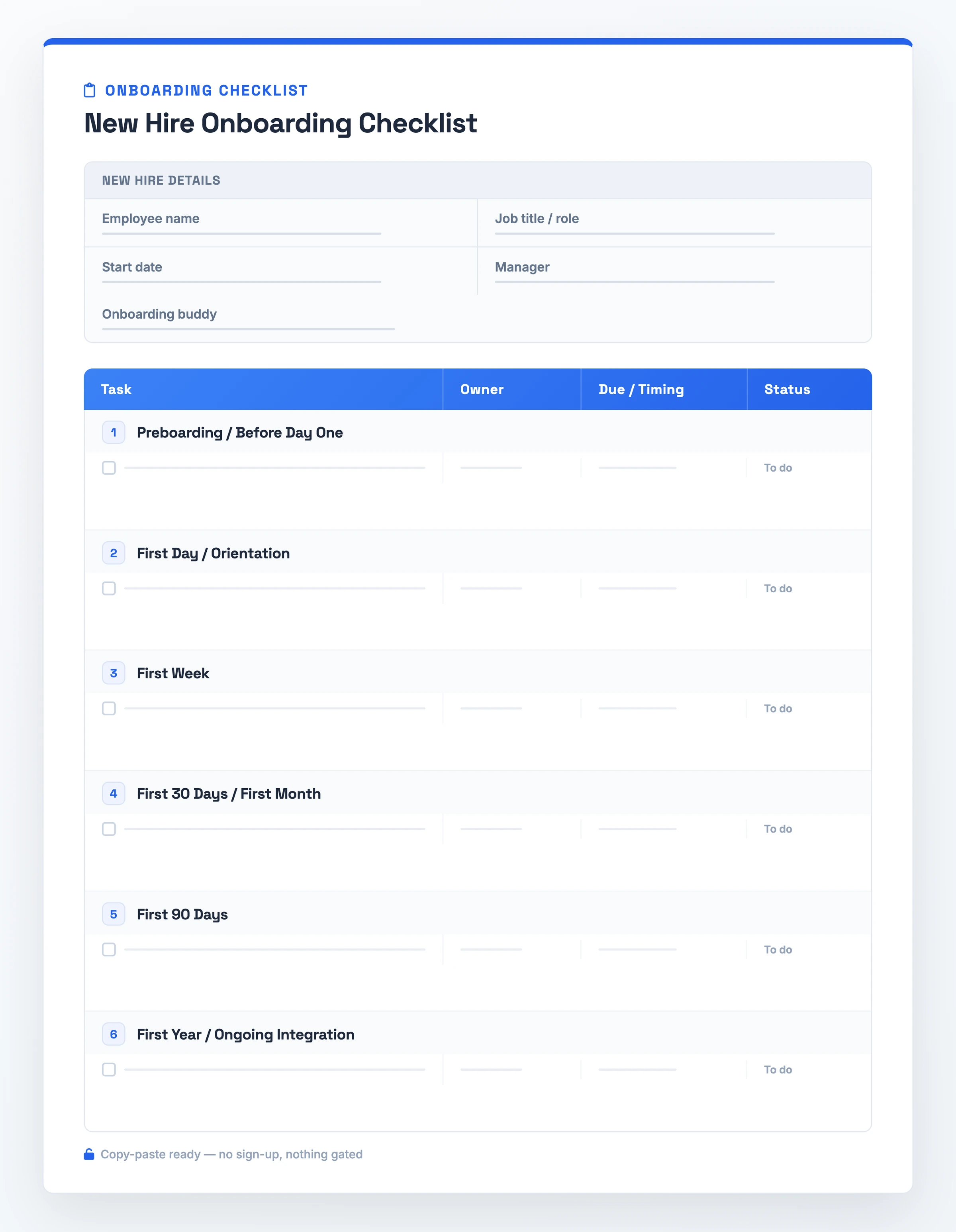
What it is: a phased task list running from preboarding to a new hire's first-year mark.
When to use it: any time you bring on a brand-new hire, from signed offer to the point they hit full speed.
What it must contain: all three phases, Pre-boarding, Orientation, and Integration, broken into tasks, each row tagged with an owner and a timing.
Where to start: copy the template below and delete the rows a role does not need.
The Onboarding Checklist Template (Copy-Paste Ready)
Onboarding Checklist: [Role]

New Hire Details
Employee name: [Name]
Job title / role: [Role]
Start date: [Date]
Manager: [Name]
Onboarding buddy: [Name]

Every task row carries: Task | Owner | Due/Timing | Status

Preboarding / Before Day One
Send paperwork and offer documents | HR | Before start | ☐
Order equipment | IT | Before start | ☐
Provision accounts and access | IT | Before start | ☐
Set up the workspace | Manager | Before start | ☐

First Day / Orientation
Welcome and team intros | Manager | Day 1 | ☐
Office and facilities tour | Buddy | Day 1 | ☐
Hand over ID and access keys | IT | Day 1 | ☐
Review the handbook | HR | Day 1 | ☐
Complete compliance paperwork | HR | Day 1 | ☐

First Week
Begin role-specific training | Manager | Week 1 | ☐
Meet the team | Manager | Week 1 | ☐
Assign a buddy | Manager | Week 1 | ☐
Set early expectations | Manager | Week 1 | ☐
Set 30/60/90 goals | Manager | Week 1 | ☐

First 30 Days / First Month
Confirm role goals | Manager | Day 30 | ☐
First check-in | Manager | Day 30 | ☐
Clarify success criteria | Manager | Day 30 | ☐

First 90 Days
Review progress against the 30/60/90 goals | Manager | Day 90 | ☐
90-day performance review | Manager | Day 90 | ☐
Culture immersion | Buddy | Day 90 | ☐

First Year / Ongoing Integration
Six-month check | Manager | Month 6 | ☐
First-year review | Manager | Month 12 | ☐
Ongoing development | Manager | Ongoing | ☐
What This Checklist Covers
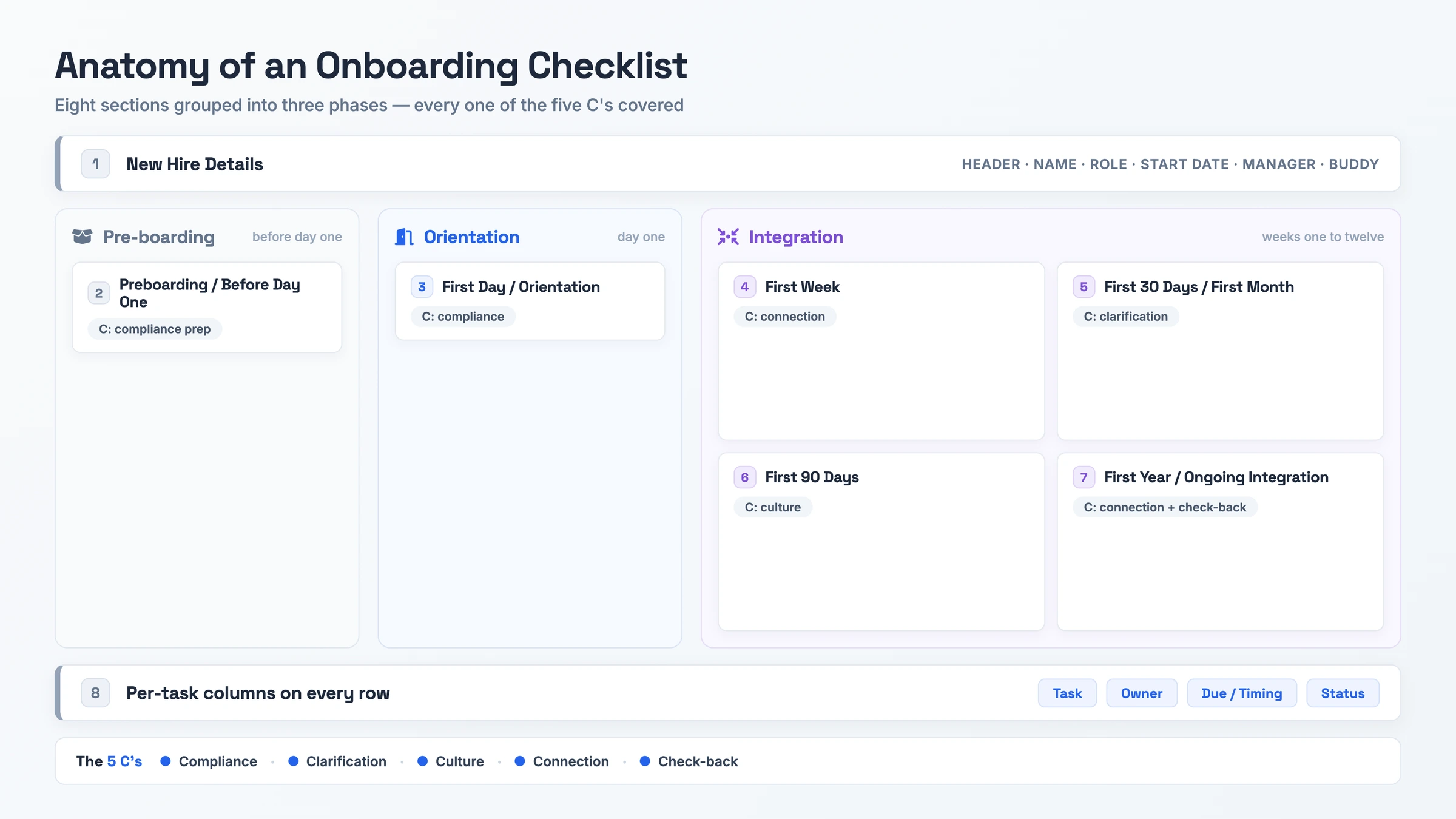
- New Hire Details (header): The identifying fields the checklist opens with. A filled-in header reads "Support Rep · Maria Lopez · start March 3 · manager Dev Shah · buddy Priya Nair". It sets the frame the phases sit inside.
- Preboarding / Before Day One: Work done before the hire arrives, so they reach a ready desk and working accounts on day one: paperwork, equipment, accounts, workspace. Phase: Pre-boarding. Covers the compliance C.
- First Day / Orientation: A welcome on arrival, the tour, access handover, handbook, and compliance paperwork. Phase: Orientation. Covers the compliance C.
- First Week: Role-specific training starts, the hire meets the team, you assign a buddy, and you set early expectations. Phase: Integration begins. Covers the connection C.
- First 30 Days / First Month: An early check-in that confirms role goals and success criteria. Phase: Integration. Covers the clarification C.
- First 90 Days: A review of progress against the 30/60/90 goals, the 90-day performance review, and culture immersion. Phase: Integration. Covers the culture C. This section and the year-mark one below carry the deepest role-specific work.
- First Year / Ongoing Integration: A six-month check, the first-year review, and ongoing development. Phase: Integration. Covers the connection and check-back C's.
- Per-task fields: Each row carries four columns, Task, Owner, Due/Timing, and Status. A filled-in row reads "Provision laptop | IT | 2 days before start | Done".
Laid out this way, the whole C framework lands on a single page: compliance up front, connection and clarification during the opening weeks, culture through the first 90 days, and check-back across the first year.
How to Run the Checklist
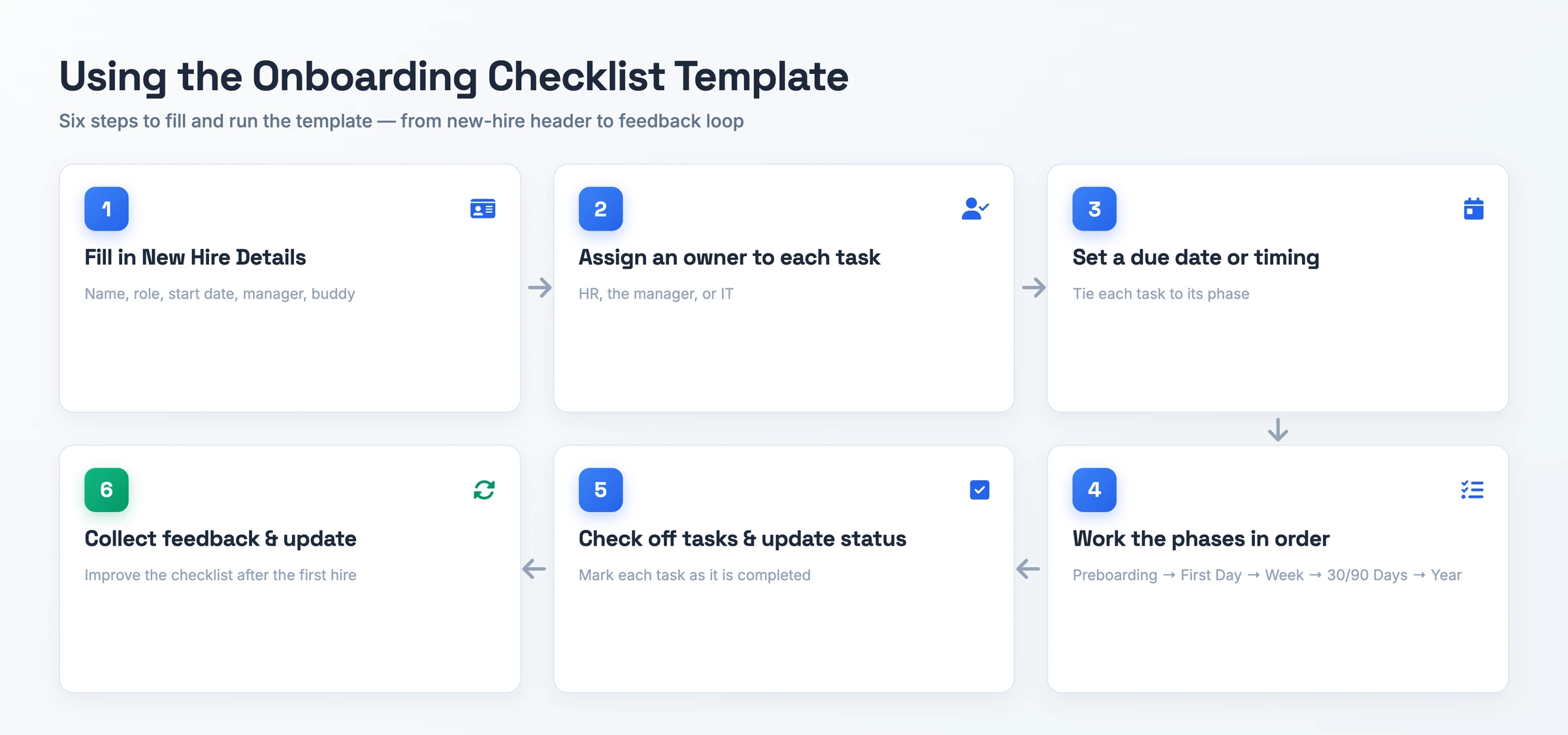
- Fill in the New Hire Details header. Note the start date first, then the hire's name and role, and finally the two people who support them: their manager and their buddy. That way the checklist tracks one person, not a generic role.
- Assign an owner to every task. Put HR, the manager, or IT next to each row, because a task with no owner is the one that slips between people.
- Set a due date or timing for each task. Tie each item to its phase in the Due/Timing column, which keeps anything from drifting past the window it belongs in.
- Work the phases in order. Take them top to bottom, starting before day one and closing at the first-year review, and confirm each phase is clear before you open the next.
- Check off each task and update its Status. Mark rows Done as you go, so the manager and the hire read the same picture during the first week.
- Collect feedback after the first hire and update the checklist. Ask what was missing or unclear, then revise the rows so the next colleague who uses the checklist inherits a clearer version.
Checklist Variants
For remote hires
Drop the on-site facilities tour and the desk setup. In Preboarding, swap them for shipped equipment and mailed access cards, and add an async check that the hire can reach each account before day one. The First Day tour becomes virtual team intros over video.
Manager's version
Built for the hiring manager rather than HR. In the manager version, expand the existing workspace task into a detailed first-day agenda, role expectations, and scheduled check-ins. The manager sets the 30/60/90 goals in the first week, schedules recurring check-ins, and takes the connection tasks. The sequence then tracks what the manager runs rather than the HR paperwork.
For IT and technical roles
The base phases stay, with technical provisioning layered on top. Preboarding and First Day add system and repository access, dev-tooling setup, and VPN or 2FA. Orientation carries an extra security and compliance training row, since IT grants access before the hire writes any code.
For hourly and frontline staff
Aimed at retail or restaurant hires, this version compresses the phases. Compliance paperwork and shift scheduling move to the front, and the training rows cover floor or POS work instead of desk and account setup. The later review sections may be simplified or adjusted to match the role's training and probation schedule.
For executives
Integration extends deep into the first year. On top of the base structure, add stakeholder mapping, a strategic-ramp plan, and board or leadership-team introductions across the quarter-mark and year-mark sections, so a leadership hire owns relationships and strategy, not just tasks.
When to Reach for This Checklist
Reach for this template the moment you sign a new hire, not on their first morning. It carries the whole run from offer to productivity, and it front-loads preboarding: the paperwork, the equipment order, and the account access that go wrong when someone tries to hold them in their head. Complete it as soon as the offer letter goes out, and those preboarding tasks surface while there is still time to act on them.
Use it again to track the long haul. Targets at the one-, two-, and three-month marks, plus the half-year check and the twelve-month review, all sit in one place, so integration keeps running well past the opening week. It also fits a manager onboarding a direct report, handing them the sequence HR would otherwise own.
Standardize with it when you hire across many roles or departments. One reusable structure, adjusted per role, beats a fresh blank document each time.
Checklist Best Practices
- Do break the work into stages, starting with preboarding, then day one, the first week, and the first month.
Don't treat onboarding as a single orientation day, which is the most-cited way hires fall through.
- Do set up the workspace and technology access ahead of the start date.
Don't skip preboarding, or the hire arrives to no desk, no accounts, and no paperwork.
- Do assign a clear owner, HR, manager, or IT, to each task.
Don't leave rows owner-less, where the task slips between HR, the manager, and IT until nobody does it.
- Do handle compliance and paperwork before or on day one.
Don't overload day one with paperwork, which drowns the new hire before they start the work.
- Do cover the 5 C's and assign a buddy so connection extends past week one.
Don't stop the checklist after the first week or hand each role the same generic list.
Skip the Blank Document: Record It Instead
Typing into a blank checklist is the step most managers put off. The alternative is to record the onboarding walkthrough once and let the recording become the filled-in document.
Hinto AI accepts common video sources such as Loom, Zoom, YouTube, and local uploads, subject to file-size and access requirements. You can also capture your screen, camera, and microphone directly in the Hinto web app or the Chrome Extension. Click record, walk through the process, and Hinto analyzes the recording, identifying UI state changes and button clicks to extract high-quality screenshots and written steps.
From a single long-form video it builds a full table of contents with multiple organized articles, and its Internal Workflows template produces detailed process guides for team operations. Publish the result on a public URL with a custom domain, SSL included. The onboarding doc goes live for the next hire.
Checklist Questions, Answered
What are the 5 C's of onboarding?
Five words, each naming a job the checklist has to finish. Compliance clears the paperwork, clarification pins down role goals, culture shows the hire how the team actually works, connection pairs them with a buddy, and check-back books the 30-day and later reviews. Every one of the five maps to a section in this template.
What is the onboarding process for a job?
It moves through three stages. Pre-boarding leads off ahead of the start date, handling paperwork and equipment. Orientation then owns arrival day, covering the greeting and the required compliance steps. Integration runs across the weeks that follow, layering in training, goals, and check-ins until the hire is fully up to speed.
Which phases does an onboarding checklist move through?
Most lists break into three parts: Pre-boarding, meaning everything before the start date; Orientation, the first day itself; and Integration, the stretch of weeks that follows. This version pushes Integration further out, adding a six-month check and a first-year review that carry the process well beyond month one.
What belongs on an onboarding checklist?
Open with the New Hire Details header, then lay out tasks across six phase sections that run from preboarding through the first year. Give each row four columns, Task, Owner, Due/Timing, and Status. Once the work is grouped by phase and every row shows both an owner and a date, tasks stop falling through the cracks.
Can I get this onboarding checklist template as a free Word, Excel, or PDF file?
Yes. Paste the full template from the block above straight into Word, Excel, Google Docs, or Notion, no signup required, or grab it as a PDF. The layout survives the move into any of them.