
Process Documentation Template: Free Copy-Paste Version and PDF
This process documentation template gives teams documenting a recurring workflow a 12-section document to fill in, from purpose and roles to steps, exceptions and review dates.
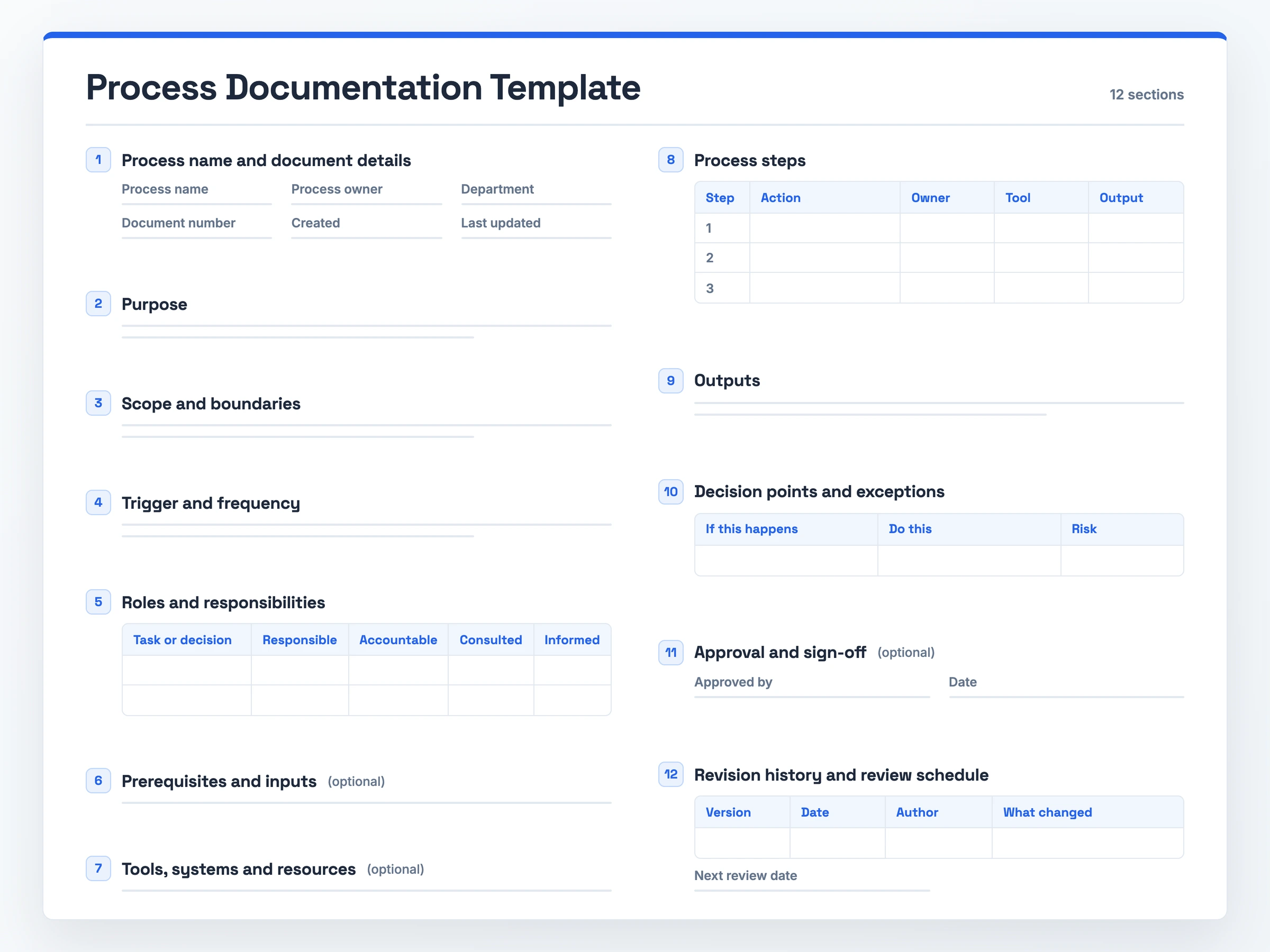
No signup: copy the full template inline, or download the blank template and process documentation sample PDF to print.
What it is: a process documentation template is a fill-in document capturing how one recurring process works, from purpose to revision history.
When to use it: when a repeated workflow needs one standard version new hires can learn.
What it must contain: numbered steps, each with an owner, tool and output, plus a screenshot for any step on a screen.
How to keep it useful: put a review date on it, since documents drift as processes change.
The Process Documentation Template (Copy-Paste Ready)
Paste this process documentation template into Word or Google Docs. For printing, the process documentation template PDF carries the same blank template and then a filled-in example. Short, low-risk processes can skip any section marked (optional).
1. Process Name and Document Details
Process name:
Process owner:
Department:
Document number:
Created:
Last updated:

2. Purpose
What this process achieves:
Why it exists:
Result of a completed run:

3. Scope and Boundaries
Starts when:
Ends when:
In scope:
Out of scope:

4. Trigger and Frequency
Trigger:
Frequency:

5. Roles and Responsibilities (RACI)
| Task or decision | Responsible | Accountable | Consulted | Informed |
|                  |             |             |           |          |
Contacts:

6. Prerequisites and Inputs (optional)
Needed before step 1:

7. Tools, Systems and Resources (optional)
Apps and access:
Reference docs:

8. Process Steps
| Step | Action | Owner | Tool | Output |
| 1    |        |       |      |        |
| 2    |        |       |      |        |
| 3    |        |       |      |        |
Screenshot or visual aid per step:

9. Outputs
Produced:
Received by:

10. Decision Points and Exceptions
| If this happens | Do this | Risk |
|                 |         |      |

11. Approval and Sign-Off (optional)
Approved by:
Date:

12. Revision History and Review Schedule
| Version | Date | Author | What changed |
|         |      |        |              |
Next review date:
What Goes Into a Process Documentation Template
- Process name and document details: Name, owner, department, document number and dates tell a reader who runs the process and whether the page is current. The example below starts with "Monthly Invoice Run, Finance, FIN-007".
- Purpose: One or two sentences on what the process achieves, why it exists and what a finished run produces.
- Scope and boundaries: The point where the process starts, the point where it ends, and the activities it leaves out.
- Trigger and frequency: The event that starts a run, such as "a deal closes in the CRM", and its usual frequency.
- Roles and responsibilities: A RACI grid that puts a name against responsible, accountable, consulted and informed, and a way to reach each person.
- Prerequisites and inputs (optional): What a performer needs before step 1: access, information, approvals.
- Tools, systems and resources (optional): The apps, logins and reference material a run relies on.
- Process steps: Numbered actions. Each names who does it, which tool they use and what it passes along. Steps that happen on screen also get a screenshot.
- Outputs: What a completed run delivers and who gets it.
- Decision points and exceptions: Each fork, what to do once things stray from plan, and the risk of skipping it.
- Approval and sign-off (optional): Who signed the document off, and on what date.
- Revision history and review schedule: One row per change (version, date, author, what changed) plus the date of the next review.
How to Fill In the Process Documentation Template
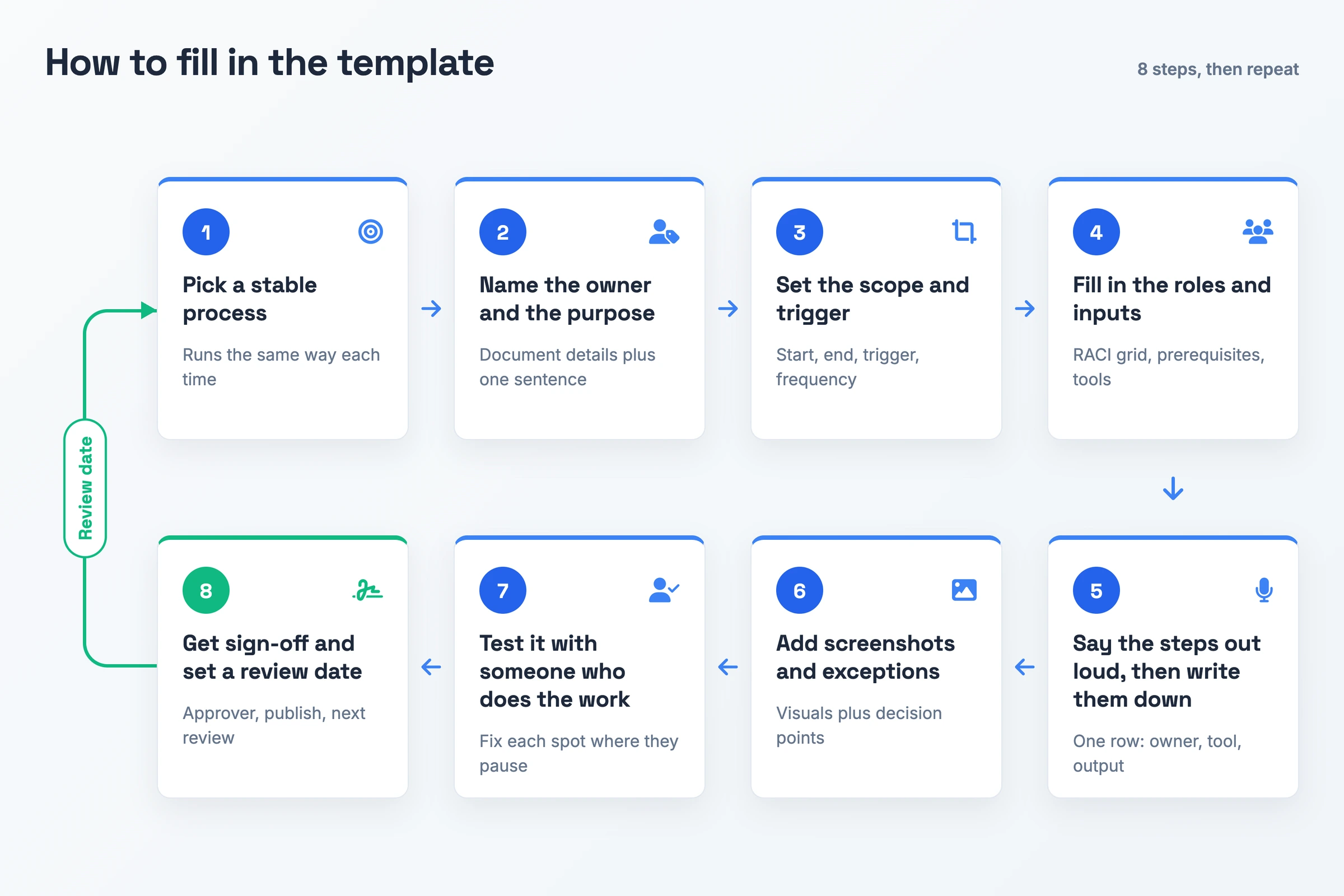
- Pick a stable process. Choose a workflow done identically on every run. A document about a stable routine stays accurate for longer.
- Name the owner and the purpose. Complete the document details and sum up in one sentence what a finished run produces.
- Set the scope and trigger. Note the opening and closing action, what kicks a run off, and its frequency.
- Fill in the roles and inputs. Complete the RACI grid. Where you keep the optional sections, note what a performer needs in hand before step 1 and which tools they use.
- Say the steps out loud, then write them down. Explain the run aloud as though teaching a new hire. Each action you describe becomes a table row with an owner, tool and output.
- Add screenshots and exceptions. Attach a visual for anything on a screen, and log every decision point with its response.
- Test it with someone who does the work. Hand the draft to someone who does this work every week, watch them complete a run using only the page, and fix each spot where they pause.
- Get sign-off and set a review date. If you use sign-off, log who approved it. Post the document wherever your team already looks and book the next review in the diary.
Process Documentation Template: A Filled-In Example
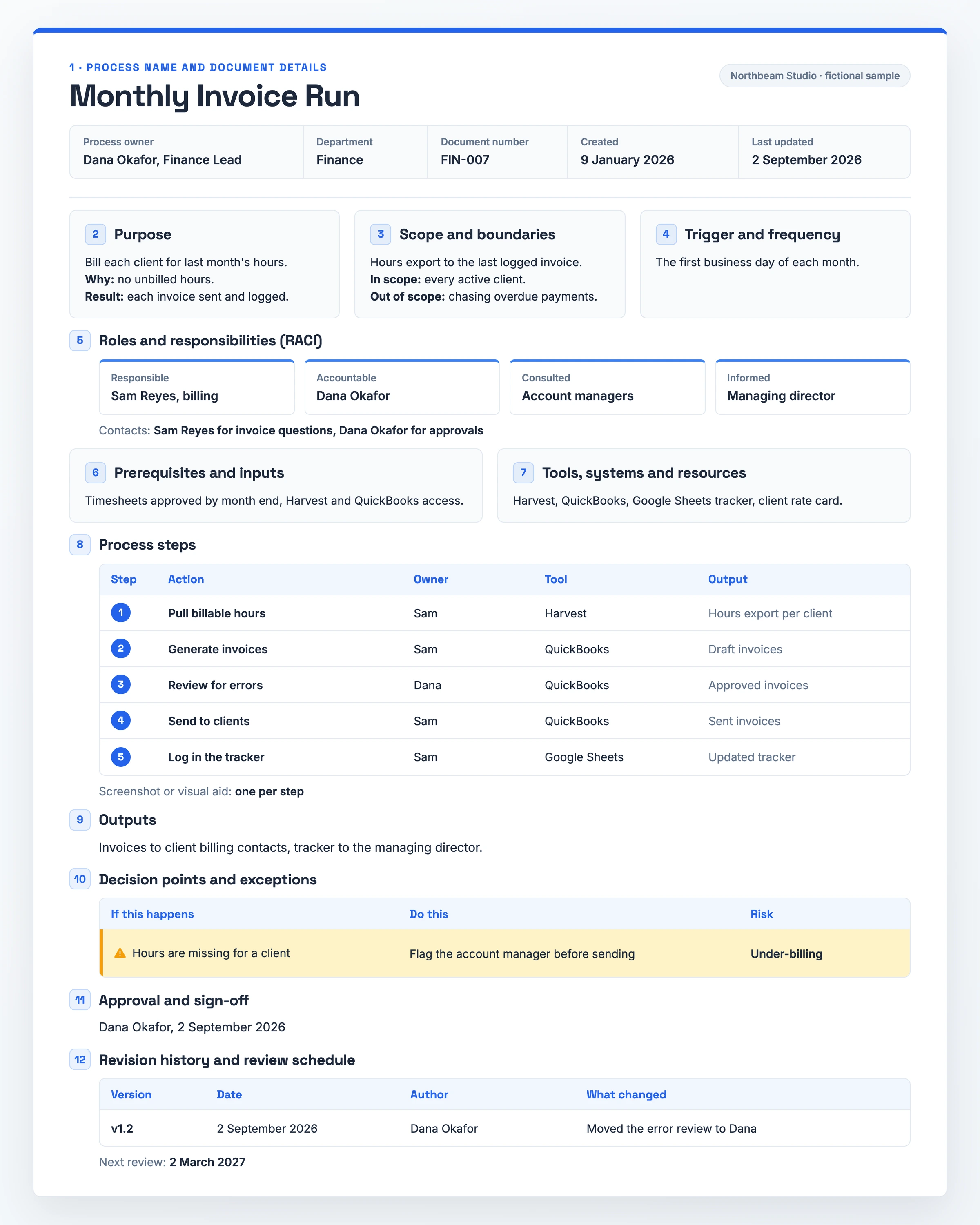
This copy is filled in for Northbeam Studio, a fictional agency with sample names and dates.
- 1. Process name and document details: Monthly Invoice Run · Owner: Dana Okafor, Finance Lead · Department: Finance · FIN-007 · Created 9 January 2026 · Last updated 2 September 2026
- 2. Purpose: Bill each client for last month's hours. Why: no unbilled hours. Result: each invoice sent and logged.
- 3. Scope and boundaries: Hours export to the last logged invoice. In scope: every active client. Out of scope: chasing overdue payments.
- 4. Trigger and frequency: The first business day of each month.
- 5. Roles and responsibilities (RACI): Responsible: Sam Reyes, billing · Accountable: Dana Okafor · Consulted: account managers · Informed: managing director · Contacts: Sam Reyes for invoice questions, Dana Okafor for approvals
- 6. Prerequisites and inputs: Timesheets approved by month end, Harvest and QuickBooks access.
- 7. Tools, systems and resources: Harvest, QuickBooks, Google Sheets tracker, client rate card.
- 8. Process steps: One screenshot per step.
- Step 1: Pull billable hours · Sam · Harvest · Hours export per client
- Step 2: Generate invoices · Sam · QuickBooks · Draft invoices
- Step 3: Review for errors · Dana · QuickBooks · Approved invoices
- Step 4: Send to clients · Sam · QuickBooks · Sent invoices
- Step 5: Log in the tracker · Sam · Google Sheets · Updated tracker
- 9. Outputs: Invoices to client billing contacts, tracker to the managing director.
- 10. Decision points and exceptions: If hours are missing for a client, flag the account manager before sending. Risk: under-billing.
- 11. Approval and sign-off: Dana Okafor, 2 September 2026
- 12. Revision history and review schedule: v1.2 · 2 September 2026 · Dana Okafor · Moved the error review to Dana · Next review: 2 March 2027
Process Documentation Template Variants
IT and Systems Process Documentation Template
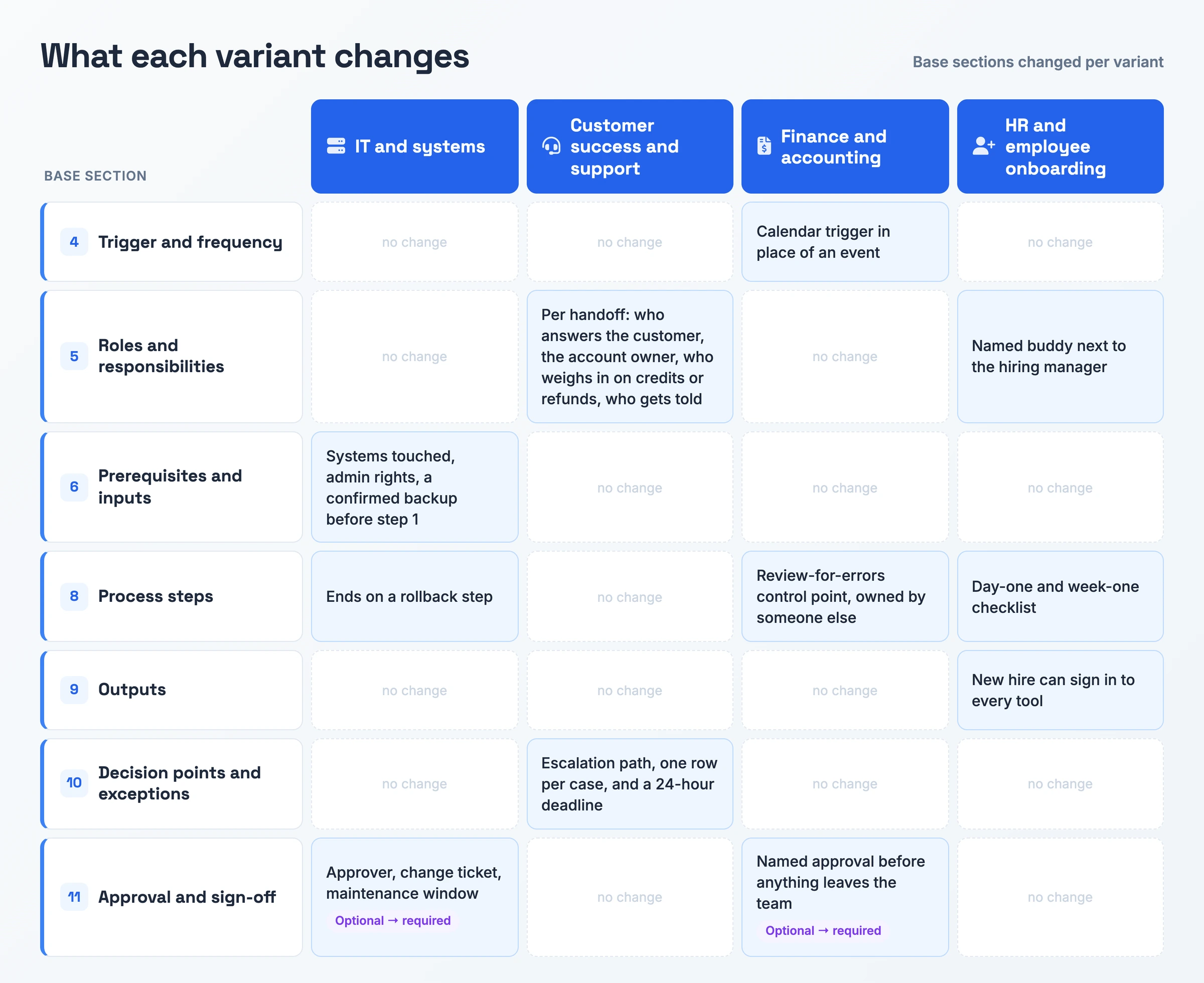
Because IT changes go wrong when access is missing or there is no way back, this version extends three of the base sections.
- Prerequisites and inputs, with systems and access: Name every system in the change's path and the admin rights required, and confirm a backup exists before step 1.
- Process steps ending in a rollback: End the steps table on the action that undoes the change, naming its owner and the tool that runs it.
- Approval and sign-off for the change: Log the approver, the change ticket number and the maintenance window everyone agreed. This section moves from optional to required.
Customer Success and Support Process Documentation Template
Support work moves through handoffs. This version therefore reworks two base sections above all, the roles grid and the exceptions table.
- Roles and responsibilities per handoff: Name the person answering the customer, the account owner, whoever must weigh in on credits or refunds, and who gets told the result.
- Decision points and exceptions, as an escalation path: Give each case one row. When security or customer data is at risk, the on-call engineer gets paged. Finance handles any billing dispute, enterprise customers go to their own account manager, and everything else joins the tier-2 support queue.
- Exception with a deadline: For customer onboarding, add a time limit, such as "If ops hasn't provisioned the account within 24 hours, escalate to the ops lead."
Finance and Accounting Process Documentation Template
Finance processes run on the calendar and carry a cost when an error leaves the building. The filled-in example above shows this variant on a monthly invoice run.
- Trigger and frequency on a fixed date: Use a calendar trigger in place of an event, like the first business day of the month or quarter end.
- Process steps, plus a control point: Insert a review-for-errors step before anything goes out, owned by someone other than the person who prepared the work.
- Approval and sign-off, before release: Require a named approval before an invoice, payment or payroll file leaves the team. This section moves from optional to required.
HR and Employee Onboarding Process Documentation Template
Onboarding unfolds over set days, which reshapes the steps table into a dated checklist.
- Process steps, as a day-one and week-one checklist: Logins and equipment are ready before the first morning. During week one the new hire receives the handbook and a five-day plan, is introduced to an onboarding buddy, and closes Friday in a 1:1 with their manager.
- Roles and responsibilities with a named buddy: Add the buddy next to the hiring manager and give a contact for both.
- Outputs that confirm access: Finish by confirming the new hire can sign in to every tool their role needs.
When a Process Documentation Template Pays Off
Hiring someone, or losing someone, is the first trigger. New starters pick the work up from the page, not from whoever happens to remember it, and the know-how remains in-house after its usual runner leaves.
The second trigger is a workflow that crosses several roles or departments. Completing the roles grid settles ownership of every step, and the finished document gives the whole team a single agreed version to follow.
Audits and improvement pushes are the third trigger. A regulated procedure needs a record an auditor can check, and laying steps, inputs and outputs next to each other shows where bottlenecks sit. A one-off task needs far less. A short note does the job, where a 12-section template would be overkill.
Skip the Blank Document: Record It Instead
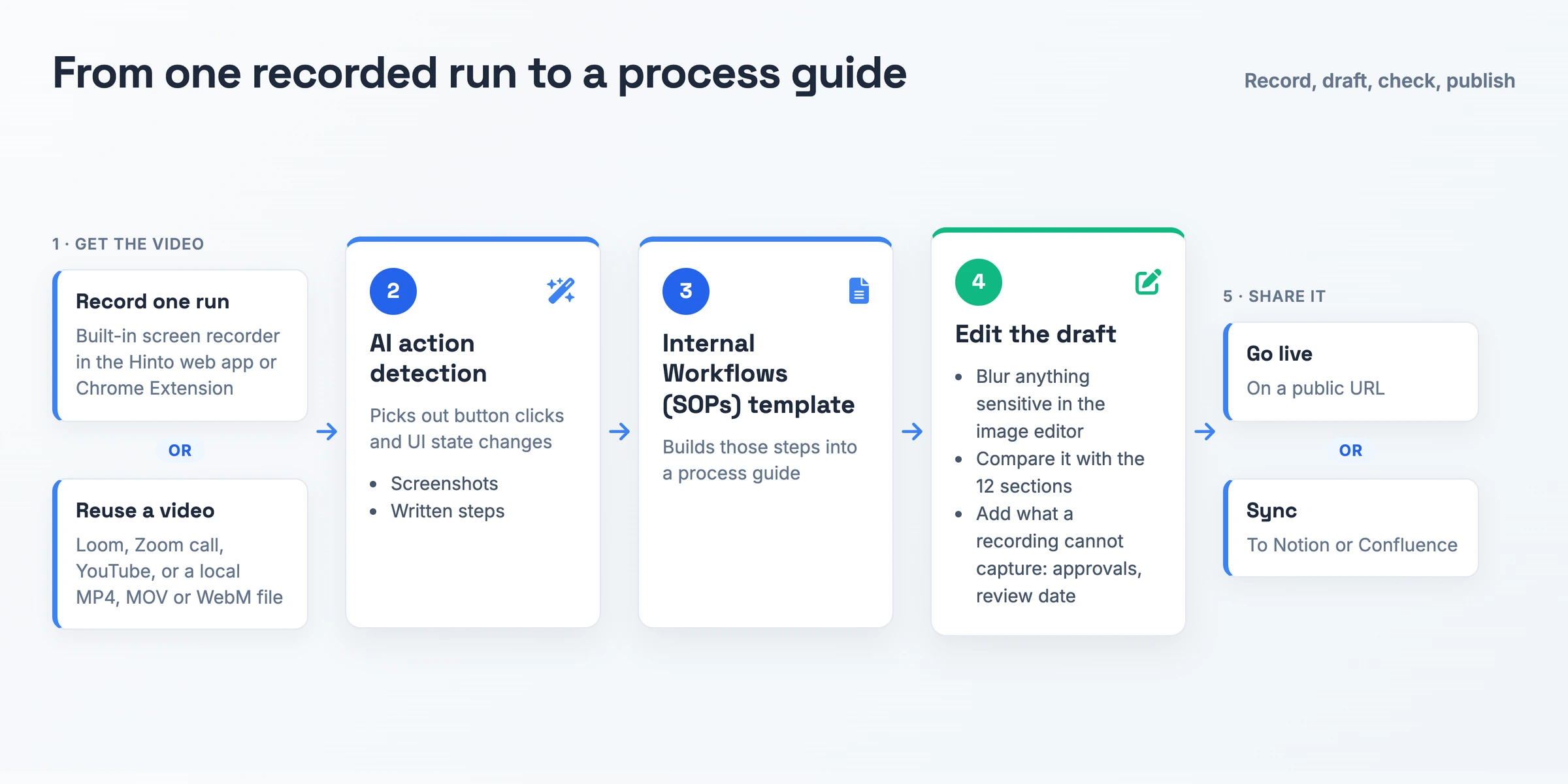
Skip reconstructing every step from memory. Record one run and edit a draft.
Hinto AI turns screen recordings and video walkthroughs into structured documentation. Record with the built-in screen recorder in the Hinto web app or Chrome Extension, or reuse a video you already have: a Loom, a Zoom call, a YouTube video, or a local MP4, MOV or WebM file. Its AI action detection picks out button clicks and UI state changes and extracts screenshots and written steps from them.
Pick the Internal Workflows (SOPs) project template to have those steps built into a process guide. Use the image editor to blur anything sensitive. Compare the draft with the 12 sections above and add what a recording cannot capture, like approvals and the review date. The finished guide can go live on a public URL or sync to Notion or Confluence.
Process Documentation Template FAQ
Should a process document include screenshots?
Yes, for every on-screen step. A picture shows the precise button or field faster than a sentence can. Leave visuals out of steps with nothing to see.
How often should you update process documentation?
Choose a review interval at publication (the example above uses six months) and add that date to the calendar. Revise sooner whenever the workflow or its software shifts. An outdated page stays confidently wrong, and people keep acting on it.
What should a process document say about exceptions?
Give every decision point a row naming the situation, the right response and the risk if it goes wrong. People tend to guess at forks, and a written "if this happens, do this" row swaps that guess for an instruction.
Who should own a process document?
One named person answers for the document and its accuracy, typically the lead of the team that runs the process. Each step carries its own owner as well. With shared ownership, no one person is on the hook. Hold off publishing until the owner field has a name in it.
How long should a process documentation template be?
Let the process set the length. A short, low-risk process needs only the core sections, without the ones marked optional. Fields nobody fills in leave a template half finished, so cut any section your team would skip.

Product leader focused on building consumer products with empathy. Former Head of Product at Chime and Craft, specializing in AI-assisted workflows and platform innovation.
Ready to Build a Better
Knowledge Base, Faster?
Get Started Free & Create Your First Article in Minutes