User Manual Template: 16 Sections to Copy and Fill In
A user manual template gives you the 16 sections a product manual needs, for software and for physical products that ship with safety and disposal information, whether you call it a user guide template or an instruction manual template. No signup: copy the full structure inline, or download it as a PDF.
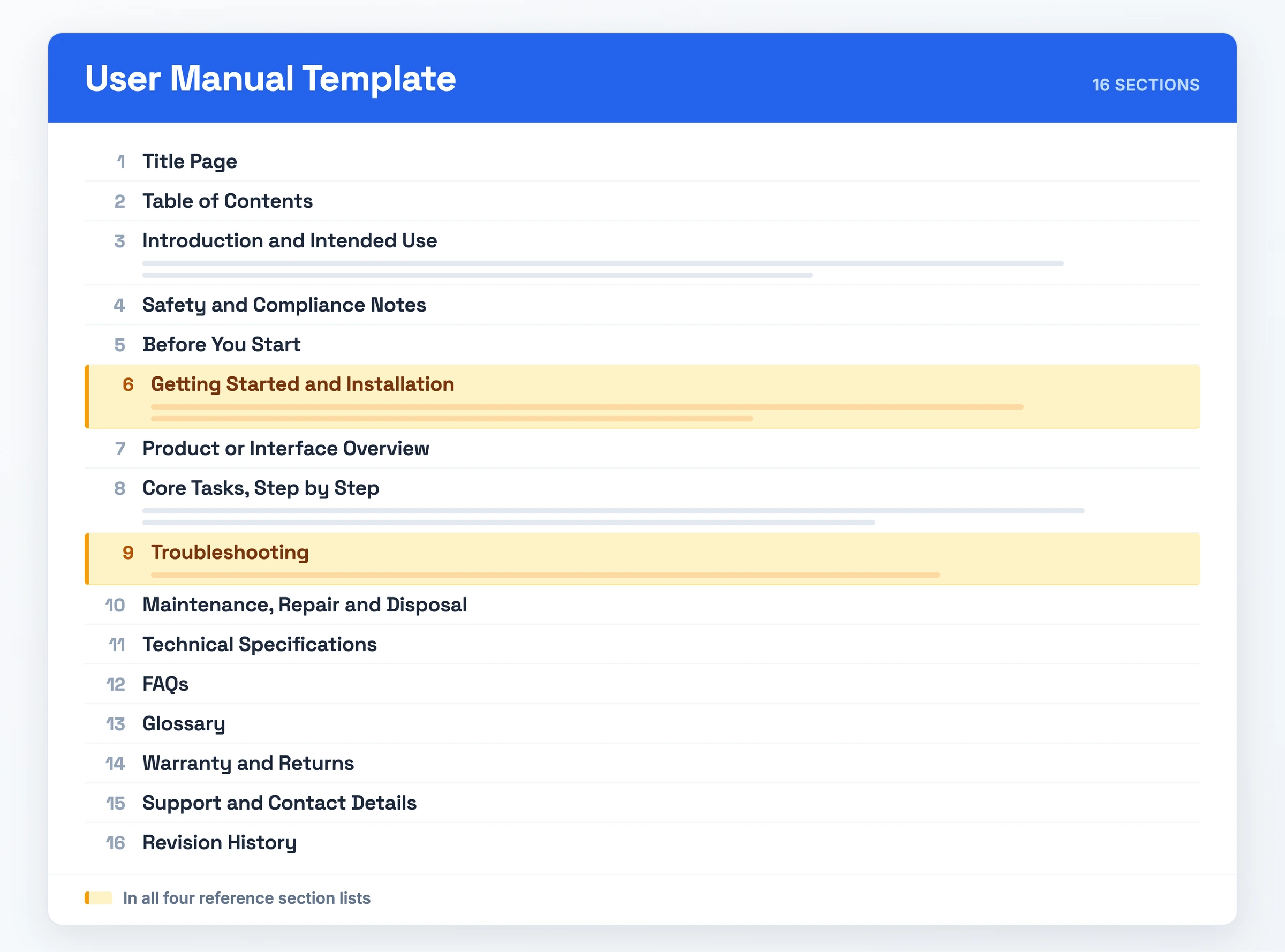
What it is: a user manual tells an end user how to install, operate, troubleshoot and maintain a product. This product manual template gives it 16 named sections, from Title Page through Revision History.
What it must contain: those 16 sections in task order, setup, use, troubleshoot, FAQ, which is the standard user manual format.
When to use it: each time you ship a product someone installs and operates without you in the room.
Why bother: customers self-serve instead of filing a support ticket.
The User Manual Template (Copy-Paste Ready)
USER MANUAL: [Product Name]

1. Title Page
   Product name, model or version, intended audience, revision date

2. Table of Contents
   Linked list of every section below

3. Introduction and Intended Use
   What the product is for, who it is for, what it is not for

4. Safety and Compliance Notes
   Warnings, hazard statements, applicable standards

5. Before You Start
   System requirements, prerequisites, accounts, accessories

6. Getting Started and Installation
   First-run setup through to a working product

7. Product or Interface Overview
   Labelled tour of the parts or screens

8. Core Tasks, Step by Step
   Numbered procedures, one task per heading

9. Troubleshooting
   Symptom, likely cause, fix

10. Maintenance, Repair and Disposal
    Upkeep, servicing, end of life

11. Technical Specifications
    Numbers, tolerances, dimensions, supported platforms

12. FAQs
    Recurring questions that do not fit a procedure

13. Glossary
    Terms and acronyms, defined once

14. Warranty and Returns
    Coverage, exclusions, how to claim

15. Support and Contact Details
    Channels, hours, response expectations

16. Revision History
    Version, date, what changed
This page ships two formats: the copy-paste text above, and the PDF linked at the top.
What Goes Into a User Manual Template
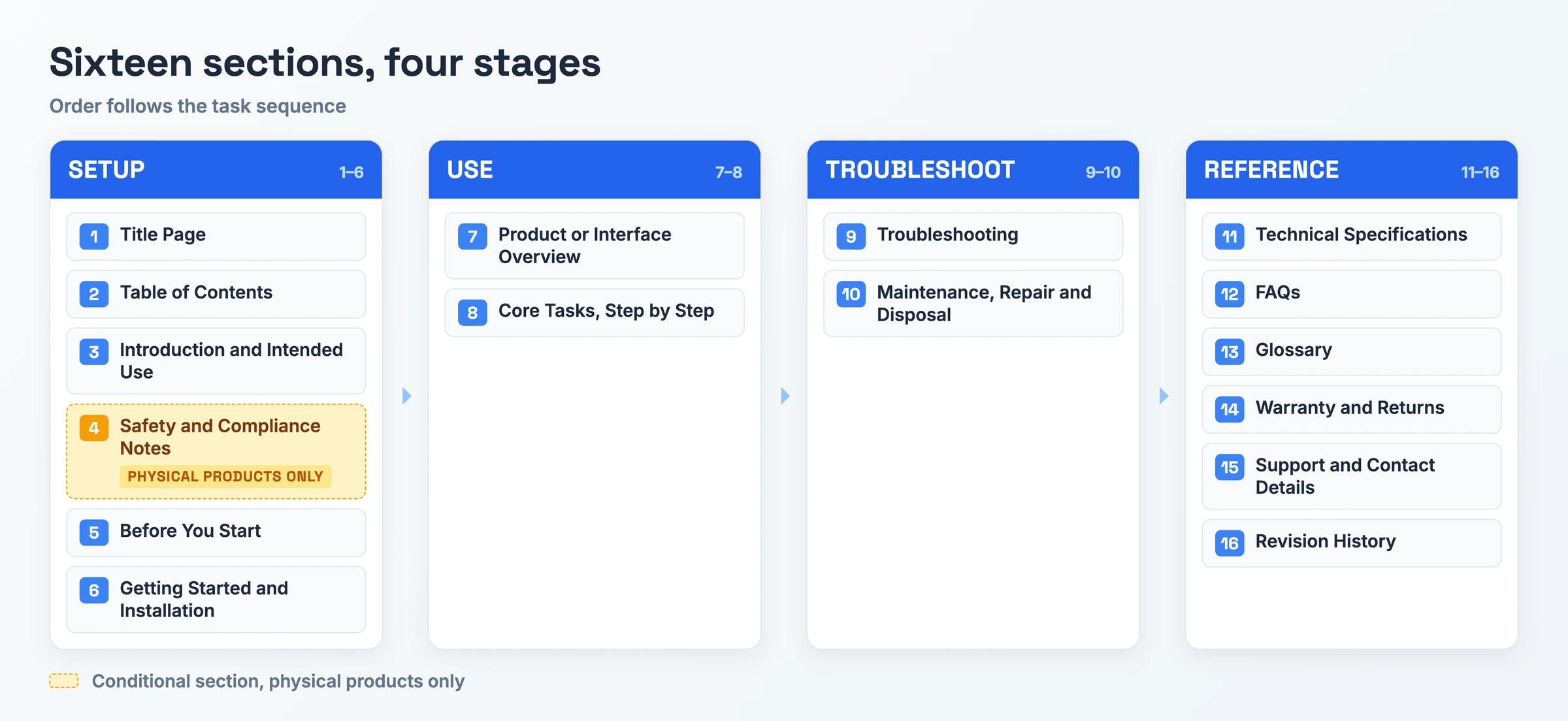
Order the sections by task sequence: setup, then use, then troubleshoot, then FAQ. That order is the user manual format proprofs, instrktiv and sweetprocess all share.
| Section | What goes in it | Example |
|---|---|---|
| Title Page | Product name, version, audience, date | "ISOVOX2, revised March 2026" |
| Table of Contents | Linked section list and page numbers | Navigation as its own step |
| Introduction and Intended Use | Purpose, audience, foreseeable misuse | "Professional vocal recording in home/studio environments" |
| Safety and Compliance Notes | Hazard statements, applicable standards | "EU LVD, EMC, RoHS, WEEE, REACH, IEC/IEEE 82079-1" |
| Before You Start | Requirements, prerequisites, accessories | Opens with System Requirements |
| Getting Started and Installation | Setup through to a working product | Named by all four lists |
| Product or Interface Overview | Labelled tour of parts or screens | Parts, then interface |
| Core Tasks, Step by Step | Numbered procedures, one per heading | Key Features, Common Tasks |
| Troubleshooting | Symptom, likely cause, fix | Common problems, resolved |
| Maintenance, Repair and Disposal | Upkeep, servicing, end of life | Chapters: Maintenance, Disposal |
| Technical Specifications | Numbers a reader looks up | Dimensions, power draw, supported OS |
| FAQs | Questions no procedure covers | Questions with no procedure |
| Glossary | Terms and acronyms, defined once | Named by proprofs and instrktiv |
| Warranty and Returns | Coverage, exclusions, claims | Instrktiv: "Warranty Information" |
| Support and Contact Details | Where the manual runs out | Support channels and hours |
| Revision History | Version, date, what changed | A stamped date keeps reviews honest |
Safety and Compliance is mandatory on a physical product and thins to data handling notes on software. The variants below run on that split.
How to Use the User Manual Template
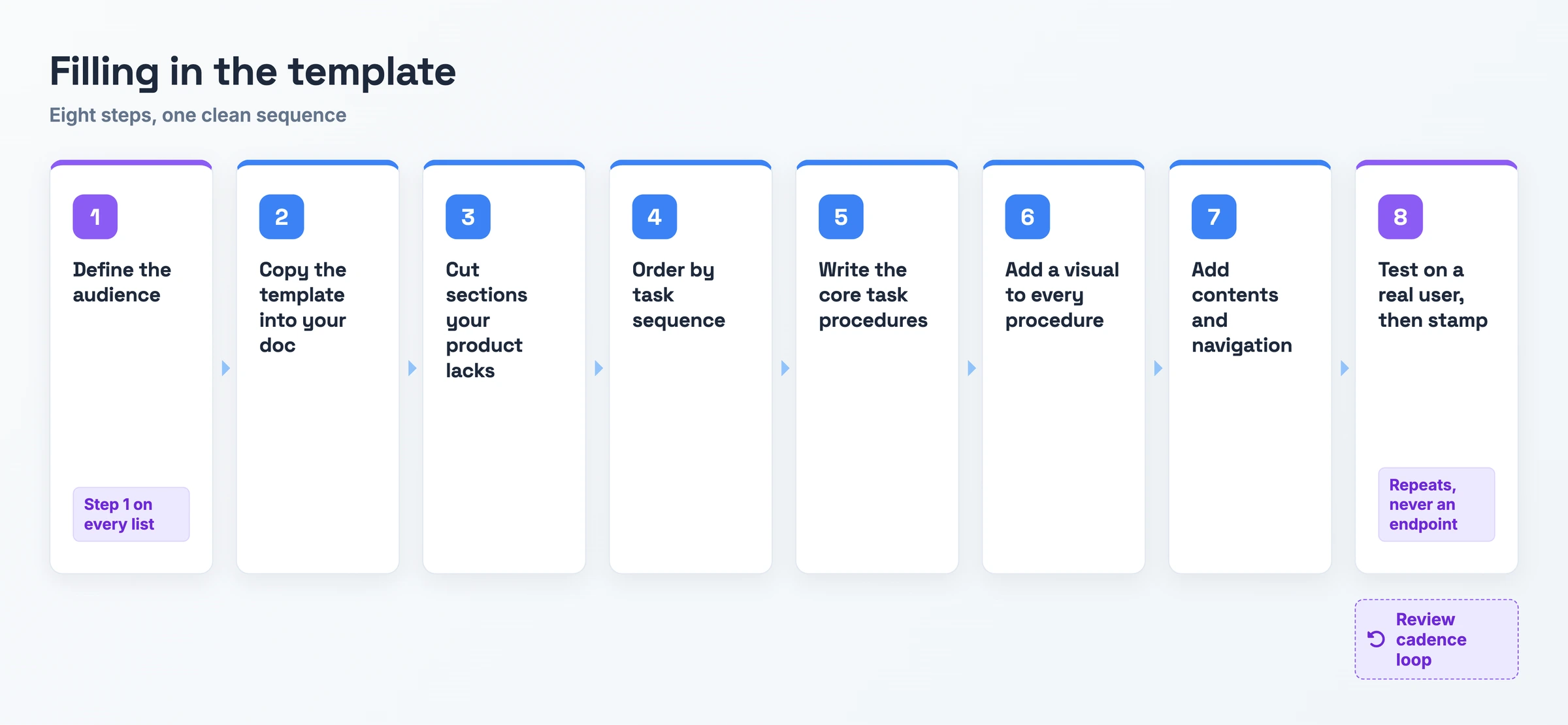
- Define the audience and their expertise level. Write a short user profile naming who reads the manual and what they already know. All four reference step lists open here, the only step they all share.
- Copy the template into your own doc. Paste the 16-section block from above into the tool your team writes in, so you start from a structure instead of a blank page.
- Cut the sections your product does not have. Software drops Maintenance and Disposal; a physical product keeps them and fills Safety and Compliance. Delete them before you write.
- Order what remains by task sequence: setup, then use, then troubleshoot, then FAQ. Proprofs, instrktiv and sweetprocess all map the user journey before drafting a line.
- Write the procedures under Core Tasks first. Number each one, keep a single action per step, and write headings a reader can scan.
- Add a screenshot, GIF or illustration to every procedure. Instrktiv adds the sequencing rule: finalize the text first, create the images last, so a rewrite does not orphan a picture.
- Give the manual a table of contents and real navigation. Page numbers, an index and links let readers land on the answer.
- Test the draft on a real user, then stamp it. Watch someone use the manual to complete a task, fold in where they stalled, then fill Revision History and set a review date. Proprofs names a quarterly minimum for software.
User Manual Template: A Filled-In Example
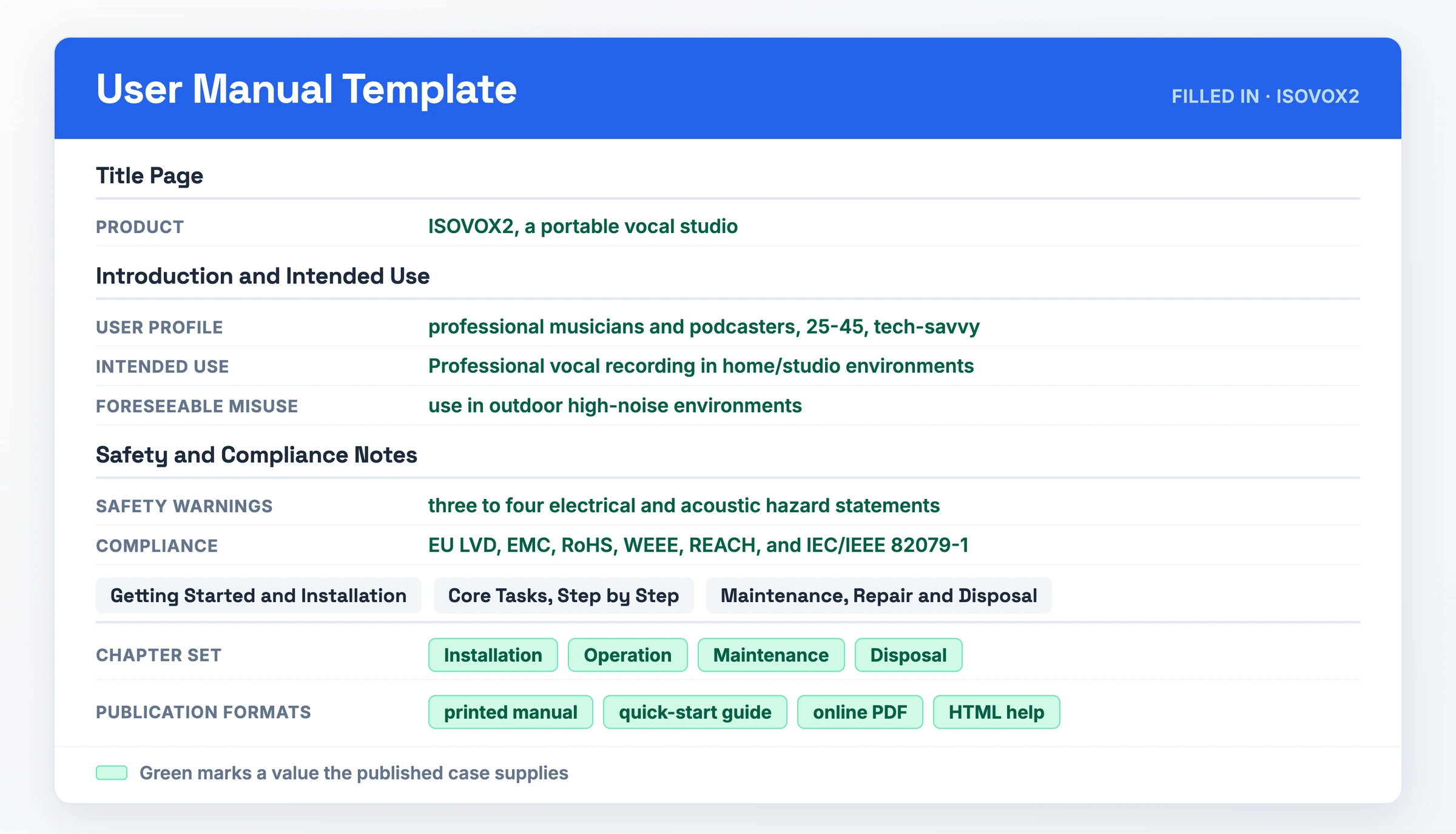
instrktiv documents the ISOVOX2, a portable vocal studio, as a worked case. Filled in with the values that case publishes, the template reads like this. Before You Start, Product or Interface Overview, Troubleshooting, FAQs, Glossary, and Support and Contact Details are left out because the case gives no values for them.
- Title Page
- Product: ISOVOX2, a portable vocal studio
- Version: 1.0 · Revised: March 2026
- Audience: professional musicians and podcasters, 25-45, tech-savvy
- Introduction and Intended Use
- Intended use: "Professional vocal recording in home/studio environments"
- Reasonably foreseeable misuse: use in outdoor high-noise environments
- Safety and Compliance Notes
- Safety warnings: three to four electrical and acoustic hazard statements
- Compliance: EU LVD, EMC, RoHS, WEEE, REACH, and IEC/IEEE 82079-1
- Table of Contents
- Chapter 1 Installation · Chapter 2 Operation · Chapter 3 Maintenance · Chapter 4 Disposal
- Getting Started and Installation (Chapter 1)
- Unpack, assemble the booth, connect the microphone, confirm the acoustic seal
- Core Tasks, Step by Step (Chapter 2)
- Record a vocal take, monitor through headphones, adjust the input level
- Maintenance, Repair and Disposal (Chapters 3 and 4)
- Clean the acoustic foam, replace a worn seal, return the unit under WEEE at end of life
- Technical Specifications
- Blank in this example, because the ISOVOX case publishes no figures
- Warranty and Returns
- Standard manufacturer terms, which the maker states on the product page rather than in this example
- Revision History
- v1.0, March 2026, first release covering all four chapters
User Manual Template Variants
The 16 sections above are the base. Four subjects bend that base in different directions, and each variant changes only the parts named here.
User Manual Template for Software
A desktop application keeps Before You Start and Getting Started and Installation intact, because a reader still has to check requirements and run an installer before anything works. Product or Interface Overview expands into a screen-by-screen tour, one heading per window or panel, since the interface is the product rather than a set of physical parts.
Safety and Compliance Notes empties down to data handling notes: where files are stored, what leaves the machine, what an uninstall removes. Maintenance, Repair and Disposal drops out entirely, replaced by whatever the update path is. Technical Specifications narrows to supported operating systems and minimum hardware.
User Manual Template for Web Application
Installation has nothing to install, so that section becomes account setup: signing up, inviting teammates, and the roles and permissions that decide what each one sees. Get that in before Core Tasks, because a reader who lacks a permission cannot follow the procedure that needs it.
Before You Start carries browser support instead of hardware. Troubleshooting gains a session and login group, which is the single largest source of tickets on a hosted product: expired sessions, blocked cookies, SSO redirects that loop. Technical Specifications shrinks to the browsers you support and nothing beyond that.
User Manual Template for Mobile Application
Installation becomes the store install: finding the app, the permission prompts the operating system raises on first launch, and how the app behaves offline when the connection drops. Cover the permissions individually, since a denied prompt breaks a feature the reader will later look up in Troubleshooting.
Before You Start names device and OS support, the versions you test against, and the storage the app needs. Product or Interface Overview runs per screen rather than per window, which matches how someone navigates a phone: one view at a time, with a back gesture rather than a menu bar.
User Manual Template for Product
A physical product uses the fullest version of the template. Safety and Compliance Notes moves up to sit directly after Introduction and Intended Use, because readers skip a hazard statement buried at position four. State Reasonably Foreseeable Unintended Use explicitly alongside intended use, the way instrktiv does.
Maintenance, Repair and Disposal carries real content: servicing intervals, replaceable parts, and end-of-life handling. Technical Specifications carries real numbers, and Warranty and Returns carries real terms. Instrktiv's structure also pushes packaging and WEEE information into appendices, which is where the compliance detail belongs once you have written the operating chapters.
When to Use a User Manual Template
Reach for it whenever you ship software an end user has to install and operate on their own. Software is the default case across the whole ranking set. The same structure covers an internal tool and a training manual for a new hire, so IT stops fielding the same question and those readers self-serve the answer instead of filing a ticket.
Shipping hardware means installation, safety and disposal information, and compliance content becomes mandatory in that branch. A regulated product carries obligations the manual has to satisfy.
Someone searching for a leadership, team or employee user manual wants a document about how to work with a person: communication preferences, how they give feedback, when to interrupt. That is a separate document with its own structure, while this template covers a product.
Skip the Blank Document: Record It Instead
You now have sixteen empty sections. You can fill them from a recording instead of typing them out.
Record the process once: click record in the browser or the Chrome extension and walk through the product. Any video source works, including a Loom, a Zoom call, a YouTube video or a local MP4.
Hinto AI analyzes the recording, identifies UI state changes and button clicks, and extracts high-quality screenshots and written steps from them. A single long-form video becomes a full table of contents with multiple organized articles, which maps onto the section list above. Crop, frame, focus or blur anything sensitive, and highlight a section to have the AI rewrite it or re-extract its images.
Publishing puts the result on a public URL with a custom domain, in any of 50+ languages from one recording. The free plan runs on 20 generations, so you can test the path first.
User Manual Template FAQ
What sections should a User Manual include?
Sixteen: Title Page, Table of Contents, Introduction and Intended Use, Safety and Compliance, Before You Start, Getting Started and Installation, Interface Overview, Core Tasks, Troubleshooting, Maintenance, Technical Specifications, FAQs, Glossary, Warranty, Support, Revision History. Order them by task sequence: setup, use, troubleshoot, then the questions no procedure answers.
What formats does a user manual have?
Two ship from this page: the copy-paste text above, which pastes into Docs, Notion or markdown, and one PDF. This page produces no Word, Canva or InDesign file. A finished manual usually ships in several formats at once: the ISOVOX2 case runs as a printed manual, a quick-start guide, an online PDF and HTML help.
What is the difference between a user guide and a user manual?
The two terms name the same document, and the choice leaves your structure the same. Proprofs, drexplain and visme title theirs "user guide"; scribe, instrktiv and sweetprocess title theirs "user manual". Their section lists overlap almost completely, so pick the term your audience searches for.
Can I create a new User Manual using AI?
Yes, and the practical route is video rather than a prompt. Hinto AI turns screen recordings into structured, multi-article documentation, detecting UI state changes and button clicks to pull screenshots and written steps from a walkthrough. It runs on a monthly generation credit system, so output is capped by the credits your plan carries.
Is a User Manual legally and professionally acceptable?
The template gives you a starting structure, and compliance sits outside it. A regulated product carries its own requirements, and instrktiv names the standards: EU LVD, EMC, RoHS, WEEE, REACH and IEC/IEEE 82079-1. Check which apply before you ship.
How do you print a User Manual?
Download the PDF above and print it. Set page size before you write, because an A4 layout reflows badly into a booklet or a quick-start card. A cover page, page numbers and an index belong in the printed artifact.