What Is User Documentation?
User documentation is the published set of instructions that shows whoever operates a product how to finish a task in it without contacting support.
Teams also call it end user documentation, end-user documentation, an instruction manual, a user guide, or a user manual, and the user documentation definition holds across all five names. The user documentation meaning turns on the reader: someone using the product rather than someone building it. It ships as web articles, help embedded in the interface, or a PDF.
How User Documentation Works
What is user documentation: published instructions that carry an operator through a task in the product on their own.
What it is for: answering the question before it becomes a support ticket, which is the cost it removes.
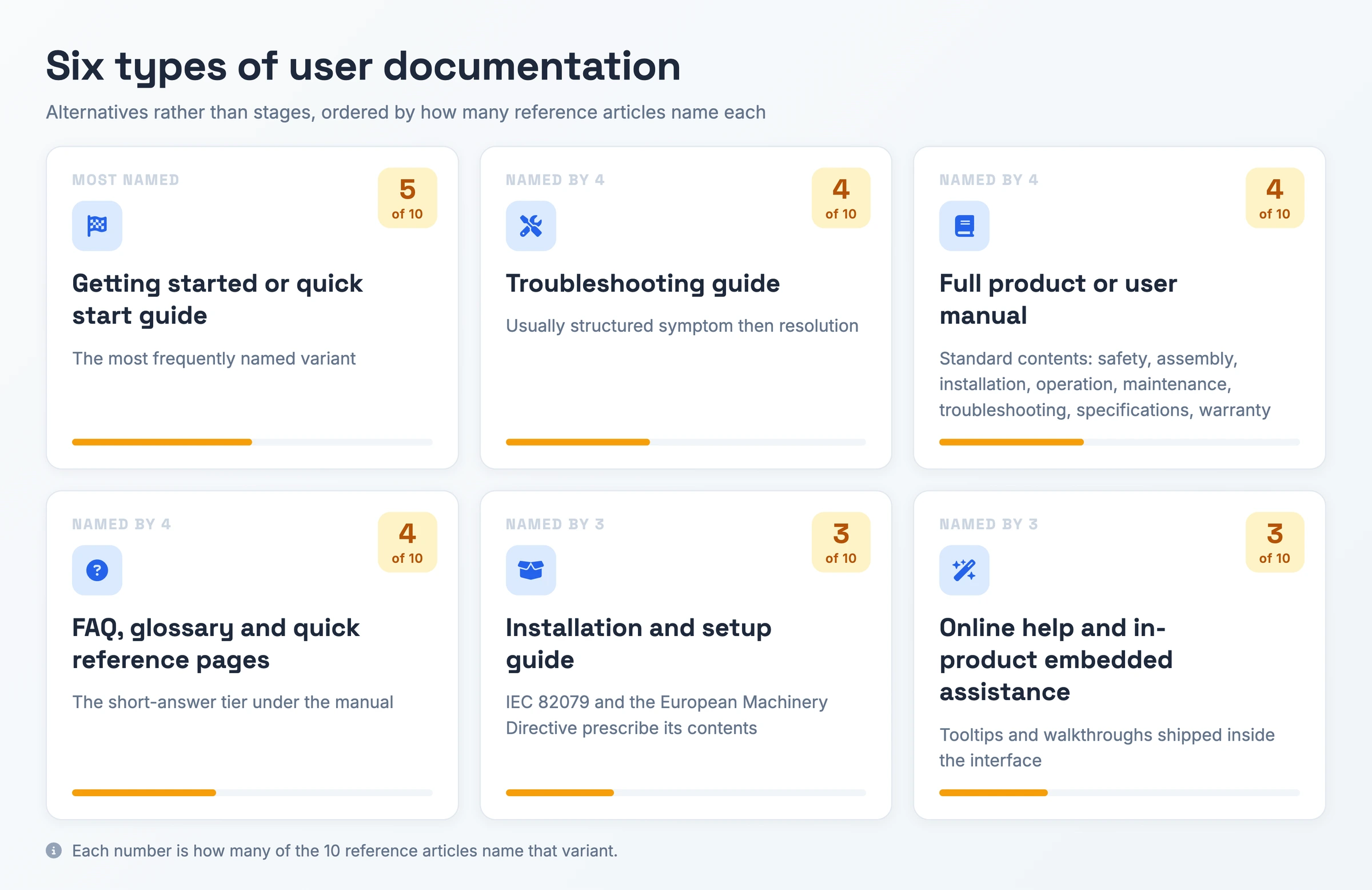
The types: quick start, installation, full manual, troubleshooting, FAQ and quick reference, plus in-product help.
How to write it: organize by the task the reader wants to finish, and pair one annotated image with each step.
What Makes Something User Documentation
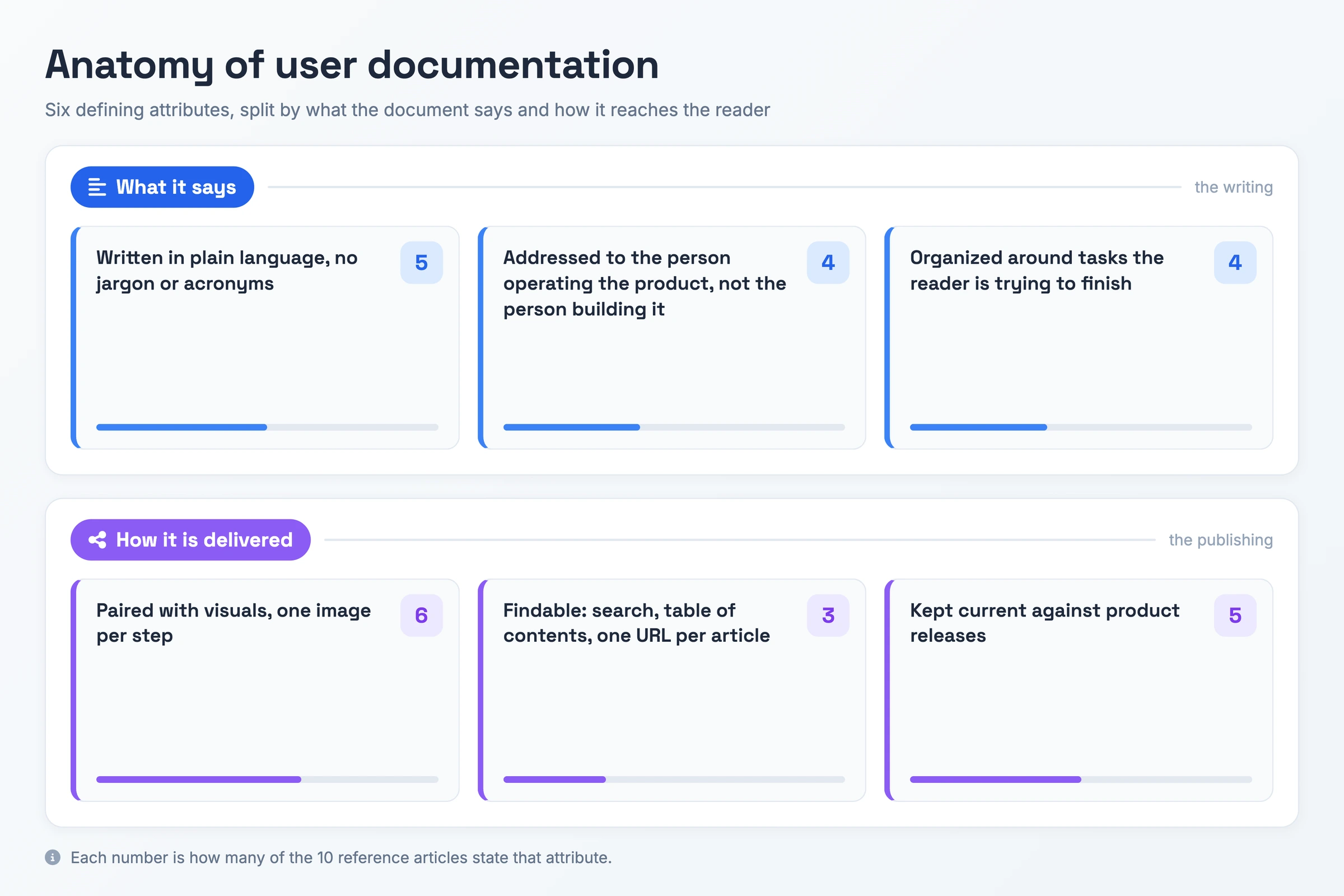
- Paired with visuals, one image per step: Each step carries a screenshot of the control it names, annotated so you can match the page against the screen in front of you.
- Written in plain language: Everyday words, with acronyms spelled out on first use; TechSmith puts the rule as treating all readers as laymen.
- Kept current against product releases: A shipped release that changes a screen the article shows forces the revision.
- Addressed to the person operating the product: You finish tasks through the interface without needing to know what runs behind it.
- Organized around tasks the reader is trying to finish: Titles name an action, so "Add a teammate to a board" replaces a page called "Contacts".
- Findable: Search, a table of contents, and one URL per article, so you land on the single page that answers you.
Why User Documentation Matters
A question that your support documentation answers rarely reaches the queue. The reader who finds the missing step stops there, files no ticket, and spares your support team the cost of answering it. Writers of reference pages claim this benefit more consistently than any other.
Onboarding is the second consequence. A new user who can follow a published task reaches their first successful result without a scheduled training session, and the colleague who would have run that session keeps the hour. The same math applies to an employee ramping up on an internal tool.
Retention is the third. The customer who finishes the task stays, and the one who gives up halfway through it leaves. For some products the quality of your instructions decides whether people adopt the software at all, which is why the authors of one reference page treat documentation as a condition of release rather than a follow-up to it.
Types of User Documentation
The column that decides which one you write is the last one.
| Type | What it covers | When you need it |
|---|---|---|
| Quick start guide | The shortest path to a first successful result | Someone signed up minutes ago, which makes this onboarding documentation the first page they meet |
| Troubleshooting guide | A symptom, then the resolution for it | The reader already tried and something failed, so they arrive by searching the error text |
| Full product or software user manual | Safety, assembly, installation, operation, maintenance, troubleshooting, specifications, warranty | The reader wants a reference to return to rather than one answer |
| FAQ, glossary and quick reference | Short answers sitting under the manual | The question resolves in a sentence and a full article would bury it |
| Installation and setup guide | Getting the product running before any task starts | Hardware or on-premise software, where IEC 82079 and the European Machinery Directive prescribe the contents |
| Online help and in-product assistance | Tooltips and walkthroughs inside the interface | The reader should not leave the screen they are stuck on, so help documentation sits beside the control |
User Documentation vs Technical Documentation vs SOP vs Knowledge Base
| Term | What it is | How it differs |
|---|---|---|
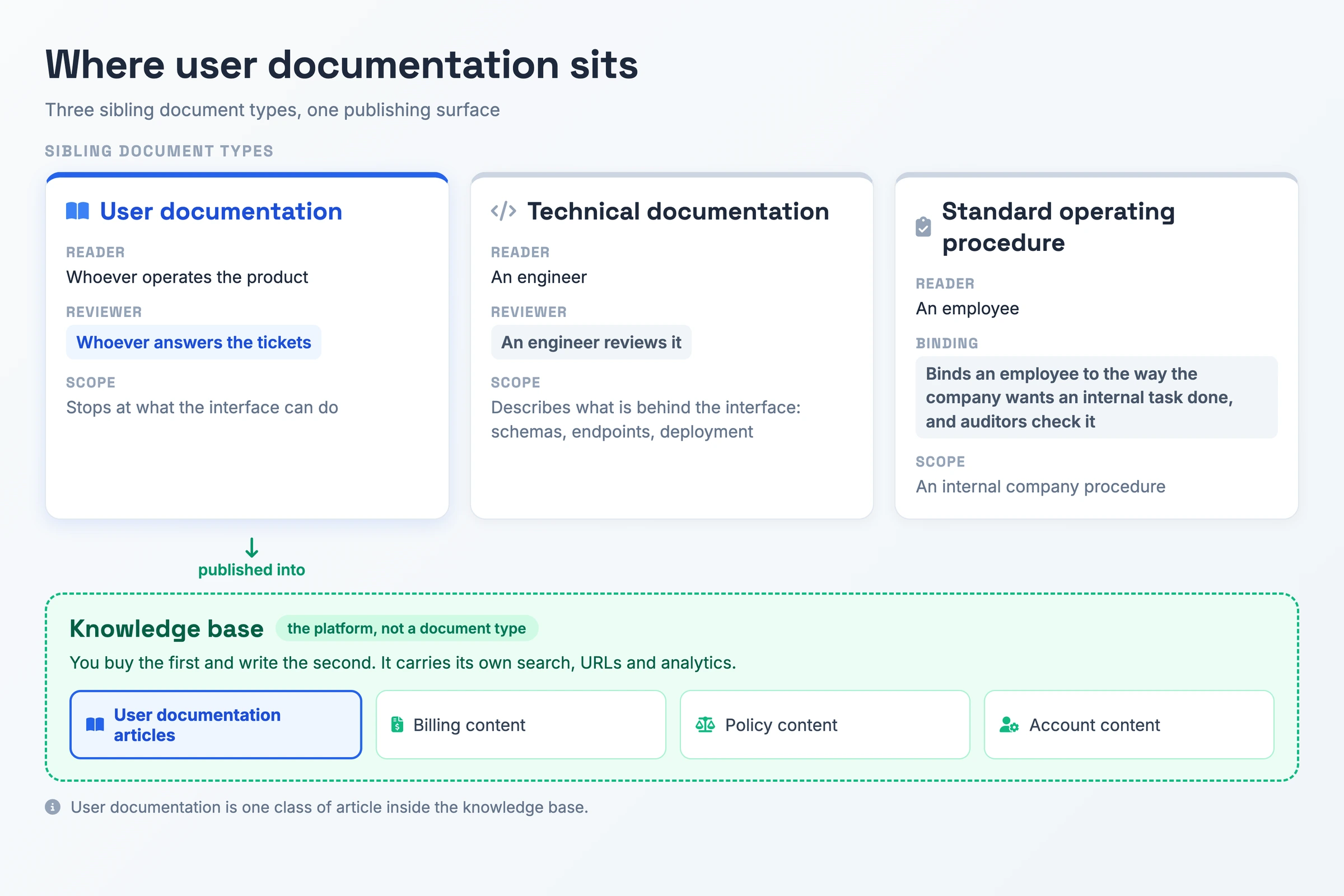
| User documentation | The published instructions a customer follows to finish a task in the product | Whoever answers the tickets reviews it, and it stops at what the interface can do |
| Technical documentation | The description of what sits behind the interface: schemas, endpoints, deployment | An engineer reviews it, and it covers parts of the product documentation set a customer has no reason to open |
| Standard operating procedure | The company's agreed way of running one internal task | It binds an employee to that way of working, and auditors check it |
| Knowledge base | The platform you publish into, with its own search, URLs and analytics | It holds billing, policy and account content alongside your articles, so user documentation is one class of article inside it |
Your reader settles the term: a customer finishing something in the product means user documentation, an engineer means technical documentation, an employee following a company procedure means an SOP. Knowledge base vs user documentation is a level distinction: you buy the first and write the second.
How to Create User Documentation or an Instruction Manual
Five published procedures converge on one sequence. Ask how to write user documentation, or how to make an instruction manual, or how to create a user manual: these steps cover all three.
- Name the audience and the single task. Decide who is reading and what one job they are trying to finish. The scope of the article is that job, not the feature underneath it.
- Map the process before writing it. Walk the task in the product and record what happens, including the places the interface behaves oddly.
- Title the article with the action. "Reset a teammate's password" returns to a reader who types what they want to do; a page called "Passwords" does not.
- Keep each step to a single action. Any step joined with "and" is really two. Put prerequisites and warnings above the step they apply to, since a warning printed underneath arrives after the reader has acted.
- Capture one image per step. Annotate the control being described, and close with an image of the finished result so the reader can check their own screen against it.
- Hand the draft to a colleague who has not done this task before. Rewrite each step they had to ask about. Your draft assumes knowledge the reader lacks, and only a cold run shows you which.
- Name an owner and a maintenance trigger. Put one person on the document, and state the event that forces a revision: a shipped release that changes a screen the article shows. Nine of the ten reference pages behind this article leave both unnamed.
User Documentation Best Practices
The user documentation best practices below each pair a rule with the failure it prevents.
- Do write one action per step, and split anything joined with "and".
Don't publish a wall of dense prose, which a reader standing at a workstation mid-task will not work through.
- Do title articles by the action the reader wants to take.
Don't file guides under topic nouns behind a flat hierarchy with no per-article URL, which leaves them unreachable from search.
- Do use active voice and short sentences, with a readability score to put a number on the result.
Don't write at the level of the person who built the feature, which assumes knowledge the beginner lacks.
- Do hold terminology and formatting to one style guide or template across the set.
Don't let each writer name the same button three different ways, which makes search miss and readers doubt they are on the right page.
- Do hand the draft to someone unfamiliar with the task and fix what they ask about.
Don't ship steps only the author has ever run.
Common User Documentation Mistakes
- Letting the content go stale after a release. The screenshot shows a button that has moved, the reader follows a step that no longer exists, and the ticket the article should have prevented gets filed anyway. manual.to reports static PDFs going out of date within months.
- Writing for the expert. You assume knowledge the beginner does not have, and the beginner is the one reader the document exists for, so they go to support instead.
- Publishing walls of dense text. Someone mid-task at a workstation stops reading part way down, so the article goes unused at the exact moment it should be helping.
- Publishing documentation readers cannot find. Weak search, a flat hierarchy and no URL per article mean you pay the full cost of writing the set and collect none of the ticket saving.
User Documentation Example
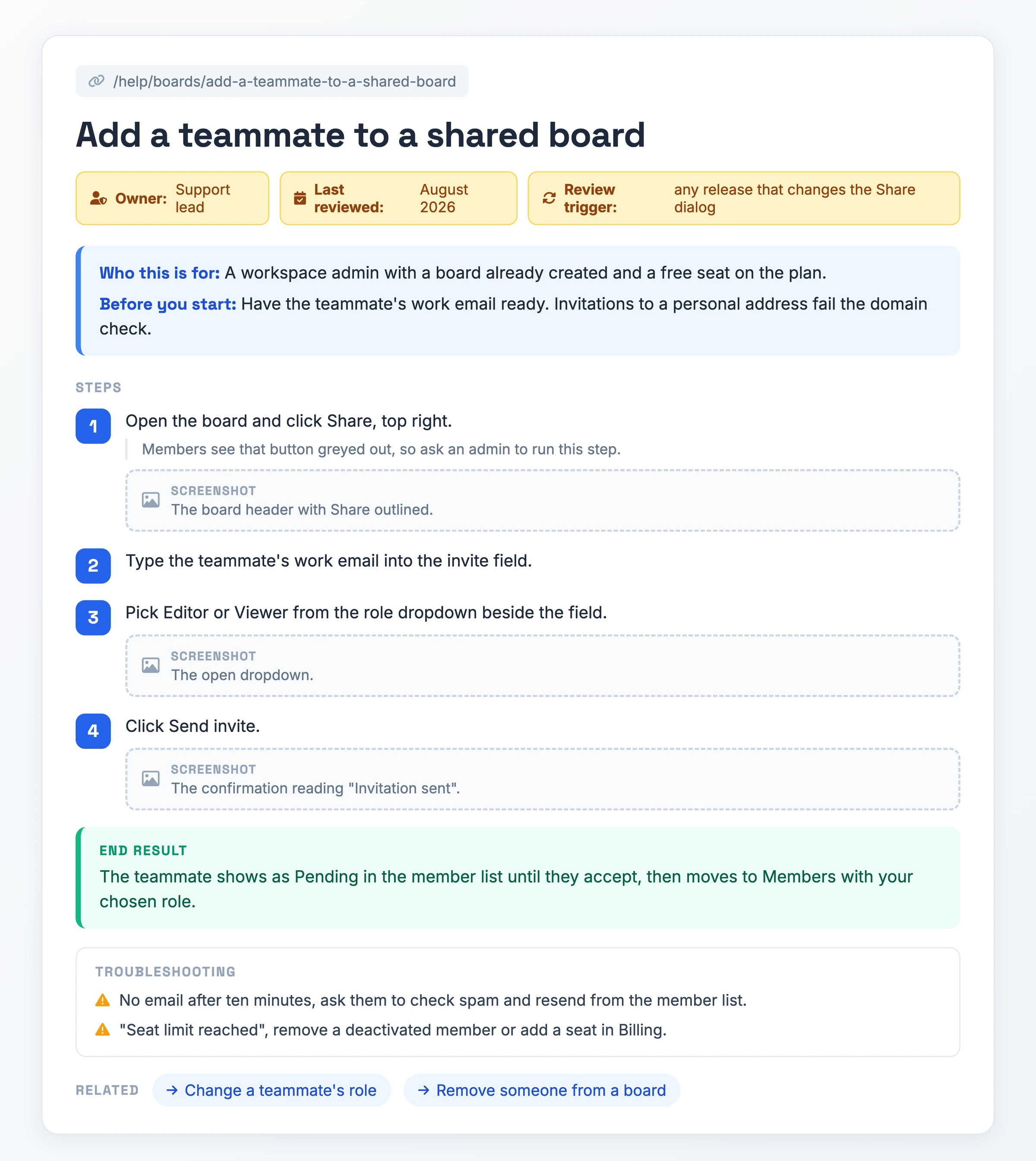
The pages ranking for user documentation examples are galleries of other companies' help centers. Lift the filled-in specimen below as a user documentation template; it carries the two fields end user documentation examples omit: an owner and a review trigger.
- Title: Add a teammate to a shared board
- Who this is for: A workspace admin with a board already created and a free seat on the plan.
- Before you start: Have the teammate's work email ready. Invitations to a personal address fail the domain check.
- Step 1. Open the board and click Share, top right. Screenshot: the board header with Share outlined. Members see that button greyed out, so ask an admin to run this step.
- Step 2. Type the teammate's work email into the invite field.
- Step 3. Pick Editor or Viewer from the role dropdown beside the field. Screenshot: the open dropdown.
- Step 4. Click Send invite. Screenshot: the confirmation reading "Invitation sent".
- End result: The teammate shows as Pending in the member list until they accept, then moves to Members with your chosen role.
- Troubleshooting: No email after ten minutes, ask them to check spam and resend from the member list. "Seat limit reached", remove a deactivated member or add a seat in Billing.
- Related: Change a teammate's role. Remove someone from a board.
- URL: /help/boards/add-a-teammate-to-a-shared-board
- Owner: Support lead. Last reviewed: August 2026. Review trigger: any release that changes the Share dialog.
The PDF carries three parts: a blank article template with every field laid out, the filled-in specimen above, and the seven-step writing checklist.
Download the user documentation template (PDF)See Real User Documentation
Hinto's own knowledge base is an instance of the term, and the article below covers trimming a video clip in eight numbered steps, each showing the control it names.
A published help article, eight numbered steps with the interface shown alongside them.
Open the live articleFrom Recording to User Documentation in One Pass
Producing that specimen from a blank page is where most teams stall, which is why user documentation tools now start from a recording instead of a document. Record the task once, or bring a video you have: Hinto AI accepts Loom, Zoom, YouTube, and local MP4, MOV or WebM files, and it records screen, camera and microphone from the browser or its Chrome extension.
Its action detection identifies UI state changes and button clicks, extracts screenshots and written steps from them, then turns one recording into a table of contents with multiple organized articles: a help center for end user documentation, or release notes generated from a product demo. When a section comes out wrong, highlight it and ask for a rewrite or fresh images for that block alone, then crop, frame, focus or blur anything sensitive. You publish the result to a public URL on your own custom domain, and it meters generations as a monthly credit allowance rather than charging per seat the way most user manual software does.
User Documentation FAQ
Who writes user documentation?
Whoever sits closest to the reader's questions: support, a product owner, or a technical writer doing technical writing user documentation full time. Keeping the page current matters more than who holds the pen, and nine of the ten reference pages behind this article never name an owner for the document after its first release.
What should a user manual include?
Wikipedia's standard contents run safety, assembly, installation, operation, maintenance, troubleshooting, specifications and warranty. Software manuals drop the physical sections, keep the rest, and add a getting-started path plus one article per task. Put an owner and a last-reviewed date in the furniture so readers can judge whether it still matches the product.
What is the difference between a user guide and a user manual?
Both names point at one thing. A user manual, user guide, owner's manual or instruction manual is material that helps someone use a particular product, service or application. Teams that do split them use guide for the short task-shaped article and manual for the complete reference.
What makes a good user guide?
The reference set agrees on three things: one annotated image per step showing the control the step describes, plain language with no unexplained jargon, and an organization built around the tasks a reader wants to finish rather than the features the product ships. A page that fails any of the three sends readers to support.
What is user documentation testing in software testing?
You walk the written steps through the live product with a first-timer, then fix each step they had to ask about. TechSmith calls them naive users, manual.to calls them never-done-it users. The exercise catches assumed knowledge and steps a recent release quietly broke.
Related Terms
Standard Operating Procedure, Knowledge Base, Process Documentation