What Is an SOP? Standard Operating Procedure Definition, Components and Examples
An SOP is an approved, versioned document that records how one recurring task gets done, so any trained person can repeat it identically.
The acronym is short for standard operating procedure, written in some organizations as standing operating procedure or standard operational procedure. Every one opens with a stated purpose, then an ordered body carrying one action per numbered step. Follow that format and the task yields the same output no matter who performs it.
How an SOP Works
SOP meaning, business operations sense: standard operating procedure. Other fields claim the acronym too: sulphate of potash in agriculture, Sum of Products in Boolean algebra, Statement of Purpose in academic admissions. Those senses stay out of everything below.
What is an SOP: an approved record of the actions in one recurring task.
What is a standard operating procedure for: steady output whoever does the work, and less training time.
Key components: purpose, scope, named roles, and a numbered procedure body.
How to create one: set the objective, draft each step alongside the operator who runs it, test the draft, publish one copy.
What Makes Something an SOP
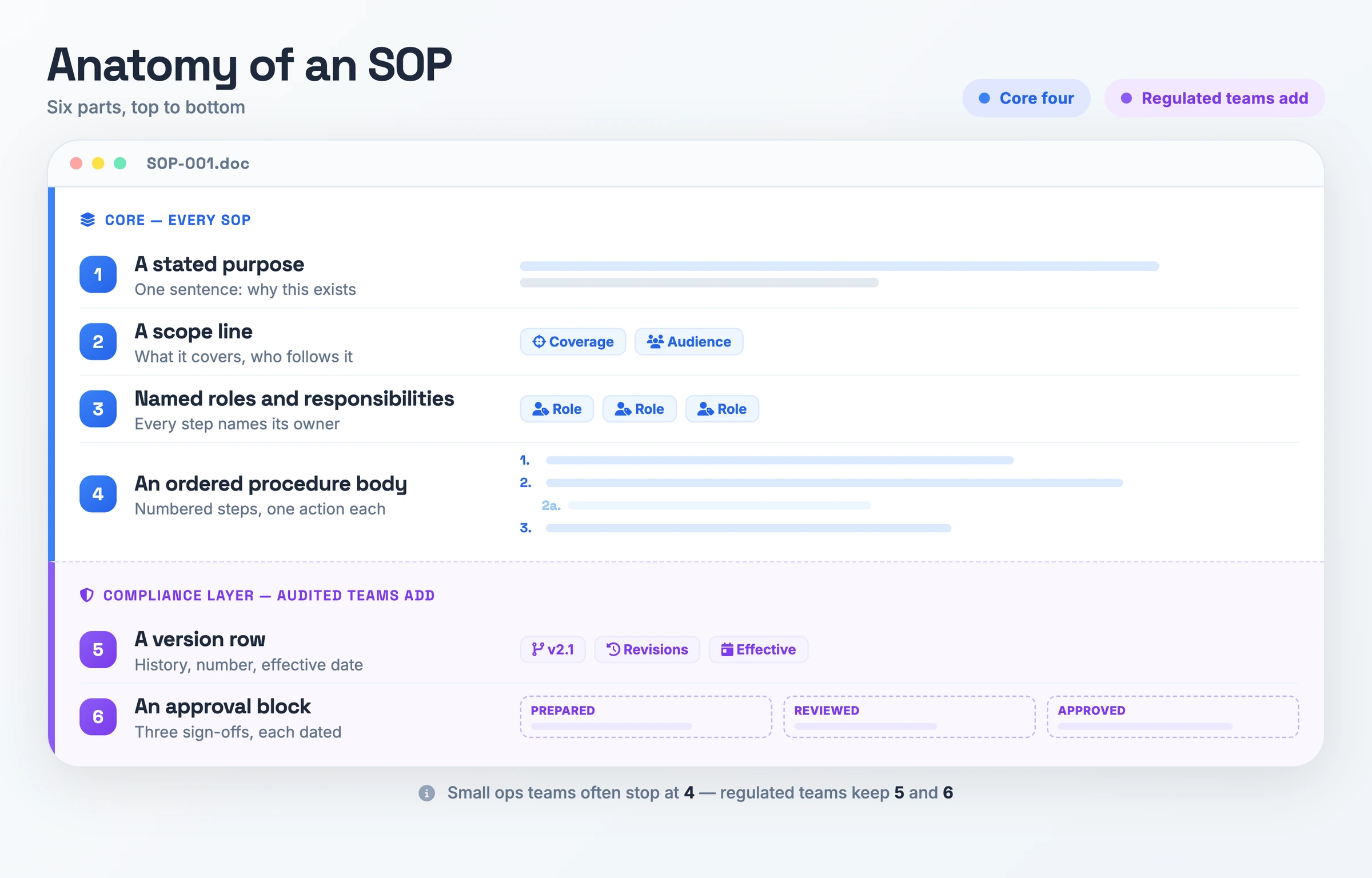
- A stated purpose: One sentence at the top saying what the document is for. Every source reviewed for this page requires this field, and together with an ordered body it is the shortest thing that still counts as an SOP.
- An ordered procedure body: Numbered steps, one action each, with substeps under a main step where that step needs its own detail.
- A scope line: One line naming the coverage and the audience. A reader sees at a glance whether the document is theirs.
- Named roles and responsibilities: Each step names the role that performs it.
- A version row: Revision history, the version number, the date this version took effect. Check the copy in front of you against the software and the policy in force today.
- An approval block: Prepared by, reviewed by, approved by, each with a date. Audited and regulated teams add this and the version row; a small ops team often stops at the first four fields.
Why SOPs Matter
Two people doing the same job two different ways is a quality problem before it is a documentation problem. The FDA Group ties written procedures to uniform performance, Northwestern to consistent outcomes regardless of who is performing the task. Write the actions down and the work stops changing shape when the shift changes: your team calculates the refund the same way on Tuesday as on Friday.
Penn State opens its writing guide by crediting SOPs with reduced training time. A new hire reads a document instead of interrupting a colleague for a week, and Northwestern goes further by having new staff draft SOPs during their own onboarding. Canva frames the same effect as preserving organizational knowledge, which pays off the month your longest-tenured operator resigns.
Regulated and audited teams get evidence. An inspector asking how you run a task wants to read the written procedure, and the FDA Group ties procedure gaps to regulatory findings. Northwestern applies the same logic to site initiation visits.
SOP vs Work Instruction vs Policy
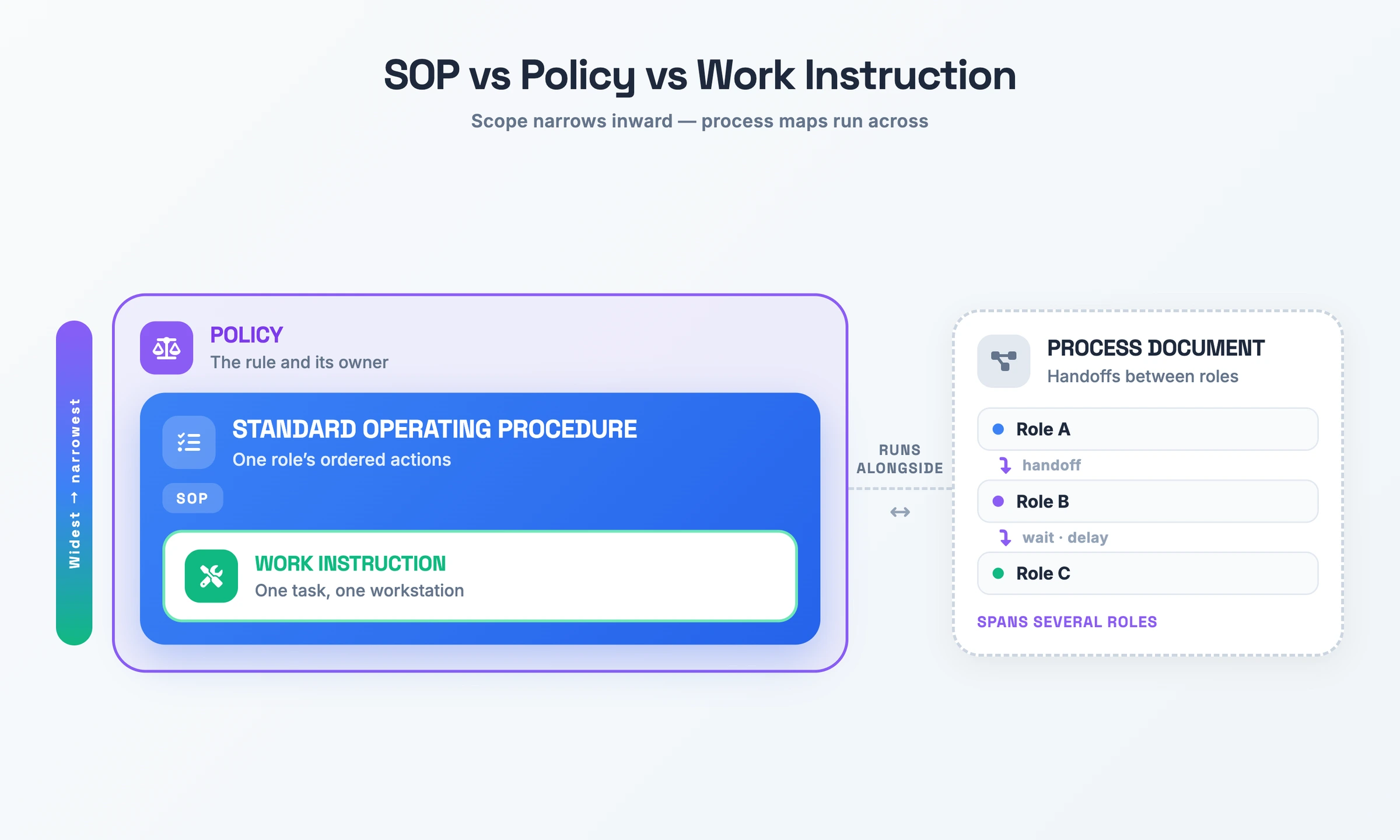
| Term | What it is | How it differs |
|---|---|---|
| Standard operating procedure | The approved sequence of actions for one recurring task | Tells one role what to do next, in order, and needs the department's sign-off before it ships |
| Work instruction | The detail for one task at one workstation | The person doing that task usually writes it; the SOP covers the whole procedure the task sits inside |
| Policy | The rule, plus the person who owns it | Its owner re-approves it once a year; the SOP states the actions that satisfy the rule, and you update it the week the tool or the form changes |
| Process document | A map of how work moves between roles | Shows the handoffs and the delays; the SOP tells one role what to do without showing anyone else's part |
Sort by what you are trying to write: one task at one station is a work instruction, the rule and its owner is a policy, roles handing work to each other is a process document, and one role's ordered actions through a recurring task belong in an SOP.
How to Create an SOP
Penn State, Atlassian and Canva each publish a sequence for how to write an SOP, and all three start in the same place.
- Define the objective. Name the single task and the result the reader should end up with. A vague objective produces a document you cannot test.
- Set the scope and name the people. Name the coverage and the audience in a line, then assign a role to each part of the work. Canva identifies creators, stakeholders and end users before drafting; Atlassian makes scope and responsibilities its third and fourth steps.
- Choose an SOP format. Five shapes recur across the reference set: a simple step-by-step list, hierarchical steps with substeps, a flowchart, a checklist, and a graphic or annotated visual procedure. Take the flowchart when the task branches on a decision, the checklist when completion matters more than order.
- Interview whoever runs the task today. Penn State titles its section "People Support What They Help Create", and the operator knows the checks that went undocumented.
- Draft the procedure body. One action per numbered step, phrased as a command, at the level of detail your least experienced reader needs. Add a table or a flow graphic wherever the procedure branches.
- Review it, then test it. Penn State runs an internal review, an external review, and a test of the draft against the real task. Canva shares the draft with stakeholders before the final version goes to the department.
- Publish one copy and train on it. Keep a single canonical version, link to it from elsewhere rather than duplicating it, and put a review date at least a year out.
SOP Example
The SOP document below covers a task most offices run every week, with a real value filled into each field.
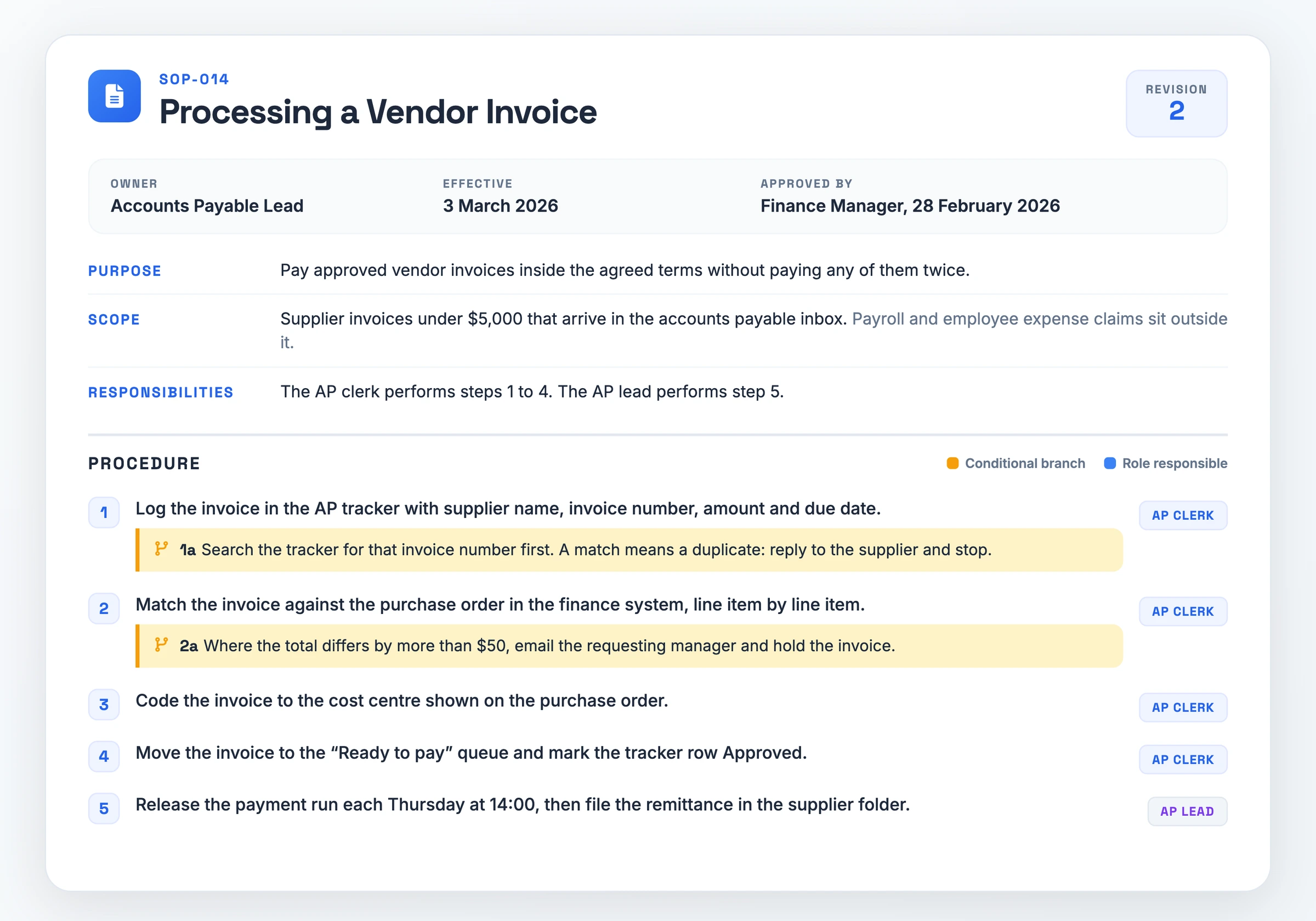
- AP-014 · Processing a Vendor Invoice
- Owner: Accounts Payable Lead · Effective: 3 March 2026 · Revision: 2 · Approved by: Finance Manager, 28 February 2026
- Purpose: Pay approved vendor invoices inside the agreed terms without paying any of them twice.
- Scope: Supplier invoices under $5,000 that arrive in the accounts payable inbox. Payroll and employee expense claims sit outside it.
- Responsibilities: The AP clerk performs steps 1 to 4. The AP lead performs step 5.
- Step 1: Log the invoice in the AP tracker with supplier name, invoice number, amount and due date.
- Search the tracker for that invoice number first. A match means a duplicate: reply to the supplier and stop.
- Step 2: Match the invoice against the purchase order in the finance system, line item by line item.
- Where the total differs by more than $50, email the requesting manager and hold the invoice.
- Step 3: Code the invoice to the cost centre shown on the purchase order.
- Step 4: Move the invoice to the "Ready to pay" queue and mark the tracker row Approved.
- Step 5: Release the payment run each Thursday at 14:00, then file the remittance in the supplier folder.
This fillable SOP template opens with a header block (document number, title, owner, effective date, revision, approver), then gives you Purpose, Scope, Responsibilities and a numbered procedure body with room for substeps. One field comes filled in to show you the tone too.
Download the SOP template (PDF)From Recording to SOP in One Pass
The steps above assume someone sits down and types the procedure out. A recording of the task replaces that blank page. Hinto AI has a screen recorder built into the web app and a Chrome extension. Either one captures the screen while you work through the task once at normal speed.
It also takes video you already have: a Loom, a Zoom session, a YouTube link, or a local MP4, MOV or WebM. Hinto analyzes the recording, identifies UI state changes and button clicks, and extracts screenshots and written steps from them. Its Internal Workflows template shapes that output as a process guide for team operations.
You still own the fields a recording cannot supply: the purpose line, the scope, the named responsibilities, the review date and the approval. Once those are in, Hinto hosts the finished document on a public URL with a custom domain.
SOP FAQ
What are the five parts of SOP?
Published sources disagree about the five, and each names a different set. The four components they share are a stated purpose, an ordered procedure body, a scope line and named responsibilities. Regulated teams add a version history and an approval block.
What are the different types of standard operating procedures?
Five shapes recur: a simple step-by-step list, hierarchical steps with substeps, a flowchart for procedures that branch on a decision, a checklist where completion matters more than order, and a graphic or annotated visual procedure. Most teams need the first.
Can I write my own SOP?
Yes. Northwestern describes SOPs as a collaborative team effort that anyone on the team can write or help write. Start with a purpose line and an ordered procedure body, then walk the draft past the operator who runs the task daily.
How often should an SOP be reviewed?
Yearly, by the owner, and again the day the tool, the form or the policy behind it changes. Northwestern calls SOPs living documents and ships a version history table in its templates. Keep one copy only, so stale versions stay out of circulation.
Which sections make up an SOP format?
Most SOPs open with a header block: the owner, the approval line, the SOP and revision numbers, plus implementation and last-review dates. Under it sit Purpose, Scope, Prerequisites, Responsibilities, Procedure, References and Definitions. The template on this page lays them out ready to fill.
What is the full form of SOP at work?
Standard operating procedure. Variants in circulation include standing operating procedure and standard operational procedure. At work the acronym names an approved, versioned document recording how one recurring task gets done. Outside work it covers statement of purpose and sum of products instead.