What Is Process Documentation?
Process documentation is a written record of how repeating work gets done in practice, who handles each part, and where that work starts and stops.
Business process documentation covers one repeating piece of work as an ordered sequence of actions, scoped to the run rather than to the department that owns it. Good process docs record the run as the team performs it today, workarounds included, and the team edits them the week a tool or a policy changes. A document of how work should run records an intention instead.
How Process Documentation Works
What is process documentation: the ordered actions behind one repeating job, plus its owner and its start and end points.
What is business process documentation: the same artifact, under the name enterprise vendors use for it.
In project management: documenting processes means each step names the role that performs it, and it carries a review date instead of a publish date.
Process flow and mapping documentation: a flowchart is one format process documentation can take, alongside written steps.
What Makes Something Process Documentation
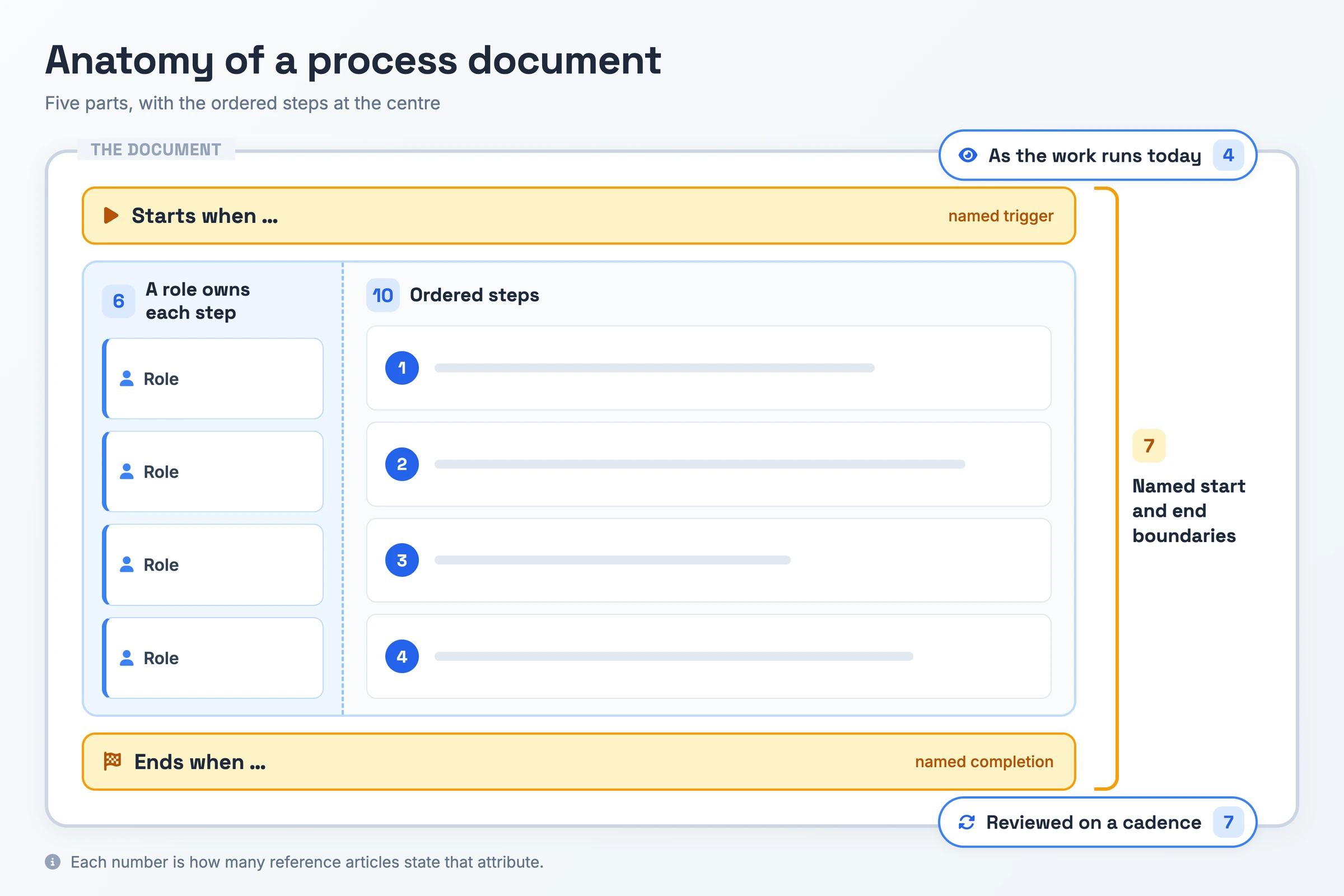
- Ordered steps: The document lists the actions for one repeating piece of work in the order they happen, so you can follow it top to bottom without deciding what comes next.
- Reviewed on a cadence: A review date sits in the header and the document changes when the work changes, which is the difference between a living document and a file somebody wrote once.
- Starts when, ends when: The header names where the process begins and where it ends, so you know where your responsibility starts and where it hands off, and one document does not swell into three processes.
- A role owns each step: Each step names the role that performs it rather than a named individual, so the document survives the person moving teams.
- As the work runs today: The record captures the run the team performs now, including the workaround in step four. A document of the ideal version describes a process the team does not follow, and readers stop opening it.
Why Process Documentation Matters
One person holding a process in their head is a single point of failure with a calendar. They take two weeks off, and the work either stops or somebody guesses their way through it, and that guess surfaces later as a refund, a missed renewal, or a compliance finding your team cannot explain.
Ramp-up costs the same money twice. A new hire without a document learns by tapping a colleague on the shoulder, so one person's onboarding spends two people's hours, repeated for the next hire and the one after. Documenting processes trades an afternoon for every future version of that conversation.
Two people running the same undocumented process produce two different outputs, which is the error rate showing up as inconsistency rather than as a mistake someone notices. Atlassian anchors that point to the ICU checklist research. Business process documentation also makes the wasteful step visible: you cannot find the bottleneck in a process your team has never described, and you cannot prove you removed it either.
Types of Process Documentation
Process documentation takes five common formats, chosen by the shape of the process. Two of them also name terms of their own, compared in the next section.
| Type | What it covers | When you need it |
|---|---|---|
| Flowchart or process map | The route drawn as shapes and arrows, with each decision point marked | Process flow documentation fits a branching run. Pair it with written steps, which carry the inputs and owners it leaves out |
| Checklist | Steps that run in a fixed order, ticked off as the reader completes them | The process has fixed start and end boundaries, a fixed order, and nothing for the reader to judge |
| SOP or written procedure | The approved, versioned form of the same content | The output has to survive an audit |
| Video walkthrough or screen recording | The process captured on screen as somebody performs it | Recording the run as it happens matters more than a tidy description of it |
| Swimlane diagram | The same route with each role given its own lane | More than one role touches the work, and the handoffs between them are where it stalls |
Process Documentation vs SOP vs Process Mapping
| Term | What it is | How it differs |
|---|---|---|
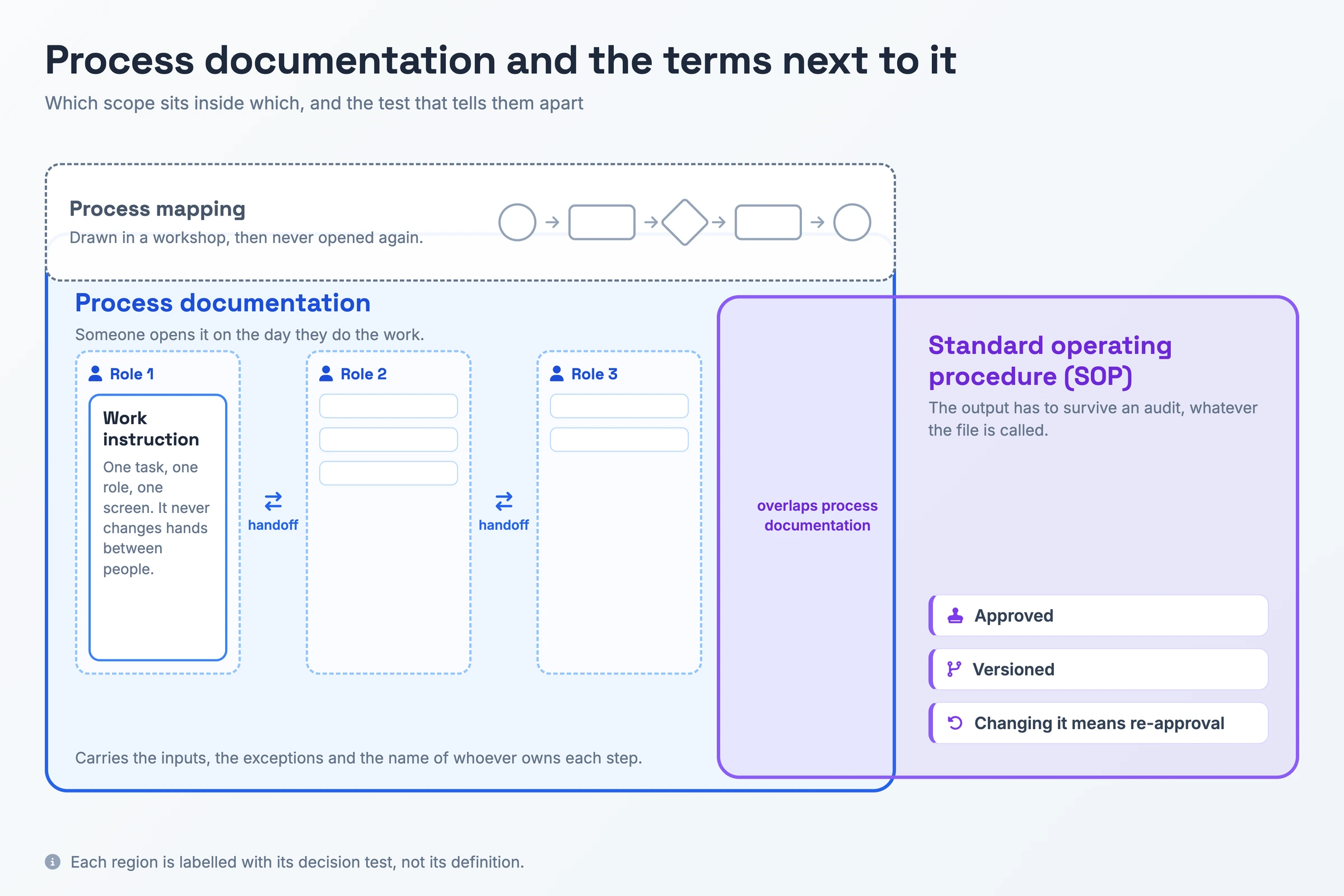
| Process documentation | The record of the whole run, with inputs, exceptions, and a named owner per step | People open it on the day they do the work, and it covers the handoffs between roles |
| Standard operating procedure (SOP) | An approved, versioned procedure produced on demand for an auditor | Changing it means re-approval, so the audit requirement decides it, whatever the file is called |
| Process mapping | The picture of the route, drawn as shapes and arrows | It stops at the diagram. Teams draw the map in a workshop and rarely reopen it |
| Work instruction | The detail for one task, one role, one screen | A document that stays with one person, without a handoff, is a work instruction inside a larger process |
Apply the test rather than the definition: audited output means SOP, a numbered procedure with no approval step is process documentation under another name, a task that stays with one person means work instruction, a document opened only during the workshop means a map, and anything a person follows on a live shift is your process documentation.
How to Create Process Documentation
- Name the process and set its boundaries. Write the process name, the event that starts it, and the event that ends it. Stop at the point where the work hands off to another team, because the rest belongs in their document.
- List the inputs and the outputs. Name what has to exist before anyone can start, such as a signed order or a filled ticket, and what exists when the work is done.
- Capture the run as it happens. Sit with the people who perform it, or record the screen while they work, and take the sequence from what they do rather than from what the old process map says.
- Write the steps in order and attach a role to each one. Give each step one action, name the result the reader should see before moving on, and put the role that performs it at the front of the step.
- Note the exceptions. Each branch the happy path skips gets a line: the refund over the approval limit, the customer with no account, the file that arrives in the wrong format.
- Hand the draft to someone who has never done the work. Watch them run the process from the document and rewrite each step they had to ask about. Their questions find more gaps than a proofread does.
- Publish it where the work happens and date it. Put it in one central searchable location, name an owner in the header, and give it a review date rather than a publish date.
Process Documentation Example
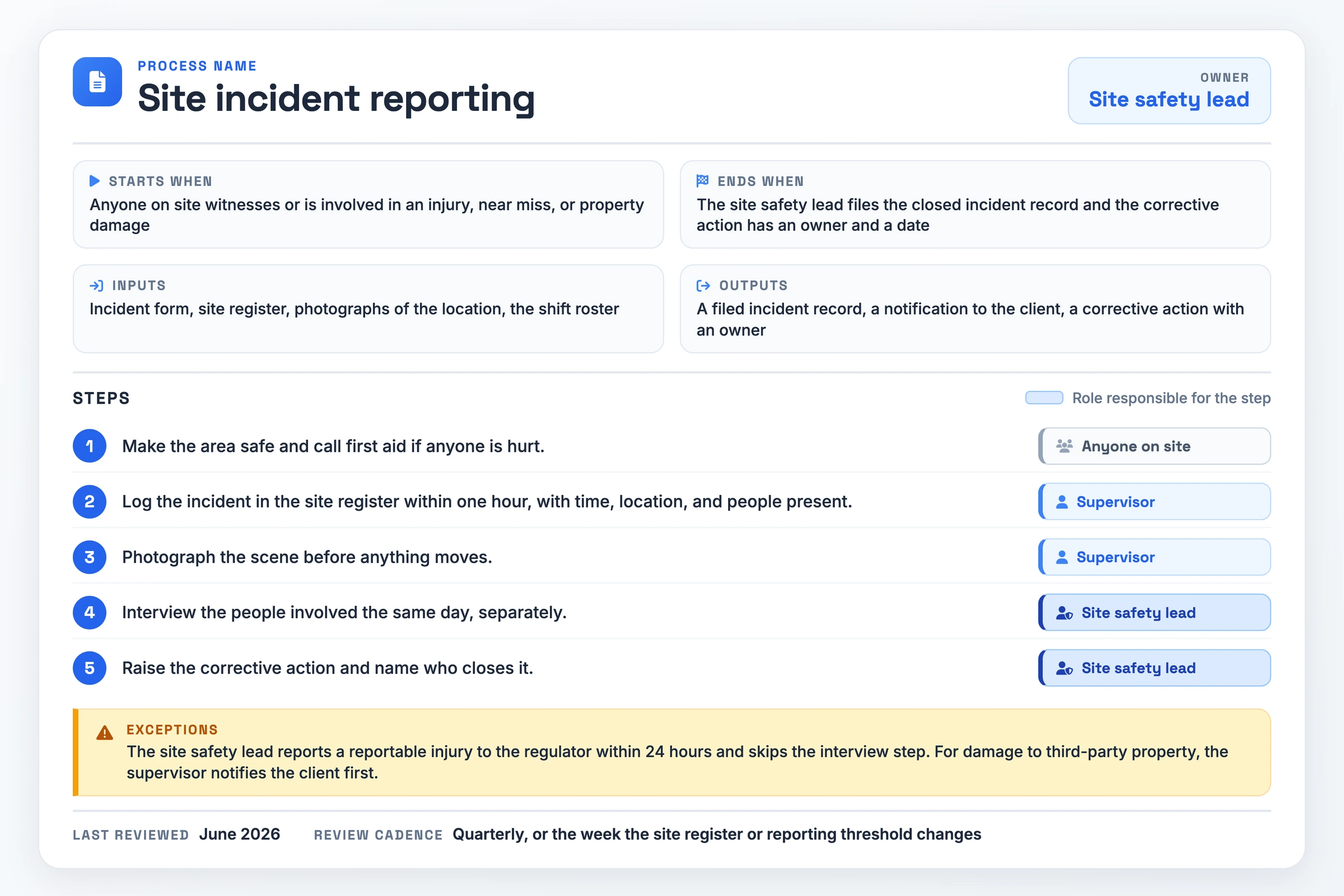
A process document needs nine fields: name, owner, starts when, ends when, inputs, outputs, steps with a role on each, exceptions, and last reviewed with its cadence. A site incident reporting process fills them in like this.
- Process name: Site incident reporting
- Owner: Site safety lead
- Starts when: Anyone on site witnesses or is involved in an injury, near miss, or property damage
- Ends when: The site safety lead files the closed incident record and the corrective action has an owner and a date
- Inputs: Incident form, site register, photographs of the location, the shift roster
- Outputs: A filed incident record, a notification to the client, a corrective action with an owner
- Step 1: Make the area safe and call first aid if anyone is hurt. Anyone on site.
- Step 2: Log the incident in the site register within one hour, with time, location, and people present. Supervisor.
- Step 3: Photograph the scene before anything moves. Supervisor.
- Step 4: Interview the people involved the same day, separately. Site safety lead.
- Step 5: Raise the corrective action and name who closes it. Site safety lead.
- Exceptions: The site safety lead reports a reportable injury to the regulator within 24 hours and skips the interview step. For damage to third-party property, the supervisor notifies the client first.
- Last reviewed: June 2026 · Review cadence: Quarterly, or the week the site register or reporting threshold changes
A one-page blank template with the nine fields laid out to fill in: process name, owner, starts when, ends when, inputs, outputs, steps with a role on each, exceptions, and last reviewed with its cadence.
Download the process documentation template (PDF)See Real Process Documentation
The page below is a finished process document you can read end to end without signing in: a document Hinto published to a public URL. It covers one repeating job, creating an internal workflow SOP project from a screen recording, as numbered steps that each carry a screenshot, and closes with a summary section.
A live process document, open and readable.
Open the live process documentFrom Recording to Process Documentation in One Pass
Writing the document is the part teams stall on, so processes stay in one person's head. Recording the run once removes the blank page: the recording already contains the process as the team performs it in practice, workarounds and all.
Hinto AI takes a screen recording and analyzes it, detecting UI state changes and button clicks to extract screenshots and written steps. The source can be a recording you make in the Hinto web app or Chrome extension, or a video you already have: a Loom, a Zoom session, a YouTube video, or a local MP4. A long recording becomes a table of contents with several organized articles, and the SOP template shapes it as an internal workflow guide.
Remote and async teams get their answer here. The Zoom training session somebody already ran becomes the document, and one click hosts it on a public URL with a custom domain. Once the tool changes, highlight the affected section and ask for a rewrite of that block instead of redoing the page.
Process Documentation FAQ
How often should you update process documentation?
Quarterly, plus the week the underlying tool or policy changes, whichever comes first. Put a named role in the header, such as the team lead who owns the process, because an unowned document goes stale by default. A new hire who hits two wrong screens stops trusting the whole library.
What is the ideal length for a process document?
One process per document, which usually lands between five and fifteen steps and reads on one screen. A draft that runs longer has crossed a boundary into a second process, so split it at the handoff. Over-detailing costs you readers, and unread detail offers no protection.
How do you get team buy-in for process documentation?
Draft it alongside the people who perform the work. Name the reviewer and the sign-off criterion before the first draft circulates, otherwise you revise three times against complaints that stay vague. A document the operators corrected themselves gets opened; one written over their heads gets routed around.
What is process flow documentation?
Process flow documentation is the same record drawn as a flowchart, one of the most common formats on this topic. The diagram shows the route and the decision points. It leaves out inputs, exceptions, and owners, so pair it with the written steps rather than shipping the picture by itself.