
What Is a Document Workflow?
A document workflow is the agreed route a file takes between people, stating who drafts, checks, signs off and stores it, and in which order.
Most routes share the same stages: create or capture, review and approve, distribute, then store or archive. Each stage has a named owner, so a stalled file has someone to ask. The route exists before any software runs it, and a team can run a clear one over email with no document management system at all.
How Document Workflow Works
Stages: create or capture, review and approve, distribute, then store or archive.
Why teams set one up: audits and compliance, because the route shows who approved which file, and each stage has a named owner.
Common example: approving and signing contracts, invoices or offers.
In one line: the agreed route a file takes between people, and in which order.
What Makes Something a Document Workflow
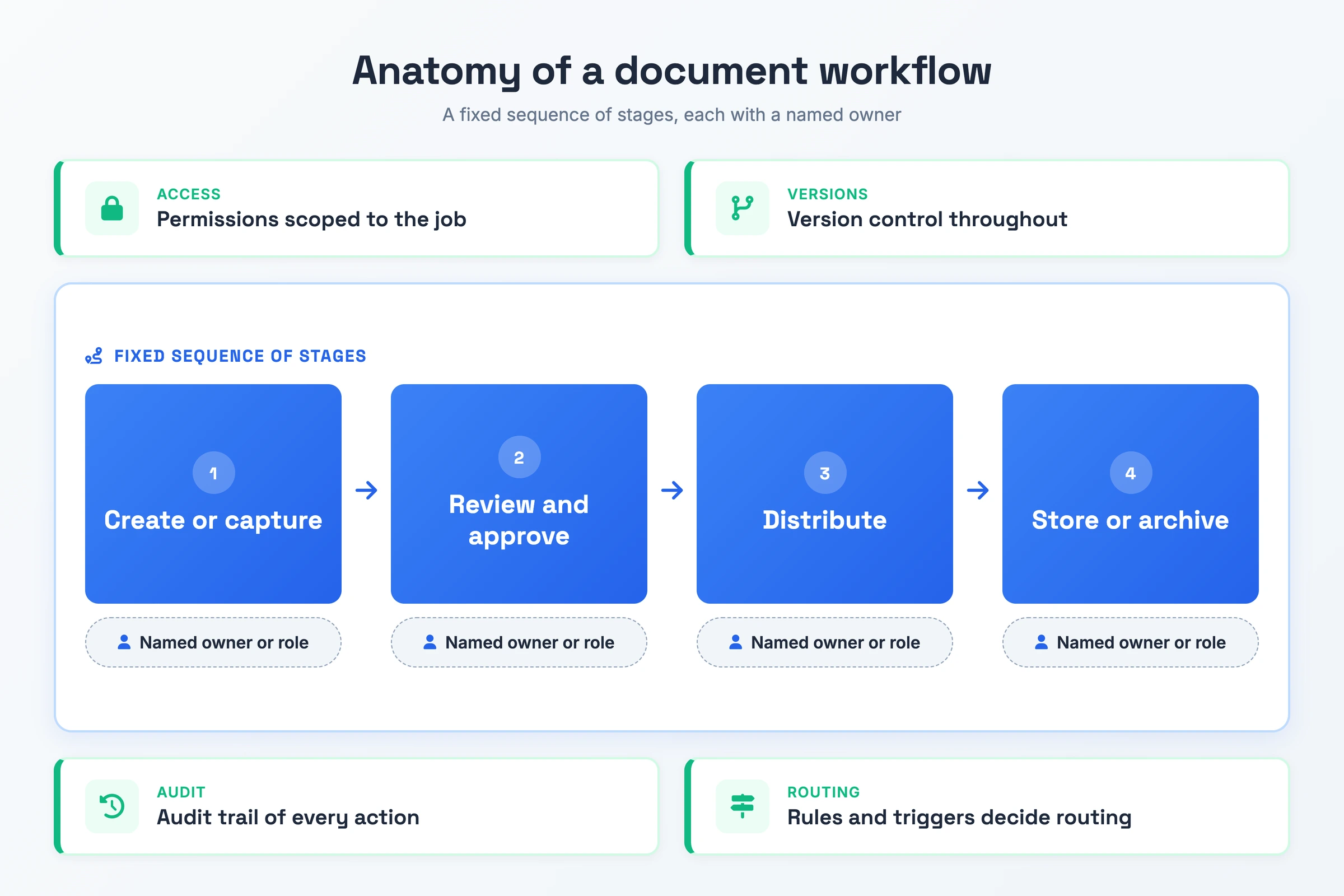
- A fixed sequence of stages: The file moves through create or capture, review and approve, distribute, and store or archive in the same order each time, whether the route runs through a shared inbox or a document management system.
- A named owner for each step: Each stage belongs to one person or role, such as Legal or Finance. That owner moves a stalled file on.
- Access scoped to the job: Reviewers get enough access to complete their step and no more, which a small team can handle with folder sharing settings.
- Version control throughout: Each person on the route works on the current version, and earlier drafts stay retrievable.
- An audit trail of each action: Decisions, comments and timestamps stay attached to the file, even when the trail is an approval thread saved next to the final copy.
- Rules that decide routing: A condition sends the file down a different path, for example an extra approval stage for invoices above a set value.
Why Document Workflow Matters
Without a defined route, a team cannot show an auditor who approved which version of a file, or when. A logged route answers that from the file's own history. If nothing was logged, the audit turns into a search through inboxes.
Slow approvals are the second cost. A file with no agreed next stop waits in whichever inbox it landed in until someone chases it.
The third cost is rework. People edit an outdated draft or sign off a file that skipped review. A route with a named owner per stage settles which version is current and where the file stands.
Document Workflow vs Workflow Documentation vs Document Management System
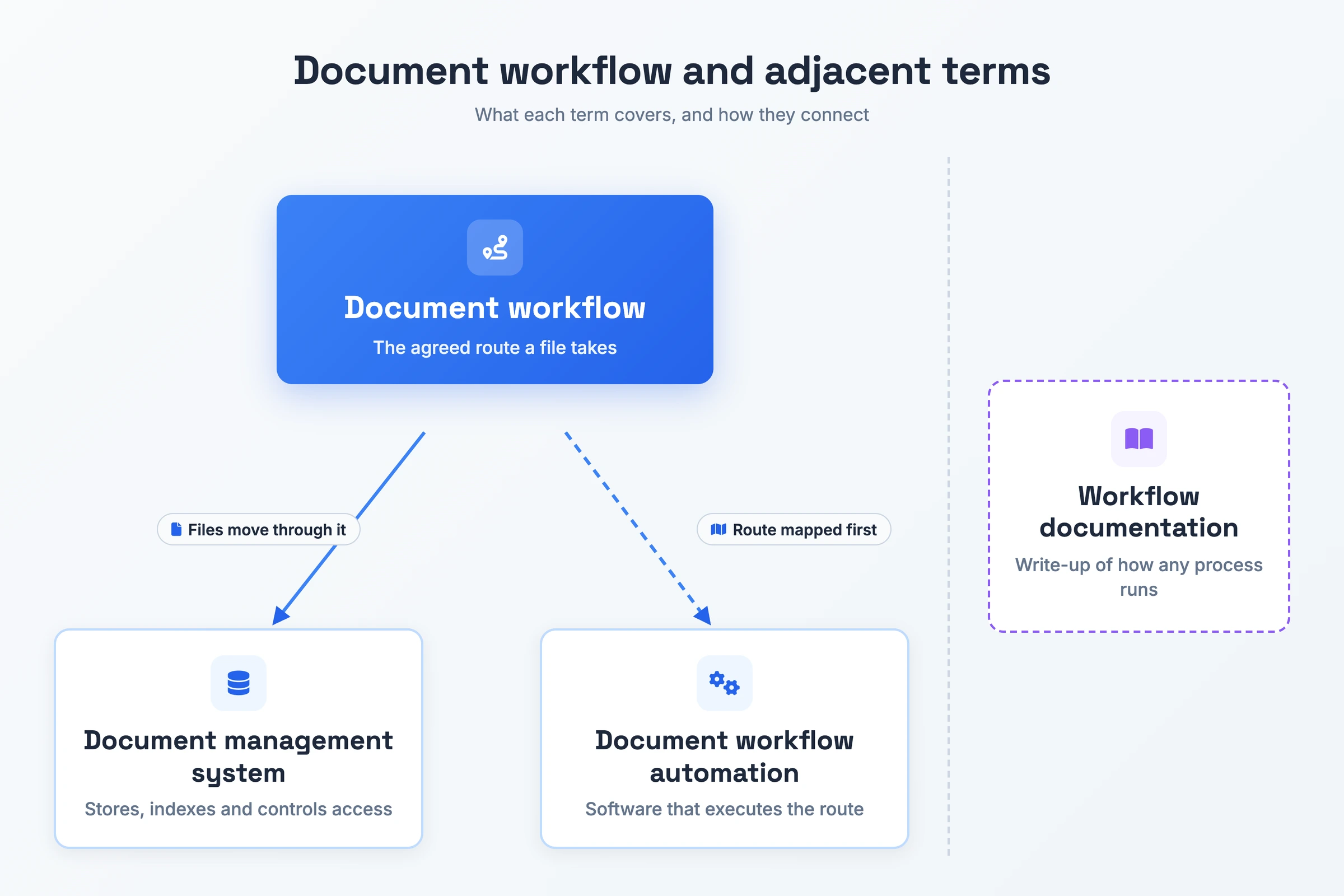
| Term | What it is | How it differs |
|---|---|---|
| Document workflow | The agreed route one file takes between people | Sets who drafts, checks, signs off and stores the file, and in which order |
| Workflow documentation | The write-up of how any process runs, such as onboarding or a support escalation | Explains how a process runs, while a document workflow decides who signs a contract before filing |
| Document management system | Software that stores, indexes and controls access to files | Stores the files the route moves through. A team can own a DMS without an agreed route, or run a clear route over email without a DMS |
| Document workflow automation | Software that executes the route: it creates tasks, sends reminders and moves files | Runs a route someone already mapped and agreed, and leaves a process with undefined owners and outcomes broken |
Agree the route first: write workflow documentation to explain a process, buy a DMS to store files, and add automation once the document workflow it will run is mapped.
How to Create a Document Workflow
- Map the current route. Follow one real file through your current document workflow process and note who receives it, what each person decides, and where it waits or goes wrong.
- Name an owner for each stage. Assign a person or role to drafting, review, approval, signing and storage, so each step has someone accountable for moving it on.
- Set the trigger and the order. Decide what starts the route, such as a request form or a file landing in a shared folder, and which stages run in sequence and which can run in parallel. Cut any review that adds a sign-off without adding a check. Each needless sequential stage slows the route.
- Add decision rules and deadlines. Write a pass criterion for each review, give each stage a due date, and state the conditions that change the path, such as an extra approval for contracts above a set value.
- Test it with a real file. Run a representative document through the route and fix each point where someone had to ask what happens next.
- Train the people on the route before go-live. Walk each owner through their stage first, because people who start cold keep routing files the old way.
- Review and revise after launch. Track completion times, overdue tasks, rejections and bottlenecks, and update the route when the people or the documents change.
Document Workflow Example
A small team approving a supplier contract can run the whole route from one five-column list, with example deadlines.
- Document workflow: Contract approval (deadlines and threshold are example values)
- Stage: Draft · Owner: Requester · Action: Drafts the contract or logs the one received from the supplier · Deadline: Same business day as the request · Next step: Legal review
- Stage: Legal review · Owner: Legal · Action: Checks the terms and returns the contract to Draft with comments when it needs changes · Deadline: 3 business days after Draft · Next step: Finance approval, or back to Draft
- Stage: Finance approval · Owner: Finance · Action: Approves cost and payment terms. Contracts above $25,000 go to an extra approval stage with the finance director · Deadline: 2 business days after Legal review · Next step: Signing
- Stage: Signing · Owner: Authorised signer · Action: Signs the approved contract electronically · Deadline: 1 business day after Finance approval · Next step: Distribute
- Stage: Distribute · Owner: Requester · Action: Sends a copy of the signed contract to the supplier and to Finance · Deadline: Same business day as signing · Next step: Store
- Stage: Store · Owner: Requester · Action: Moves the signed contract to the controlled contract repository with its comments, decisions and timestamps attached · Deadline: Same business day as distribution · Next step: Route complete, contract filed
A two-page document workflow template with stage, owner, action, deadline and next step columns, blank rows to fill in, and the contract approval above as a reference.
Download the document workflow template (PDF)From Recording to Document Workflow in One Pass
Mapping the current route is step 1 above, and a recording captures it with little effort. Ask the person who handles the file to walk through it on screen, saying who drafts, who reviews, who signs off and where the file lands.
Hinto AI turns that recording into a structured written document of the route. Record with the built-in screen recorder in the Hinto web app or Chrome Extension, capturing screen, camera and microphone, or upload a video you already have from Loom, Zoom, YouTube, or a local MP4, MOV or WebM file. Hinto detects UI state changes and button clicks in the video and extracts screenshots and written steps from them.
The output is a process guide your team can read and agree on before anyone builds the route in software. Host it on a public URL with a custom domain, or sync it to Notion, Confluence, GitHub or GitLab. Hinto documents the route, and your team, inbox or DMS still runs it.
Document Workflow FAQ
Who is responsible for each step in a document workflow?
Each stage has one named owner, a person or a role such as Legal or Finance. The route states who drafts, checks, signs off and stores the file. When a file stalls, the owner of the current stage is the person to ask. Access permissions follow the same roles.
Does a document workflow record who approved what?
A well-run one does. The decisions, comments and timestamps from each stage stay attached to the document, which gives you an audit trail. In a document management system the software logs it. A team working over email can save the approval thread alongside the final file.
How does version control fit into a document workflow?
Version control runs alongside each stage and keeps reviewers and approvers on the same current file. Without it, someone can approve a draft that Legal already changed. Some routes treat tracking and versioning as a stage of its own.
Does a document workflow speed up approvals?
It can. A defined route removes the wait while a file sits in an inbox with no clear next stop, and parallel review lets several reviewers act at once. Extra sequential stages slow the route down again.
Should a document workflow change after it goes live?
Yes. Treat it as a living process: track completion times, overdue tasks, rejection rates and bottlenecks, and ask the people who use it daily where it breaks. Revise the route when owners, documents or rules change, or it drifts away from how the team works.

Product leader focused on building consumer products with empathy. Former Head of Product at Chime and Craft, specializing in AI-assisted workflows and platform innovation.
Ready to Build a Better
Knowledge Base, Faster?
Get Started Free & Create Your First Article in Minutes