
What Is an Internal Knowledge Base?
An internal knowledge base is a searchable set of written answers, behind a company login, that shows staff how each process, policy or tool works.
It also goes by company knowledge base, employee knowledge base or internal KB. Inside you find runbooks, policies, decision records, new-hire guides and FAQs, all addressed to staff, not customers. Because the answers live in a single hub, staff treat it as the one trusted source instead of piecing things together from inboxes and chat threads.
How an Internal Knowledge Base Works
What is an internal knowledge base? It's a login-protected, searchable collection of answers on how your processes, policies and tools work.
Why use it instead of shared folders and Slack threads? Folders and threads scatter answers across copies. A knowledge base gives your team one recognized source of truth, found by search.
Why do companies build one? It saves staff from hunting for answers, and it keeps know-how on record after people leave.
What Makes Something an Internal Knowledge Base
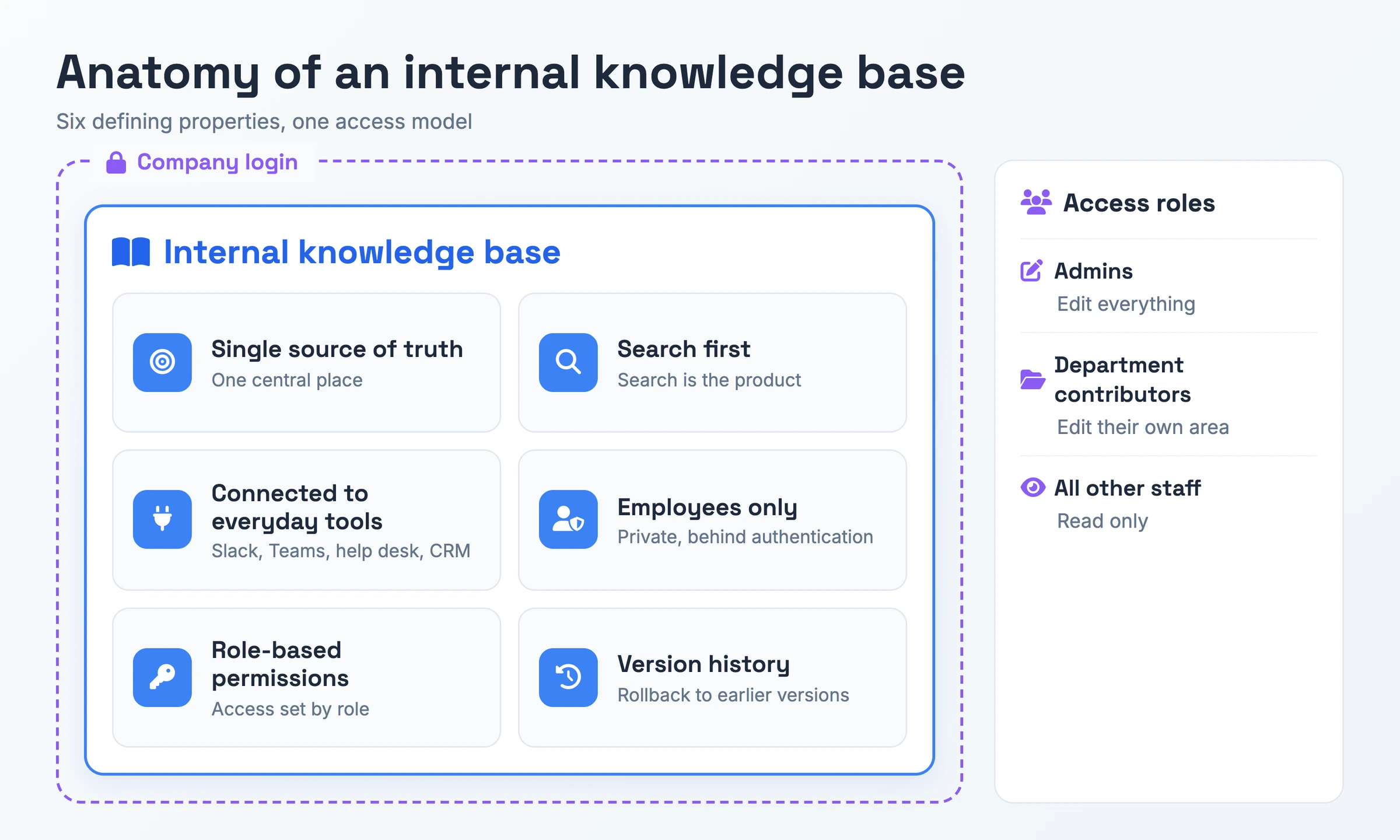
In practice, six properties of the content itself answer "what is an internal knowledge base":
- Single source of truth: With one recognized answer per question, departments stop following rival versions of one policy.
- Search first: Staff find answers by typing a question. In the words of the HelpCenter.io guide, "Search is the product."
- Connected to everyday tools: Staff get answers inside Slack, Teams, the help desk or the CRM without leaving the tools they already use.
- Employees only: Behind the company login, the content can name internal tools, contacts and workarounds.
- Role-based permissions: Admins edit everything, department contributors edit their own area, and all other staff read.
- Version history: Each article keeps its earlier versions, since policies get rolled back and staff need to know what they said before.
Why an Internal Knowledge Base Matters
Without one, staff lose time hunting for answers or recreating information that already exists.
New hires feel the gap first. With no written answers, they learn by tapping senior colleagues on the shoulder, and each routine question costs two people's time. The wider team pays too. At around 50 people, HelpCenter.io notes, the same question gets answered in Slack five times a week. One written answer would have covered it.
You pay the last cost when someone resigns. A 2018 Panopto survey of more than 1,000 US workers found that 42% of institutional knowledge is unique to the employee in that role. Whatever they never wrote down goes with them, and their successor has to reconstruct the process alone.
Internal Knowledge Base vs External Knowledge Base vs Company Wiki vs Intranet
| Term | What it is | How it differs |
|---|---|---|
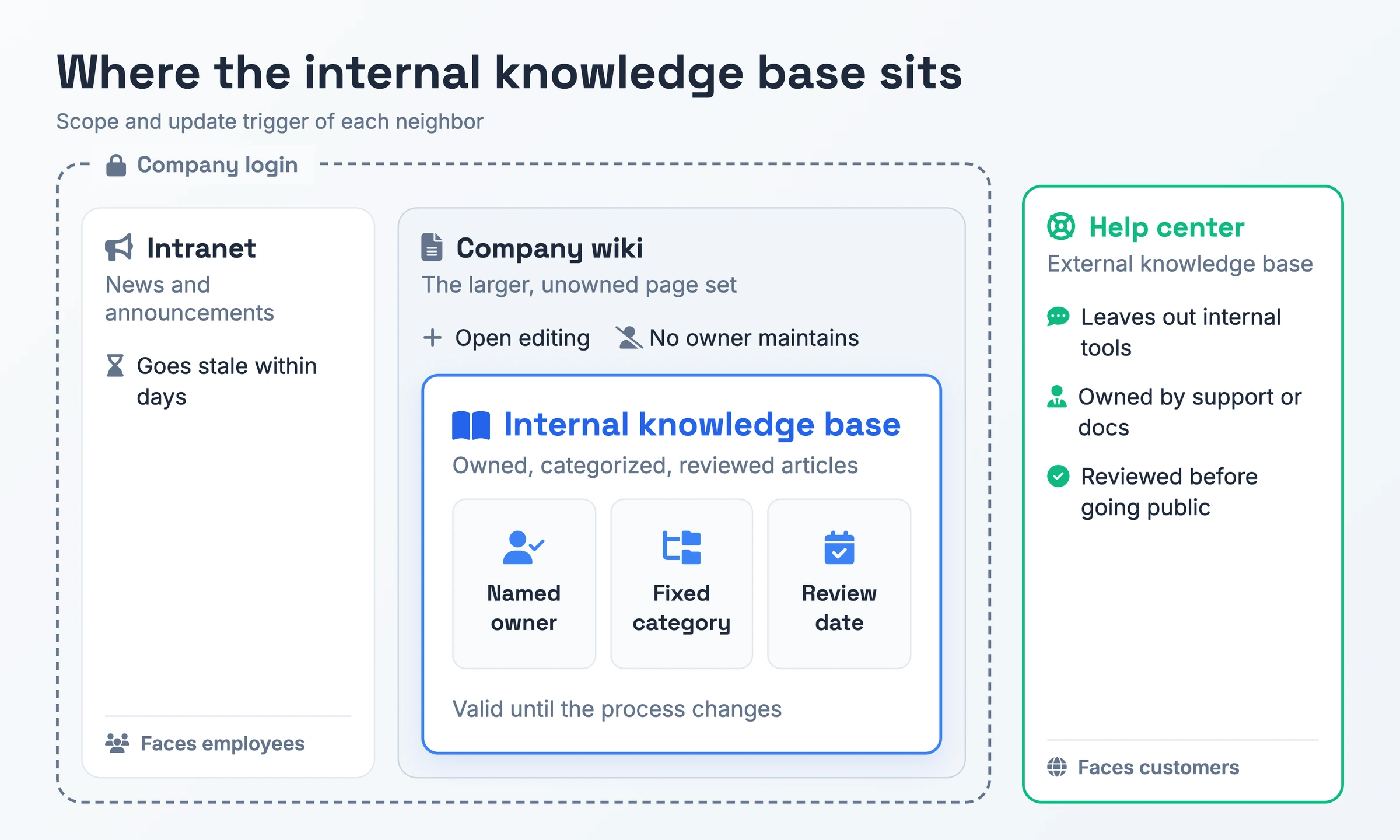
| Internal knowledge base | Owned reference answers for staff, behind the company login | Each article carries a named owner, a fixed category and a review date, and gets revised whenever its process does |
| External knowledge base (help center) | Customer-facing answers anyone can read online | Support or docs own it and review each article before it goes public. It leaves out internal tools, escalation contacts and workarounds |
| Company wiki | An open page set anyone in the company can add to | Employees can usually create pages without approval and no owner maintains them. Readers cannot tell which pages are still true |
| Intranet | The company's internal news and announcement channel | Carries short-lived announcements, like a new VP starting, that go stale within days |
Pick an internal knowledge base for owned, reviewed answers your staff can trust. Treat the help center as its public twin and the wiki as the larger, unowned page set. The intranet plays the role of bulletin board.
How to Create an Internal Knowledge Base
- Audit what already exists. Pull together everything in Drive, Notion, Dropbox and code READMEs. Then note which questions new hires and support agents keep asking. In HelpCenter.io's experience, an audit turns up 3 or 4 near-duplicate onboarding docs.
- Define 8 to 12 top-level categories. Group them by function (Engineering, Support, HR, Sales) with article types under each, in line with HelpCenter.io's scheme. HubSpot suggests testing the structure with employees who did not build it.
- Set one article standard. Follow HubSpot's format, with titles phrased the way people type searches, a brief summary up top, numbered steps and a last-reviewed date.
- Name an owner for each article. Each article gets a single named owner and a review date 90 or 180 days out.
- Set access and choose the platform. Map admins, department contributors and other staff to the three access levels described above. The platform needs search, integrations, access controls and version history. HelpCenter.io names Notion as enough for teams under 20 people.
- Make it searchable. Tag synonyms, acronyms and common misspellings, then test the search with the phrasing a new hire would use.
- Review on a fixed cadence. HelpCenter.io recommends a 30-minute review every two weeks against three metrics: % of articles past their review date, % of zero-result searches and % opened at least once in the past 30 days.
Internal Knowledge Base Example
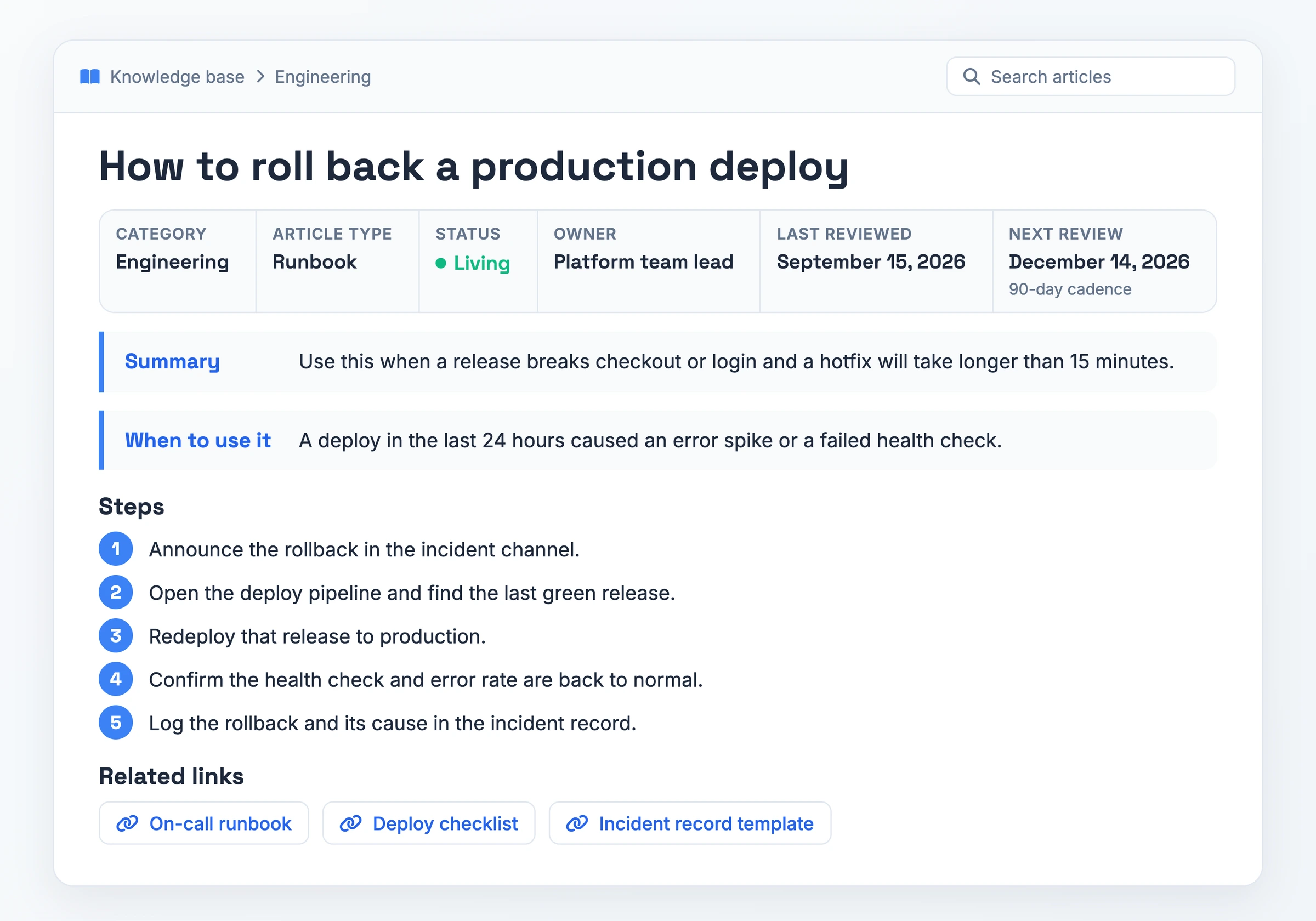
This sample runbook comes from the Engineering section of an internal knowledge base, written up as a platform team might file it.
- Title: How to roll back a production deploy
- Category: Engineering
- Article type: Runbook
- Status: Living
- Owner: Platform team lead
- Last reviewed: September 15, 2026
- Next review: December 14, 2026 (90-day cadence)
- Summary: Use this when a release breaks checkout or login and a hotfix will take longer than 15 minutes.
- When to use it: A deploy in the last 24 hours caused an error spike or a failed health check.
Steps:
- Step 1: Announce the rollback in the incident channel.
- Step 2: Open the deploy pipeline and find the last green release.
- Step 3: Redeploy that release to production.
- Step 4: Confirm the health check and error rate are back to normal.
- Step 5: Log the rollback and its cause in the incident record.
Related links: On-call runbook, Deploy checklist, Incident record template
A free starter structure, no form required: top-level categories, article types, status tags, a one-page article template and a review checklist.
Download PDF - Internal Knowledge Base Starter StructureFrom Recording to Internal Knowledge Base in One Pass
Writing is the step where internal knowledge base projects often stall, since each article has to be typed by hand. Hinto AI turns a screen recording of the process into a structured document. Each article then begins as a recording you already have.
Capture a new recording with Hinto's own recorder, in the web app or the Chrome Extension, with screen, webcam and mic captured together. Or start from a video you already have: a Loom, a recorded Zoom training, a YouTube link, or an MP4, MOV or WebM file from your computer.
Hinto then spots each click and screen change in the recording and turns them into screenshots with written steps. One long video can become a full table of contents with several organized articles, and the Internal Workflows template produces detailed process guides for team operations. Before sharing, use the image editor to blur internal data visible in a screenshot.
To publish into the tools your team searches daily, sync the generated articles to Notion or Confluence.
Internal Knowledge Base FAQ
What is an internal knowledge base?
It's a private library of documented answers that only staff can open. Employees look up how a process, policy or tool works there, while a named owner keeps each article accurate. Staff stop chasing whichever colleague still remembers.
Who can access an internal knowledge base?
Employees can, once they sign in with their company login. Editing rights then depend on role, and staff without an editing role get read-only access. Customers see the external help center instead, which support or docs teams review before anything goes public.
How often should you update an internal knowledge base?
Revise an article the moment its process changes, and review each one every 90 or 180 days, the cadence HelpCenter.io recommends. HubSpot suggests monthly or quarterly reviews and lets any employee flag a stale article. In Plane's words, "Outdated documentation is worse than missing documentation."
How does an internal knowledge base help with onboarding?
New hires settle routine questions on their own instead of interrupting teammates. A single article such as "Onboarding week 1: what to expect" walks them through the first days. When the colleague who trained them leaves, the written answers stay.

Product leader focused on building consumer products with empathy. Former Head of Product at Chime and Craft, specializing in AI-assisted workflows and platform innovation.
Ready to Build a Better
Knowledge Base, Faster?
Get Started Free & Create Your First Article in Minutes