
What Is SOP Documentation?
SOP documentation is the controlled system that tracks each written process guide's approved version, its owner, its storage location and its next review date.
A single SOP tells a worker how to do one task. Standard operating procedure documentation governs the whole library of SOP documents. It records which version is live, who signed it off, where the team finds it, and when someone has to check it again.
How SOP Documentation Works
What it tracks: each SOP's approved version, owner, location and review date, plus what changed, why, when and who.
Why it matters: procedures stay consistent across authors and versions, which cuts errors in the work.
Audits: you can prove what procedure text applied on a given past date.
Where it lives: shared-drive files, a wiki or knowledge base, or dedicated SOP software.
What Makes Something SOP Documentation
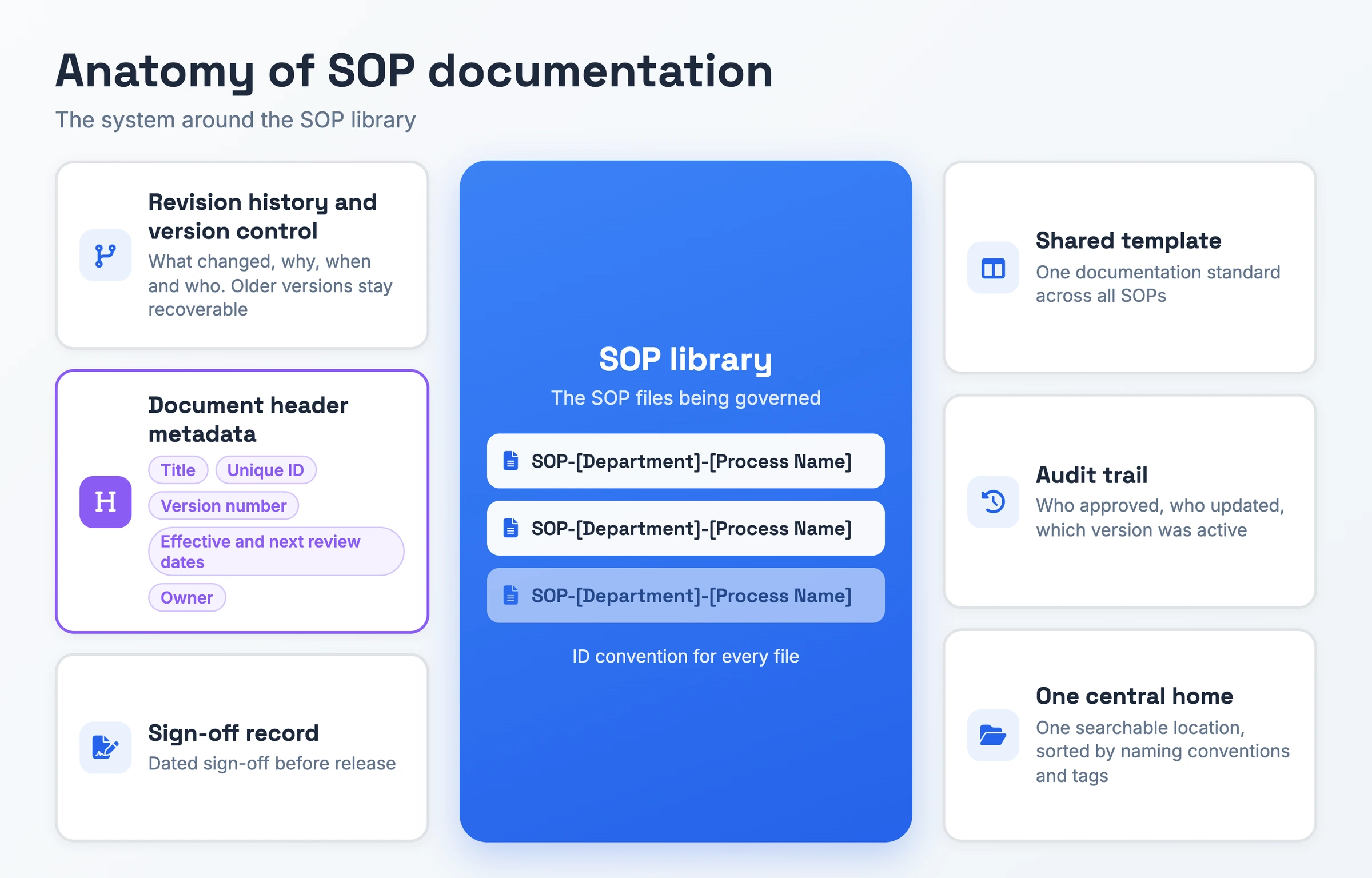
- Revision history and version control: Each change records what changed, why, when and who made it, and older versions stay recoverable.
- Document header metadata: Each SOP starts with its title, an ID patterned like SOP-[Department]-[Process Name], the current version, its effective and next review dates, and whoever owns it.
- Sign-off record: A named approver signs and dates each new version before it goes live.
- Shared template: All SOPs follow one documentation standard, so authors stop deciding fonts, margins and outlines from scratch.
- Audit trail: The system shows who approved, who updated, and which version was active at any point in time.
- One central home: SOPs live in one searchable location, sorted by naming conventions and tags.
Why SOP Documentation Matters
Without a shared standard, Guidde notes, "different people write in different styles, use different formatting". Readers then face two near-identical files and no way to tell which one is current. In the words of Process.st, that ends with "Updates happen in forks. Approvals happen over email. New hires search five places." One template and one live version per procedure keep execution consistent across authors and across versions.
Audits add a record-keeping requirement. Regulated teams working under ISO, SOC 2 or HIPAA need proof of which version of a procedure was active during any period, per Process.st. A dated approval record and a revision log produce that proof. A folder of overwritten files with no version history leaves the auditor with today's version and nothing else.
The third consequence shows up when people leave. An owned, reviewed SOP keeps the steps with the team after the person who ran the process moves on. An unreviewed one does harm instead, and FirstHR warns that "an outdated SOP is worse than no SOP because it actively misleads."
SOP Documentation vs SOP vs Knowledge Base
| Concept | Meaning | Added control |
|---|---|---|
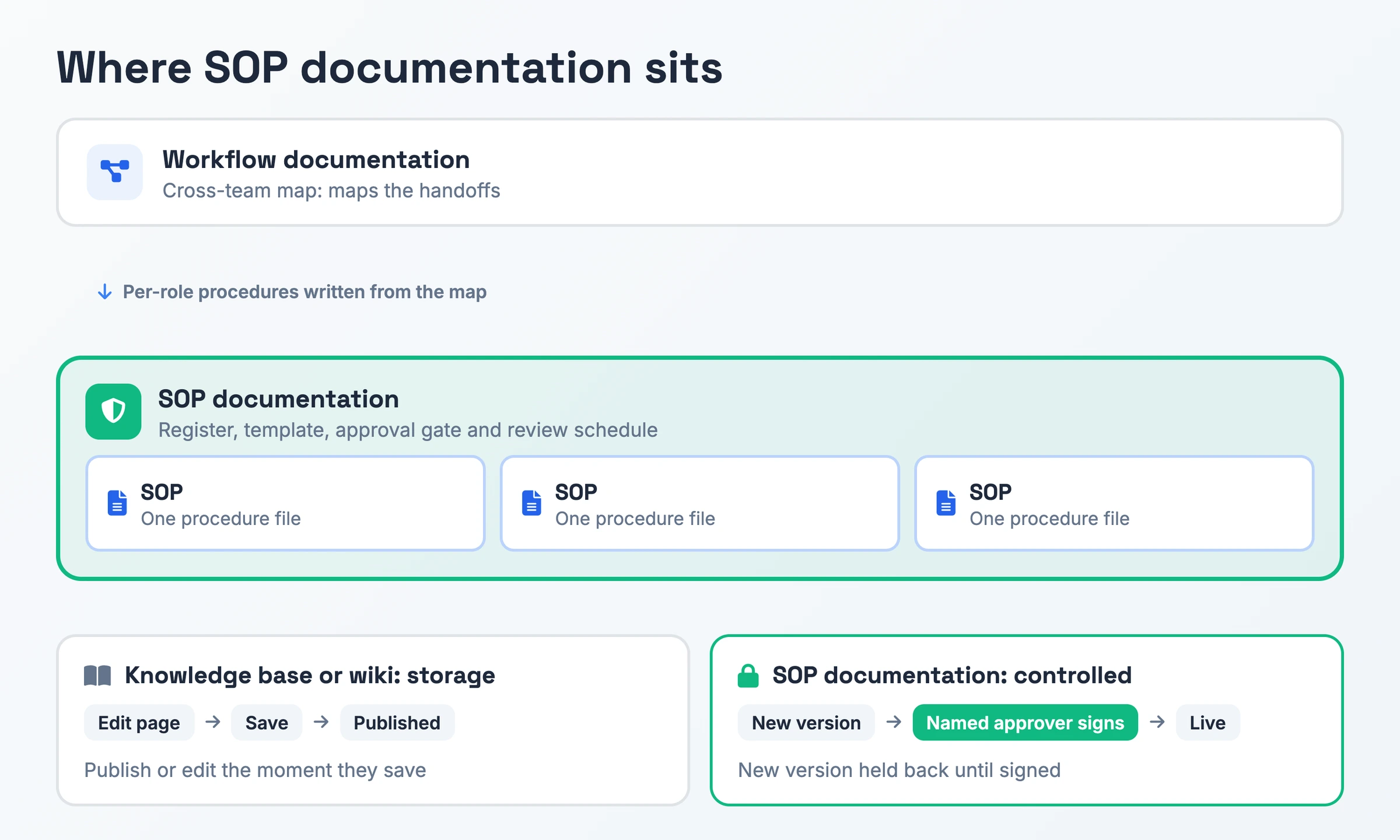
| SOP | One procedure file a worker opens to do a task | SOP documentation is the register, template, approval gate and review schedule that decides which version of that file is live and who updates it next |
| Knowledge base or wiki | Storage where an editor can publish or change a page the moment they save it | SOP documentation software holds a new version back until a named approver signs it, and can prove what text applied on the date an auditor asks about |
| Workflow documentation | A map of the handoffs between people and systems that a team draws once per cross-team process | SOP documentation governs the per-role procedures written from that map, giving each one an owner and check date |
A procedure is a file, a wiki holds files, and workflow documentation draws the map. Add SOP documentation once you must answer which version is live, who owns it and when its next check falls due.
How to Create SOP Documentation
- Name one person accountable for the whole set. That person decides who signs off before a new version goes live. Each SOP also gets its own owner, meaning whoever runs the process today, even when someone else wrote it.
- Standardize one template. Save a blank file that already carries the header fields listed earlier, plus department, approver and review cadence. Our Standard Operating Procedure page covers how to write an SOP body.
- Agree on one central, searchable home. Pick a single location the whole team can reach, separate edit access from view access, and apply naming conventions and tags.
- Set a version scheme. Start at v1.0, move to v1.1 for a minor change such as a corrected step or an updated link, and to v2.0 for a major one. Archive the previous version instead of overwriting it.
- Route each new version through review and approval. Have the task's day-to-day operator review the draft, test it with someone new to the process, then get the approver's dated sign-off before you publish.
- Announce changes and collect acknowledgment. Tell the people who follow the SOP what changed, and require compliance-critical SOPs to be acknowledged. Then check that people are working from the updated file.
- Schedule checks and define triggers. Schedule reviews every 6 months or annually by SOP category, and move a check earlier once a tool update, a new regulation or a reworked workflow lands. Use each review to judge how helpful the SOP was and where to modify it.
SOP Documentation Example
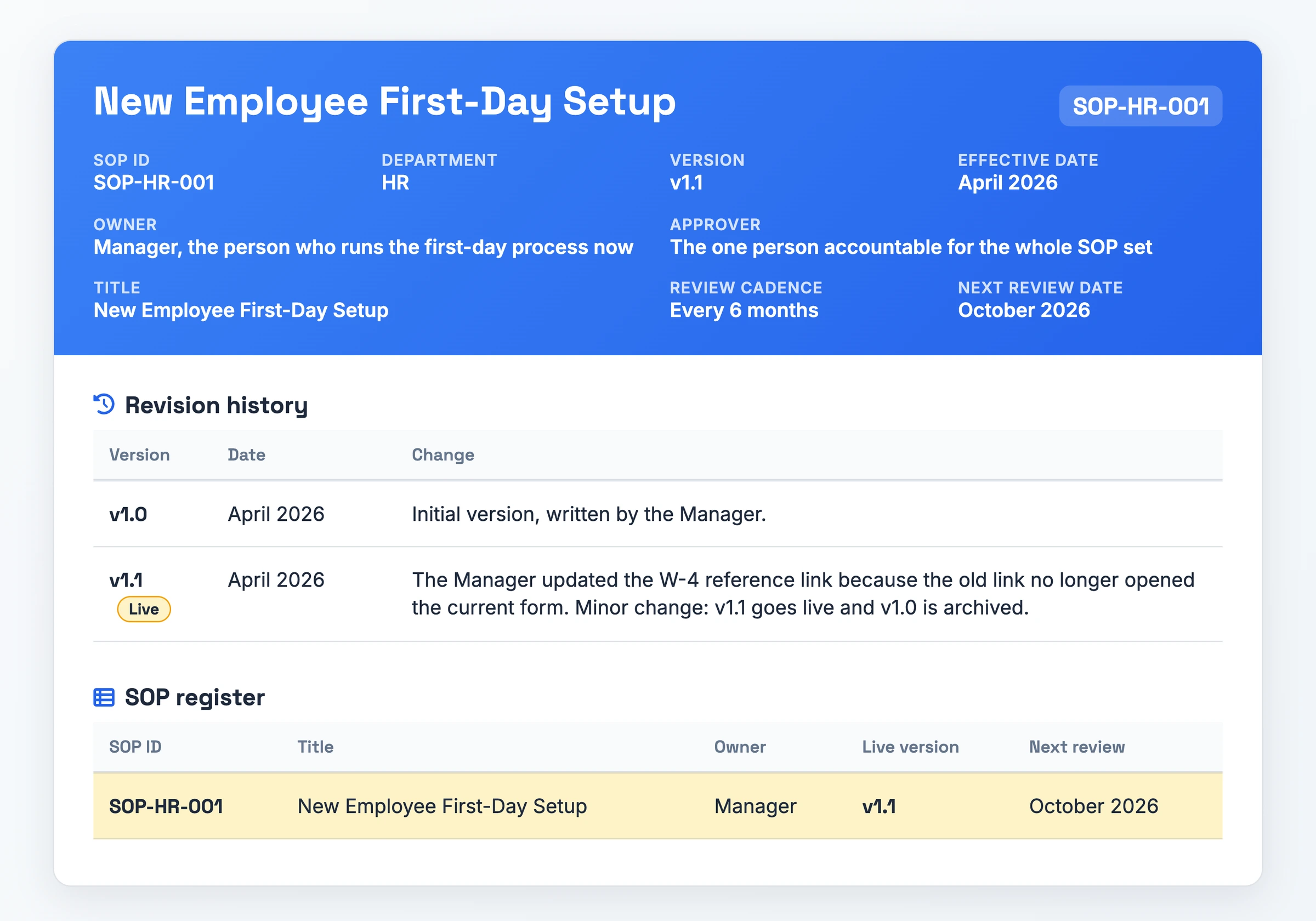
This SOP documentation example shows only the control record around SOP-HR-001, an illustrative onboarding SOP, after one minor update.
Document header
- SOP ID: SOP-HR-001
- Title: New Employee First-Day Setup
- Department: HR
- Version: v1.1
- Effective date: April 2026
- Owner: Manager, the person who runs the first-day process now
- Approver: the one person accountable for the whole SOP set
- Review cadence: every 6 months
- Next review date: October 2026
Revision history
- v1.0, April 2026: Initial version, written by the Manager.
- v1.1, April 2026: The Manager updated the W-4 reference link because the old link no longer opened the current form. The change is minor, so the version moves to v1.1 and v1.0 goes to the archive.
SOP register row
- SOP-HR-001: New Employee First-Day Setup · Owner: Manager · Live version: v1.1 · Next review: October 2026
An SOP documentation template with a document header, a revision history log, an SOP register listing each owner, live version and next review date, and a setup checklist.
Download the SOP documentation template (PDF)From Recording to an SOP Draft in One Pass
Hinto AI converts a screen recording you already made into a structured SOP draft, which removes the blank-page step.
You can record your screen, camera and microphone in the Hinto web app or the Chrome Extension. A video you already have works too: a Loom, a Zoom training session, a YouTube video, or a local MP4, MOV or WebM file. Hinto identifies UI state changes and button clicks in the video and extracts screenshots and written steps from them.
Hinto then syncs the draft to Notion or Confluence, or hosts it on a public URL with your own custom domain. Your approval gate, version numbers and review dates stay in your documentation system. When a step changes, highlight that section and use the Regeneration Tool to rewrite it or re-extract its images, leaving the rest of the SOP untouched.
SOP Documentation FAQ
How often should SOP documentation be reviewed?
Review it on a schedule and when something changes. FirstHR's schedule reviews compliance, onboarding and customer-facing SOPs every 6 months, and financial and IT SOPs annually. Check sooner if the workflow, its software or the governing regulation shifts.
Who owns SOP documentation?
Two roles share it. A set-level approver decides who signs each release before it goes live. A per-SOP owner, the one doing the task now even if someone else wrote it, keeps the steps current because they spot drift first.
Why does SOP documentation go out of date?
The usual cause is an update with no owner. A tool changes, the SOP stays as it was, and readers keep following the old steps. The second cause is updating the file without telling the people who follow it. FirstHR calls that the most common failure mode. Assign an owner and announce each change.
Can a shared drive work as SOP documentation?
It can for a small set. Word, Google Docs and PDF files on a shared drive cost nothing, but they keep per-file version history only, with no approval gate or register. FirstHR suggests moving to a knowledge base past 20 SOPs. Even then, as Process.st puts it, "a wiki stores pages," so the approval gate and register still need adding.
How should SOP versions be numbered?
Start at v1.0. Use v1.1 for a minor change, such as correcting a step or updating a link, and v2.0 for a major change. Put the date of the last update in the header, log each change in the revision history, and archive the previous version instead of overwriting it.

Product leader focused on building consumer products with empathy. Former Head of Product at Chime and Craft, specializing in AI-assisted workflows and platform innovation.
Ready to Build a Better
Knowledge Base, Faster?
Get Started Free & Create Your First Article in Minutes