Release Notes Examples: 5 Filled-In Notes You Can Copy
These release notes examples cover five common release situations, from a feature announcement in a SaaS app to a hotfix, an app store listing, a dated API change and a company-wide switch to a new IT tool. Product, engineering and IT teams can copy any of these release note examples as text, and each one has a matching PDF.
Jump straight to the examples.
What good release notes samples share: an opening line that pins down the product, version, release date and platform.
App store updates: give each fix its own line, with the old symptom and the new behavior.
Strong vs weak: strong items describe a benefit to the user, while weak items list internal parts.
Vague entries: the sample release notes and changelog examples on this page name each fix individually. For an unfilled layout, open the Release Notes Template.
What Makes a Good Release Notes Example
Each gallery specimen cites these seven criteria by number.
- Header line with version and date. Open with the product name, the version or build number, the release date and, if it differs by platform, where it shipped (web, iOS, API). Readers who miss this line cannot tell whether the note applies to the version they run.
- Short summary up top. One to three sentences ahead of any list say who is affected and how. Without them, readers land straight in the bullets.
- Outcome-led wording. Every entry is phrased as something the reader gains or no longer suffers ("You can now..."). Weak wording lists internal components ("Optimized search indexing pipeline").
- Typed change labels. Entries sit under a type tag, such as Fixed or Breaking, with like entries grouped together. Untagged, a repair and a new feature read alike.
- Specific bug fixes stated as before and after. Each fix pairs the symptom someone ran into with how the product behaves today, one fix to a line. The weak version settles for a single catch-all line.
- Required actions and breaking changes called out first. Whatever the reader has to do goes near the top, paired with its deadline. When nothing is needed, the note says "No action required". Weak notes tuck a breaking change somewhere mid-list.
- Known issues and a place to get help. Anything still broken comes with a workaround or the date its fix lands, and the closing line sends readers to docs or a support contact. Leaving this out implies nothing is broken.
5 Release Notes Examples Worth Copying
Here are five specimens, one per release type, that we count among the best release notes examples to borrow from. Every company in them is fictional.
Example 1: SaaS Feature Launch
For a PM announcing one feature in a B2B invoicing app.
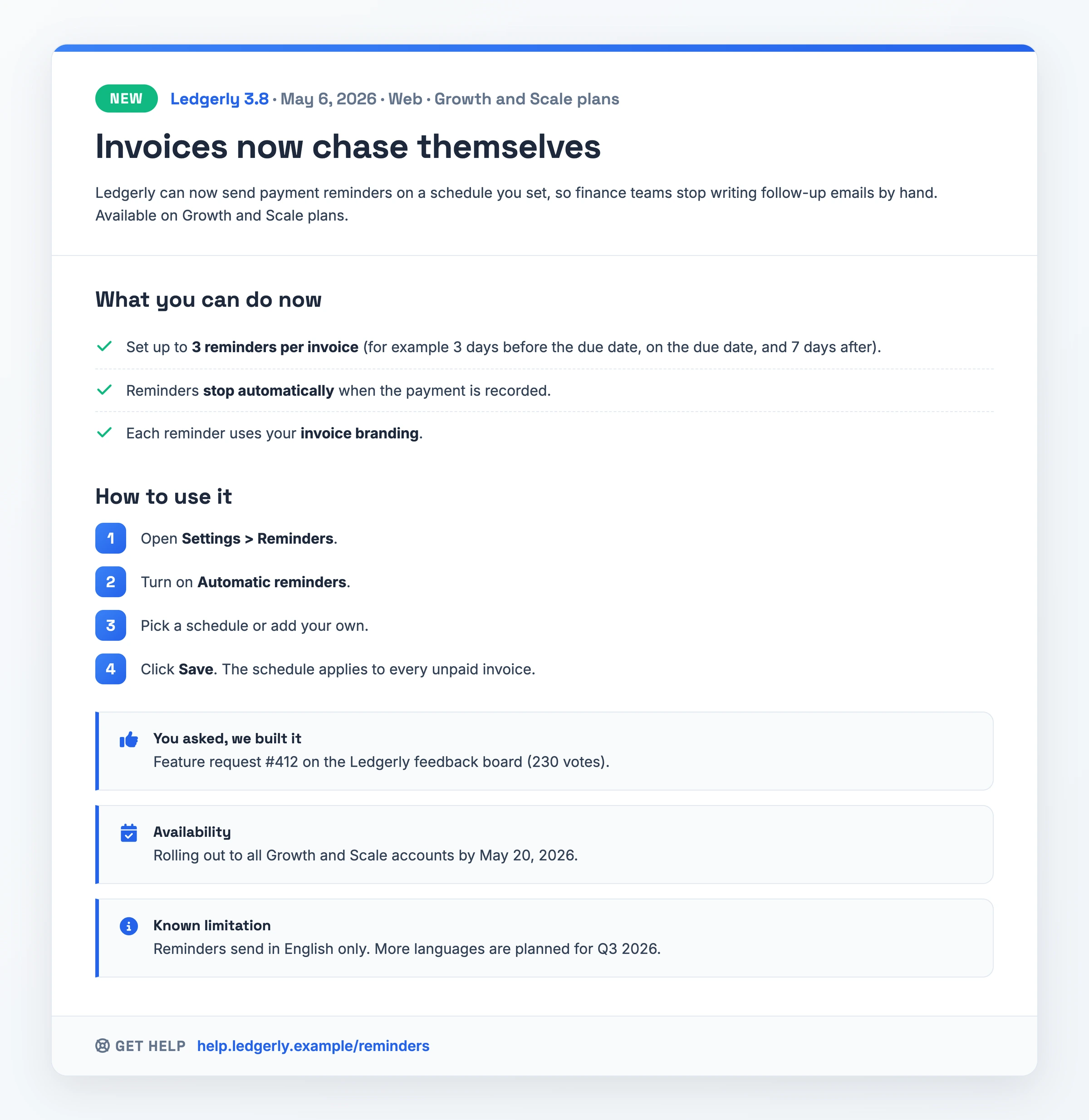
- Header: Ledgerly 3.8 · May 6, 2026 · Web · Growth and Scale plans
- New: Invoices now chase themselves
- Summary: Ledgerly can now send payment reminders on a schedule you set, so finance teams stop writing follow-up emails by hand. Available on Growth and Scale plans.
- What you can do now: set up to 3 reminders per invoice (for example 3 days before the due date, on the due date, and 7 days after). Reminders stop automatically when the payment is recorded. Each reminder uses your invoice branding.
- How to use it: (1) Open Settings > Reminders. (2) Turn on Automatic reminders. (3) Pick a schedule or add your own. (4) Click Save. The schedule applies to every unpaid invoice.
- You asked, we built it: feature request #412 on the Ledgerly feedback board (230 votes).
- Availability: rolling out to all Growth and Scale accounts by May 20, 2026.
- Known limitation: reminders send in English only. More languages are planned for Q3 2026.
- Get help: help.ledgerly.example/reminders
What makes it work: criteria 1, 2, 3, 4 and 7. Its title is the outcome itself.
Watch out for: the English-only limit is Ledgerly's. State your own feature's limits.
Download PDF - Invoices now chase themselves
Example 2: Mobile App Store Update
A mobile PM drafting the update text for both app stores.
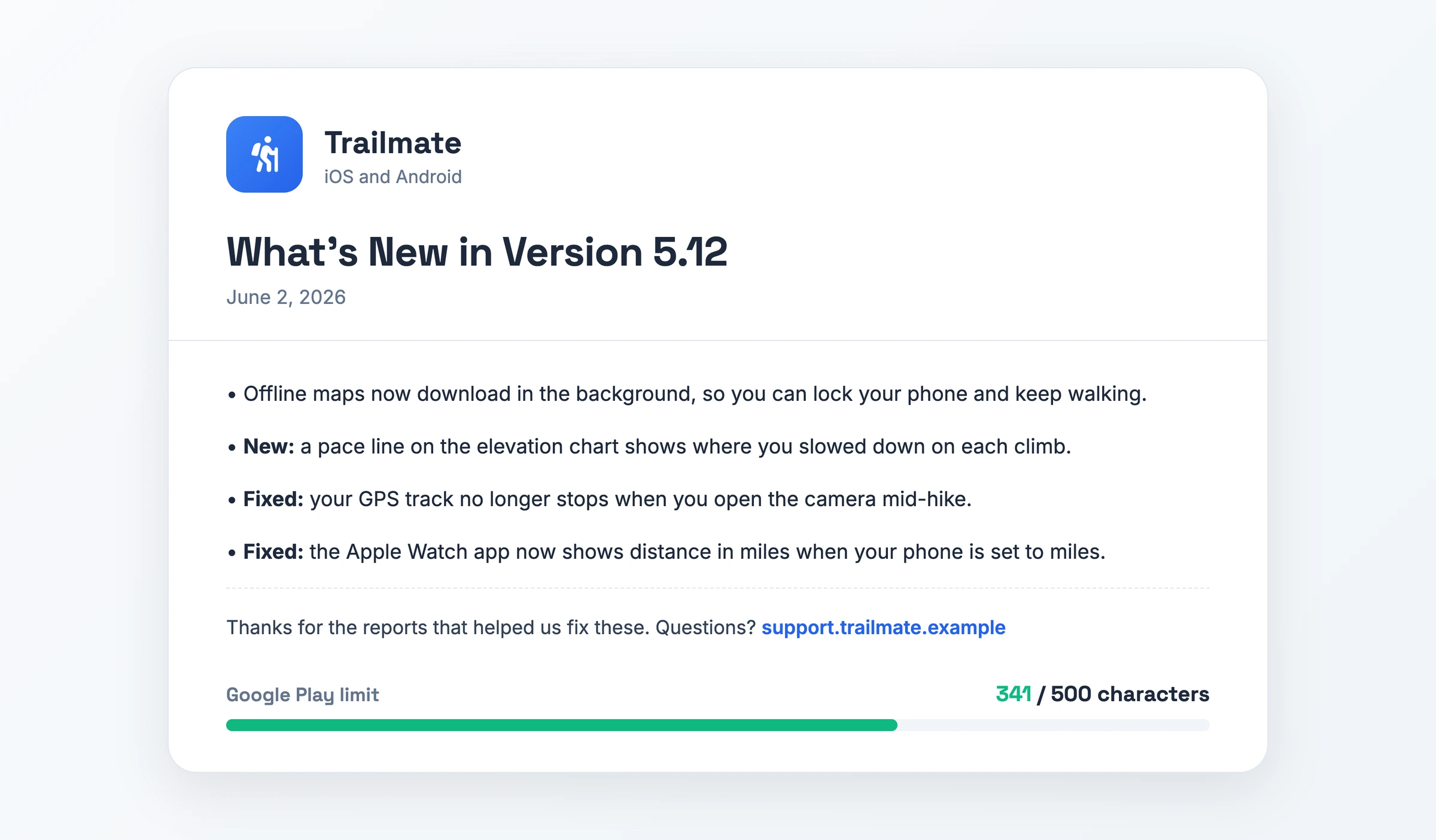
- Header: Trailmate · What's New in Version 5.12 · June 2, 2026 · iOS and Android
- Offline maps now download in the background, so you can lock your phone and keep walking.
- New: a pace line on the elevation chart shows where you slowed down on each climb.
- Fixed: your GPS track no longer stops when you open the camera mid-hike.
- Fixed: the Apple Watch app now shows distance in miles when your phone is set to miles.
- Closing line: Thanks for the reports that helped us fix these. Questions? support.trailmate.example
With bullet characters and line breaks, the four lines total 341 of Google Play's 500 characters.
What makes it work: criteria 1, 2, 3, 4, 5 and 7. Each fix names what the hiker saw.
Watch out for: a fifth bullet could push the text past Google Play's 500-character cap.
Download PDF - What's New in Version 5.12
Example 3: Bug-Fix Patch Release
For a support lead announcing a live hotfix to scheduling software.
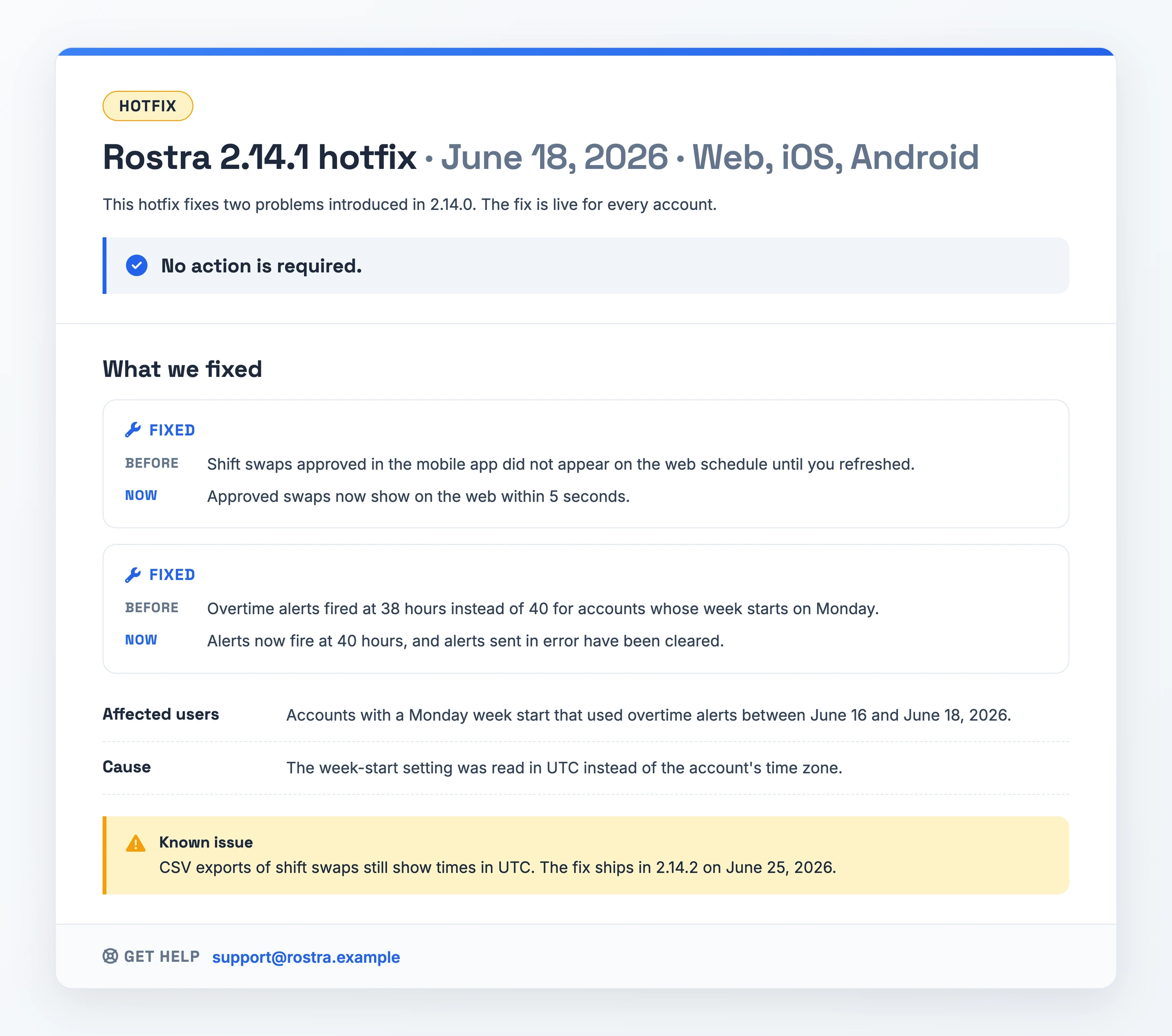
- Header: Rostra 2.14.1 hotfix · June 18, 2026 · Web, iOS, Android
- Summary: This hotfix fixes two problems introduced in 2.14.0. The fix is live for every account. No action is required.
- Fixed: Shift swaps approved in the mobile app did not appear on the web schedule until you refreshed. Approved swaps now show on the web within 5 seconds.
- Fixed: Overtime alerts fired at 38 hours instead of 40 for accounts whose week starts on Monday. Alerts now fire at 40 hours, and alerts sent in error have been cleared.
- Affected users: accounts with a Monday week start that used overtime alerts between June 16 and June 18, 2026.
- Cause: the week-start setting was read in UTC instead of the account's time zone.
- Known issue: CSV exports of shift swaps still show times in UTC. The fix ships in 2.14.2 on June 25, 2026.
- Get help: support@rostra.example
What makes it work: criteria 1, 2, 5, 6 and 7, with "No action is required" up front.
Watch out for: the cause line. Keep yours to one line.
Download PDF - Rostra 2.14.1 hotfix
Example 4: API Version Change
A platform team tells integrators about a dated API version.
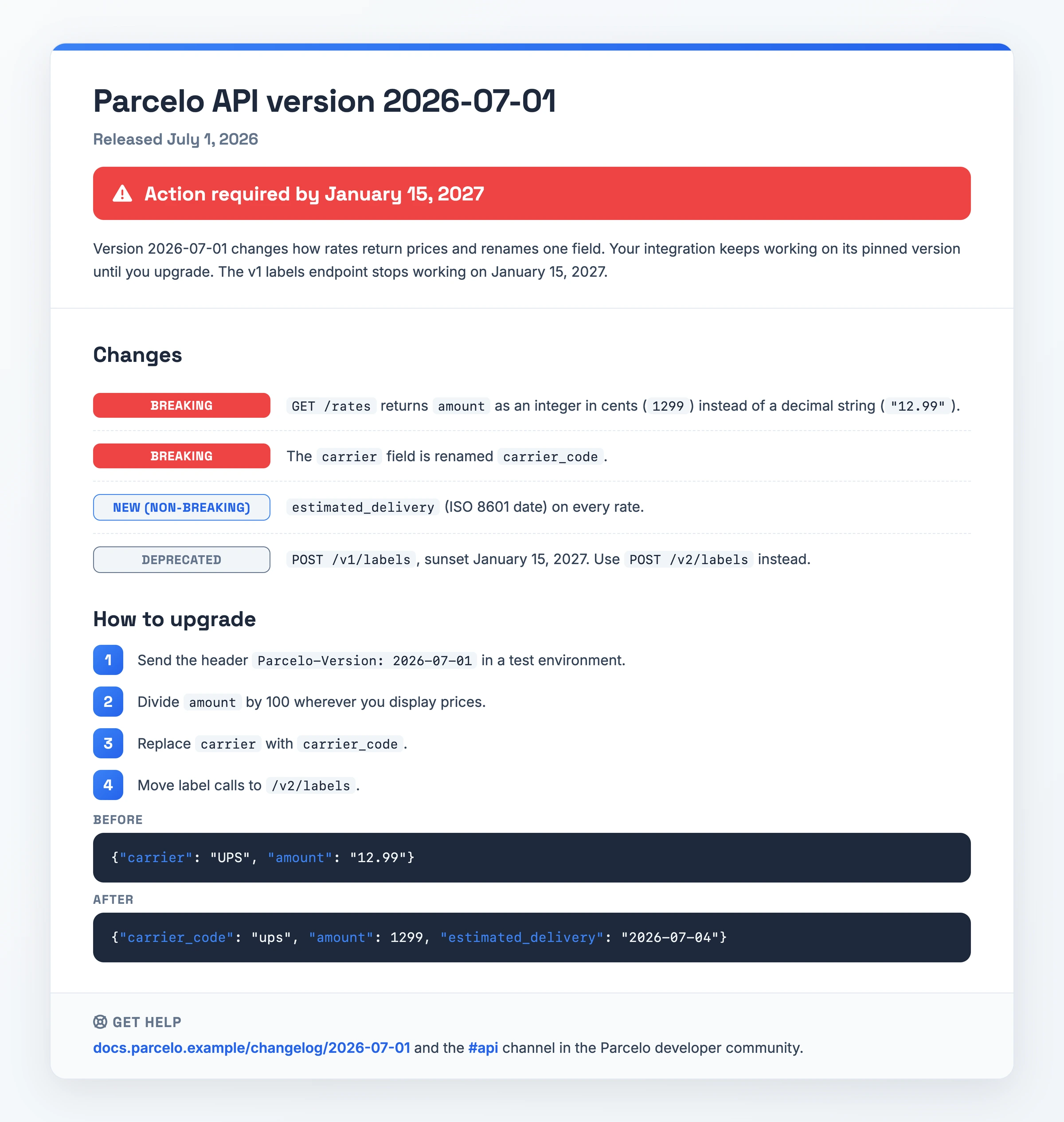
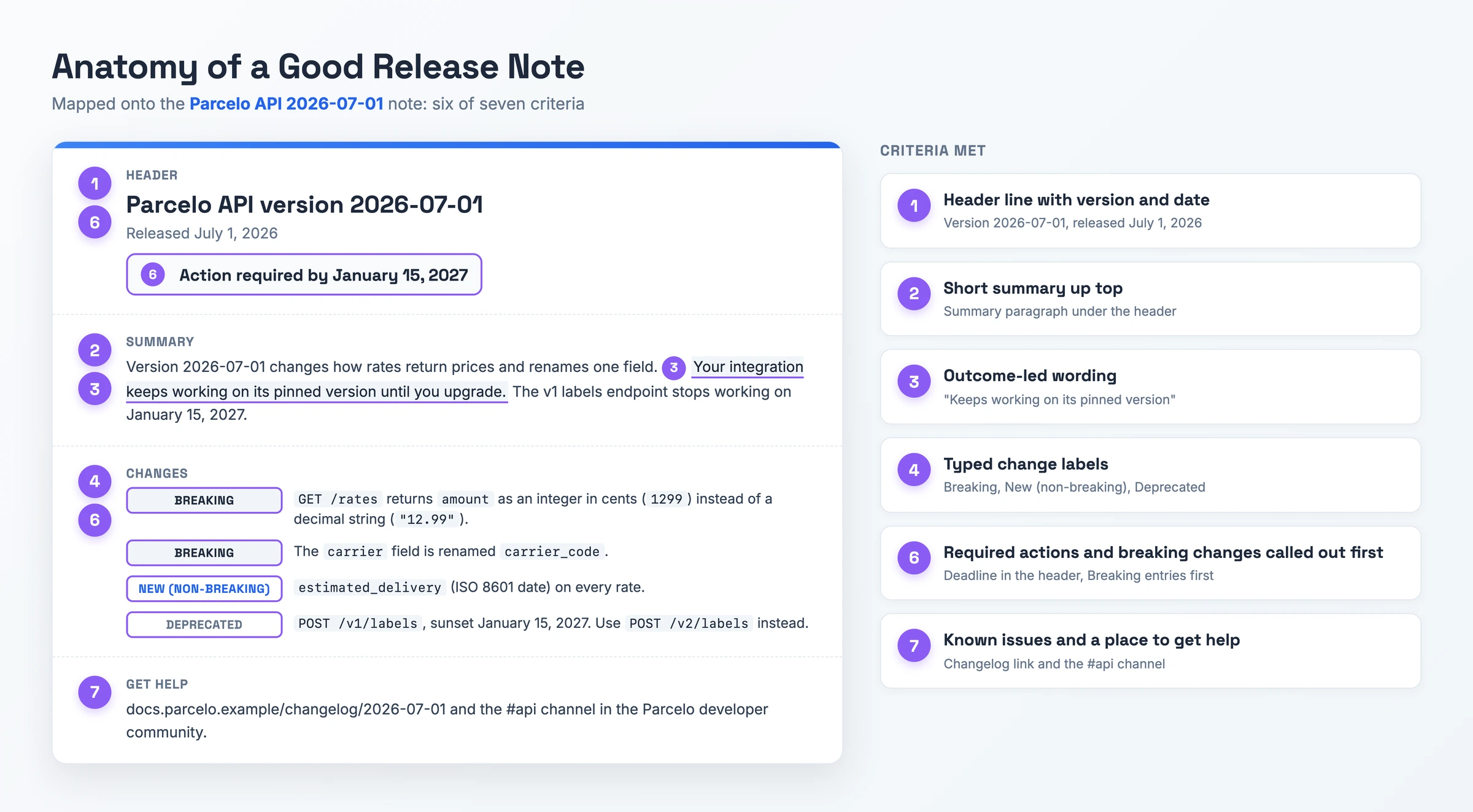
- Header: Parcelo API version 2026-07-01 · Released July 1, 2026 · Action required by January 15, 2027
- Summary: Version 2026-07-01 changes how rates return prices and renames one field. Your integration keeps working on its pinned version until you upgrade. The v1 labels endpoint stops working on January 15, 2027.
- Breaking:
GET /ratesreturnsamountas an integer in cents (1299) instead of a decimal string ("12.99"). - Breaking: the
carrierfield is renamedcarrier_code. - New (non-breaking):
estimated_delivery(ISO 8601 date) on every rate. - Deprecated:
POST /v1/labels, sunset January 15, 2027. UsePOST /v2/labelsinstead. - How to upgrade: (1) Send the header
Parcelo-Version: 2026-07-01in a test environment. (2) Divideamountby 100 wherever you display prices. (3) Replacecarrierwithcarrier_code. (4) Move label calls to/v2/labels. - Before:
{"carrier": "UPS", "amount": "12.99"} - After:
{"carriercode": "ups", "amount": 1299, "estimateddelivery": "2026-07-04"} - Get help: docs.parcelo.example/changelog/2026-07-01 and the #api channel in the Parcelo developer community.
What makes it work: criteria 1, 2, 3, 4, 6 and 7. The deadline and the sunset date sit on top.
Watch out for: the breaking amount type change. Give each type change a before-and-after snippet.
Download PDF - Parcelo API version 2026-07-01
Example 5: Internal IT Tool Rollout
For IT operations announcing a tool to about 420 staff at Northwind Freight, a logistics firm.
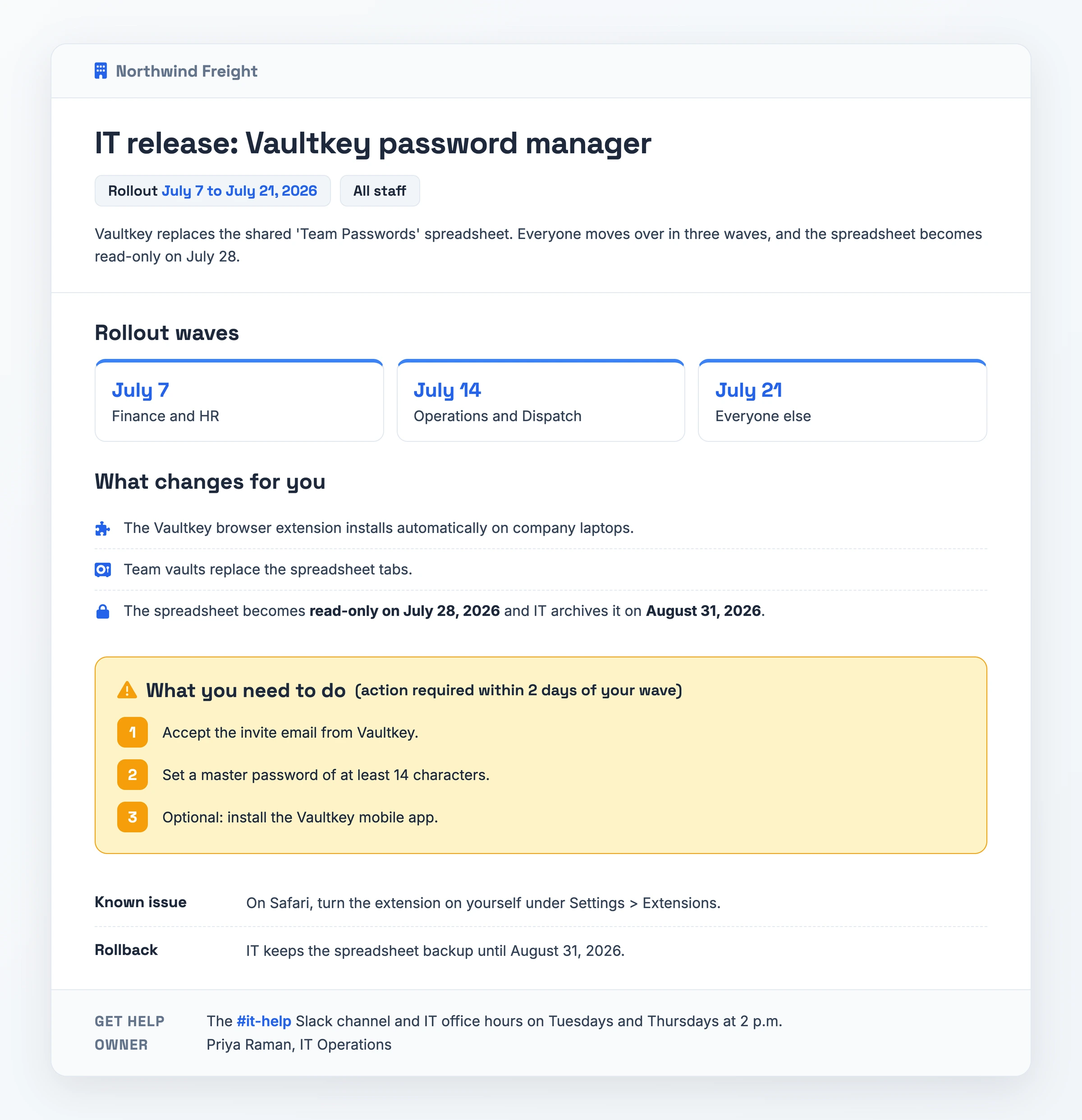
- Header: IT release: Vaultkey password manager · Rollout July 7 to July 21, 2026 · All staff
- Summary: Vaultkey replaces the shared 'Team Passwords' spreadsheet. Everyone moves over in three waves, and the spreadsheet becomes read-only on July 28.
- Rollout waves: Finance and HR on July 7, Operations and Dispatch on July 14, and everyone else on July 21.
- What changes for you: the Vaultkey browser extension installs automatically on company laptops. Team vaults replace the spreadsheet tabs. The spreadsheet becomes read-only on July 28, 2026 and IT archives it on August 31, 2026.
- What you need to do (action required within 2 days of your wave): (1) Accept the invite email from Vaultkey. (2) Set a master password of at least 14 characters. (3) Optional: install the Vaultkey mobile app.
- Known issue: on Safari, turn the extension on yourself under Settings > Extensions.
- Rollback: IT keeps the spreadsheet backup until August 31, 2026.
- Get help: the #it-help Slack channel and IT office hours on Tuesdays and Thursdays at 2 p.m.
- Owner: Priya Raman, IT Operations.
What makes it work: criteria 1, 2, 3, 6 and 7. Every action has a deadline.
Watch out for: dates baked into each wave. If one slips, send the note again.
Download PDF - IT release: Vaultkey password manager
How to Adapt a Release Notes Example
- Pick the gallery specimen closest to your release type. Choose by release type: feature launch, store update, hotfix, API change or internal rollout. If none fits, the unfilled Release Notes Template is the starting point.
- Scale the depth to the size of the change. Big launches deserve background and an image. Minor tweaks can be rolled into a brief digest, and a patch should open with what it fixes.
- Keep the typed label and the short summary. Hold on to these two fields at any size, even when you cut everything else.
- Rewrite each entry around the outcome. Swap engineering terms for the result a user notices.
- Answer "does this affect me?" in the first sentence. Name who benefits or who must take action.
- Confirm the facts with the team that built it. Ask the engineers who shipped it to confirm behavior, plans, platforms and version before it goes out.
- Tag the entry so readers can find it later. Give it a date, a change type, a product-area tag and a permanent URL, and use one layout each time you ship.
When You Need Release Notes
Large releases that span several products or enterprise tenants need notes most, because admins have to filter by product, platform and version to spot what affects them. Smaller releases need them as well: one new feature in a web app (Example 1), or a hotfix whose users want to know if their problem is solved (Example 3).
Hard limits apply on mobile and in APIs. Apple caps the update text at 4,000 characters on the App Store, and Google allows 500 on Google Play (Example 2). API integrators should hear about a change the moment a deadline forces code work (Example 4).
Internal tools count too. The note tells support staff, sales reps and system owners what moved, whom to ask and how a rollback works (Example 5).
Common Release Notes Mistakes
- Writing in engineering jargon or copying tickets verbatim. A line such as "Optimized search indexing pipeline", or a raw commit message, says nothing about the reader's work. People stop reading.
- Vague "bug fixes and performance improvements" entries. The person who reported a bug cannot see whether it got fixed, and support gets another ticket.
- Hiding breaking changes and must-do steps mid-list. Listed as one bullet among many, a breaking change goes unnoticed, and integrations break when the deadline arrives.
- Shipping a long unbroken log with no summary. Without a summary, readers have to scan every bullet to learn whether anything concerns them.
- Letting personality hide what changed. Readers searching for a change cannot find it under a clever headline that names no feature.
Skip the Blank Page: Record It Instead
Teams that demo each release can record that session and hand it to Hinto AI, whose "What's New" template produces a first draft of the note. Hinto takes Loom, Zoom and YouTube links, MP4, MOV and WebM uploads, and screen captures from its own recorder in the web app or Chrome Extension.
While processing the video, Hinto spots button clicks and screen changes and pulls out screenshots plus written steps. For engineering, a recorded sprint demo can become a searchable list of bug fixes.
A section that reads wrong can be highlighted and regenerated, including its images. The finished note can live on a public page under your own domain, be produced in 50+ languages, or go out to Intercom, Notion, Confluence, GitHub or GitLab.
Release Notes FAQ
What labels should release notes use?
Stick to six: New, Improved, Fixed, Deprecated, Breaking and Known issue. Grouping entries by label lets each reader jump to the part that concerns them. Without labels, fixes blend in with features, and the change a particular user needs is easy to miss.
Should release notes include screenshots or videos?
For visible changes, yes. People grasp a redesigned screen quicker from an annotated image, GIF or short clip than from prose, and pointing to the docs saves you from writing a manual inside the note. Minor fixes need nothing more than text.
How do you write release notes for an API change?
Open with the code changes integrators owe you and their cutoff date, set apart under its own heading. Below that, list breaking changes, new fields and deprecated endpoints one per line, then number the upgrade steps. In Example 4, Parcelo's header says "Action required by January 15, 2027" before anything else.
How do you make release notes people read?
Start every entry with the benefit, for instance "Large exports no longer time out." Keep internal component names out of it. Example 1 leads with "Invoices now chase themselves" and an outcome summary, then the setup steps.
Related Examples
User Manual Examples, Knowledge Base Examples, Process Documentation Examples