The Release Notes Template
This release notes template lays out the 11 sections a shipping team needs to tell users what changed. Copy the whole structure with no signup, or download it as a PDF.
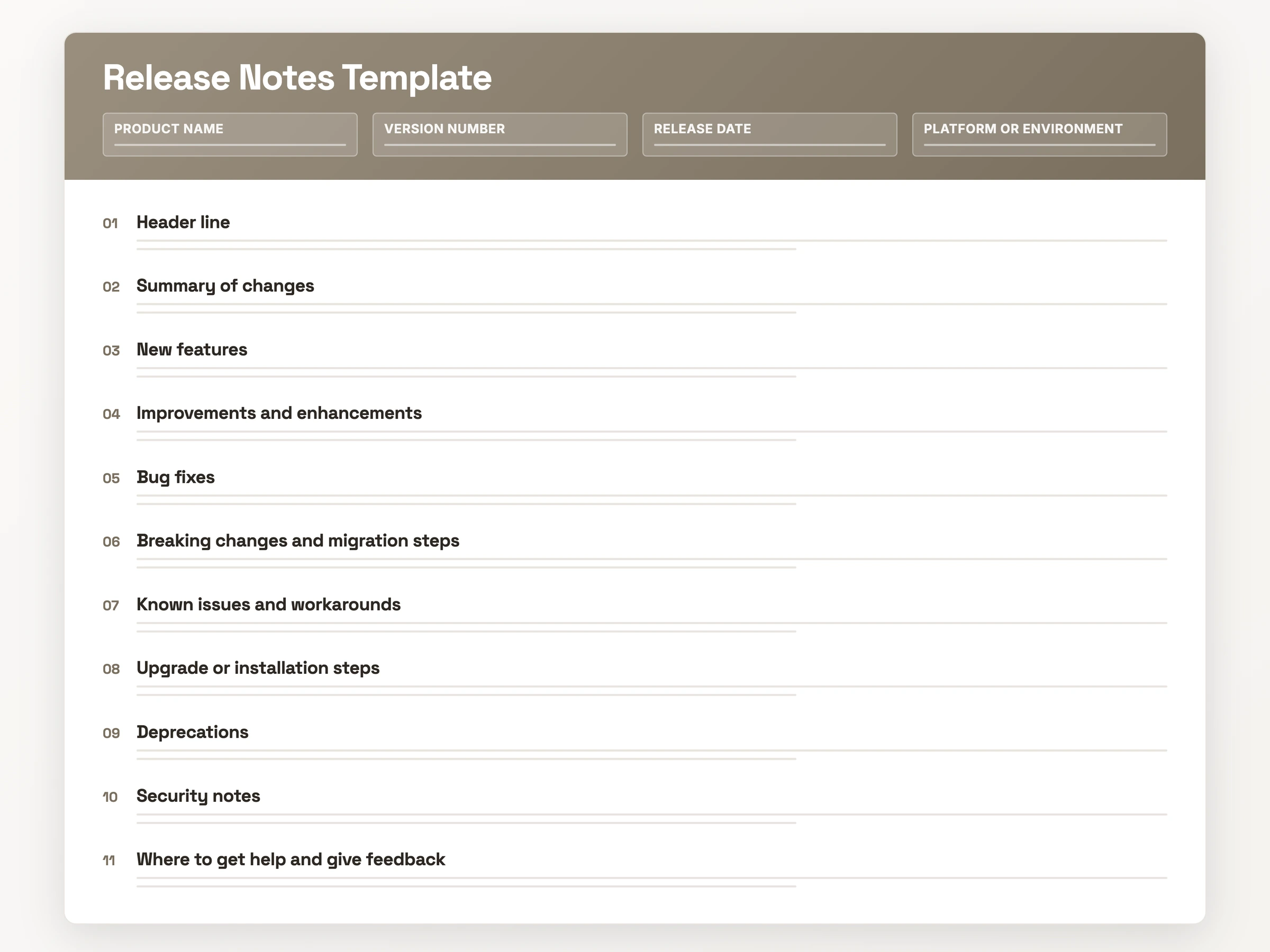
What they are: the per-release record of what changed, in plain language, for the people it affects.
What it contains: 11 sections, chiefly the header line, summary of changes, new features, bug fixes and known issues.
What it looks like: typed New, Improved and Fixed labels, short bullets, two to three sentences per entry.
When to use it: any release a user sees or has to act on: a major launch, a patch, an API or security fix.
The Release Notes Template (Copy-Paste Ready)
The block below is the whole template, free to copy on the spot, with no signup or email step. It pastes unchanged into Word, Google Docs, Confluence, Notion or a Markdown file, and the PDF holds the same 11 sections if you would rather print it. Replace the bracketed prompts, then delete the sections this release does not touch.
[Product Name] Release Notes
Version: [x.y.z]
Release date: [YYYY-MM-DD]
Platform / environment: [web, iOS, Android, API, staging]

Summary of changes (Purpose)
[One or two sentences: what this release addresses and who it affects]

New features
- [What the user can now do, not the internal feature name]

Improvements and enhancements (Performance Improvements)
- [What already existed, and what is better about it from the user's side]

Bug fixes
- Fixed: [what the user saw before, and what happens now]

Breaking changes and migration steps
- [What stops working], so [what you have to change, and by when]

Known issues and workarounds (Ongoing Issues)
- [Unresolved problem] · [affected platform] · [workaround] · [fix timeline]

Upgrade or installation steps (Upgrade Steps / Installation Notes)
1. [What the reader must do to get on the new version]

Deprecations
- [Feature, integration or API] is deprecated on [date]. [What to move to]

Security notes
- [Security-relevant change, stated without describing the vulnerability]

Where to get help and give feedback
- Docs: [link] · Support: [email or channel] · Feedback: [link]
What Goes Into a Release Notes Template
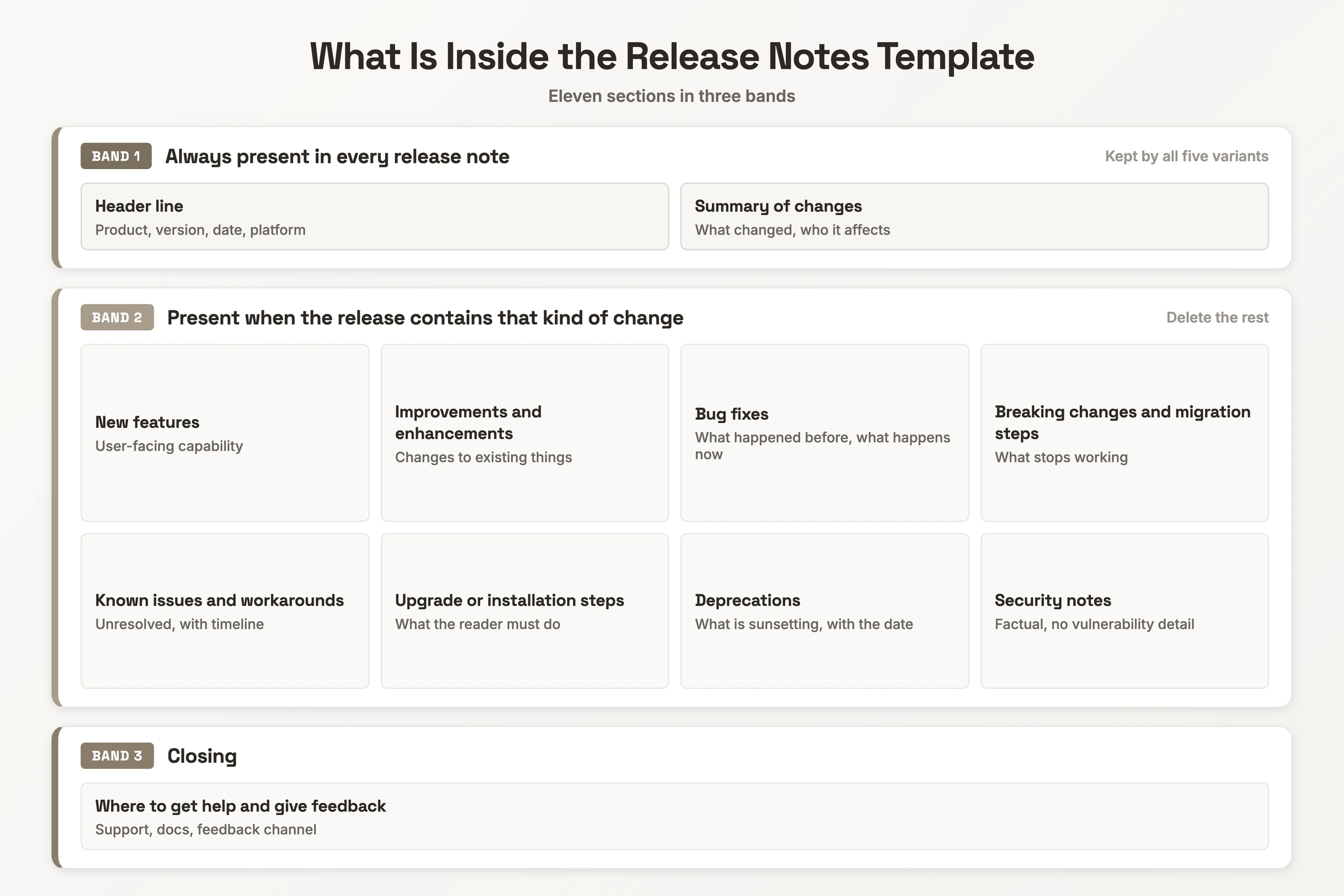
A release notes template has eleven sections, each with one job. Write each for the person who reads it: developers and customers need different things.
| Section | What goes in it | Example line |
|---|---|---|
| Header line | Product, version, date, platform. Asana adds assignee and impact level. | Acme 4.2.0 · 2026-03-12 · Web and iOS |
| Summary of changes | What it addresses and who it affects. Scanners read this line, AI agents quote it. | "Exports finish on large accounts." |
| New features | The capability the reader gains. A commit dump fails here: GitHub leaves organising to you. | "You can now export large datasets without the process timing out." |
| Improvements | What already existed, from the user's side. | "Faster load times: image caching cuts page load by 30%." |
| Bug fixes | What the user saw before, what happens now. "Bug fixed and updates applied" tells the reader nothing. | "Fixed: login error on specific email domains." |
| Breaking changes | What stops working, and the migration step. | "v1 export endpoint removed. Move to /v2/exports." |
| Known issues | The problem, the platform, a workaround, a timeline. | "Pricing may display incorrectly in the EU." |
| Upgrade steps | What the reader must do to upgrade. | "Upgrade the mobile app by December 31." |
| Deprecations | What is sunsetting, the date, the replacement. | "The legacy reporting API is deprecated on January 1." |
| Security notes | The change, stated factually, with vulnerability details left out. | "Session tokens now expire after 12 hours." |
| Where to get help | Support contact, docs link, feedback channel. | "Docs · support@ · Feedback tab" |
How to Use the Release Notes Template
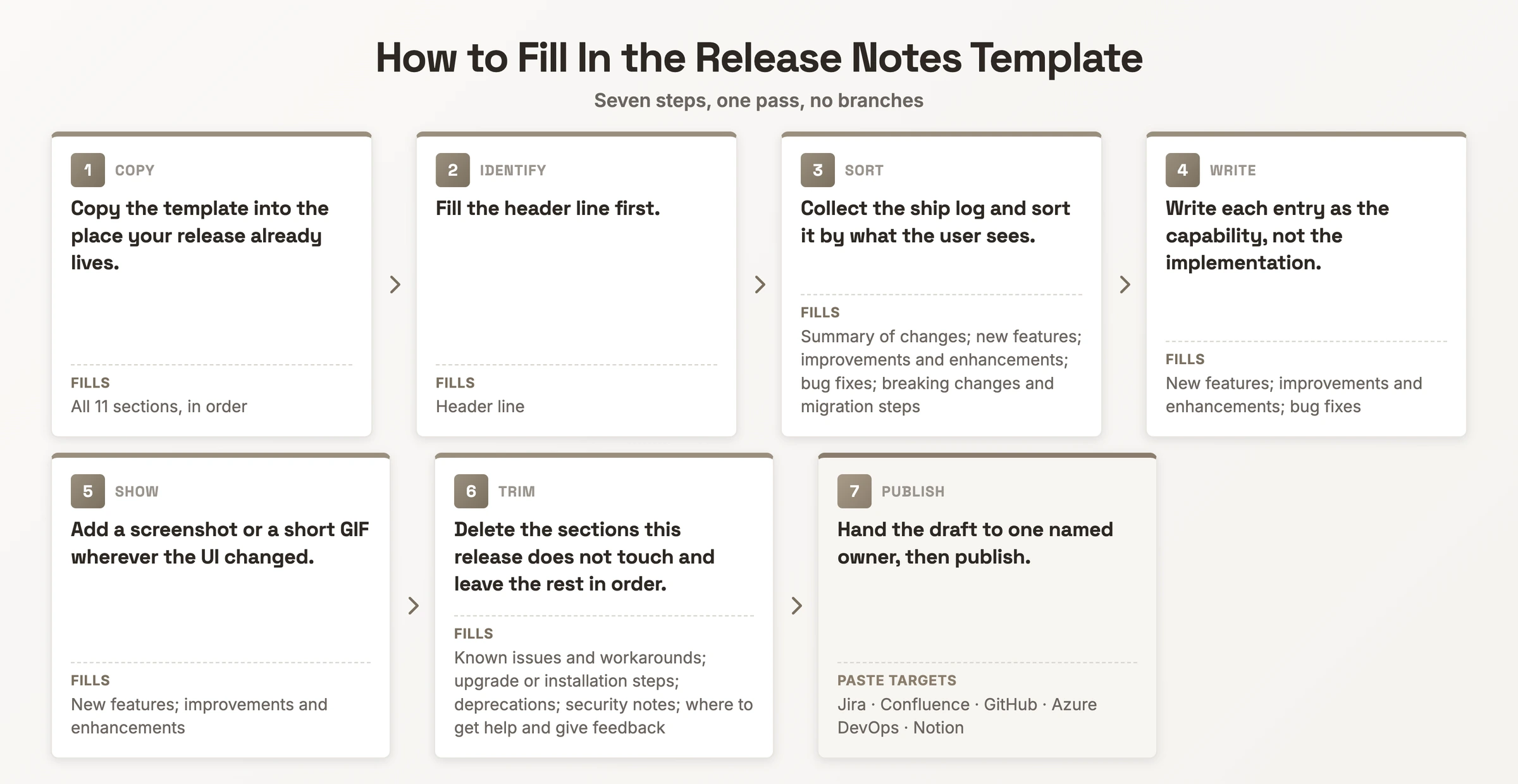
- Copy the template into the place your release already lives. It pastes unchanged into Jira, Confluence, Notion, GitHub or Azure DevOps, so the note sits beside the work instead of in a stray doc.
- Fill the header line first. Product name, version number, release date and platform, so anyone landing on the note knows which build it describes before reading a word.
- Collect the ship log and sort it by what the user sees. Split each change into new features, improvements, bug fixes and anything that breaks, and drop the entries that stay invisible to users.
- Write each entry as the capability, not the implementation. "Implemented batch processing" becomes "You can now export large datasets without the process timing out", which answers the reader's question of whether this release affects them.
- Add a screenshot or a short GIF wherever the UI changed. If an entry needs three paragraphs, it probably needs a fifteen-second GIF instead.
- Delete the sections this release does not touch and leave the rest in order. A patch drops new features and upgrade steps, and users should not have to relearn the structure each release.
- Hand the draft to one named owner, then publish. Without a single person accountable for the sign-off, the note ships late or ships twice.
Release Notes Template: A Filled-In Example
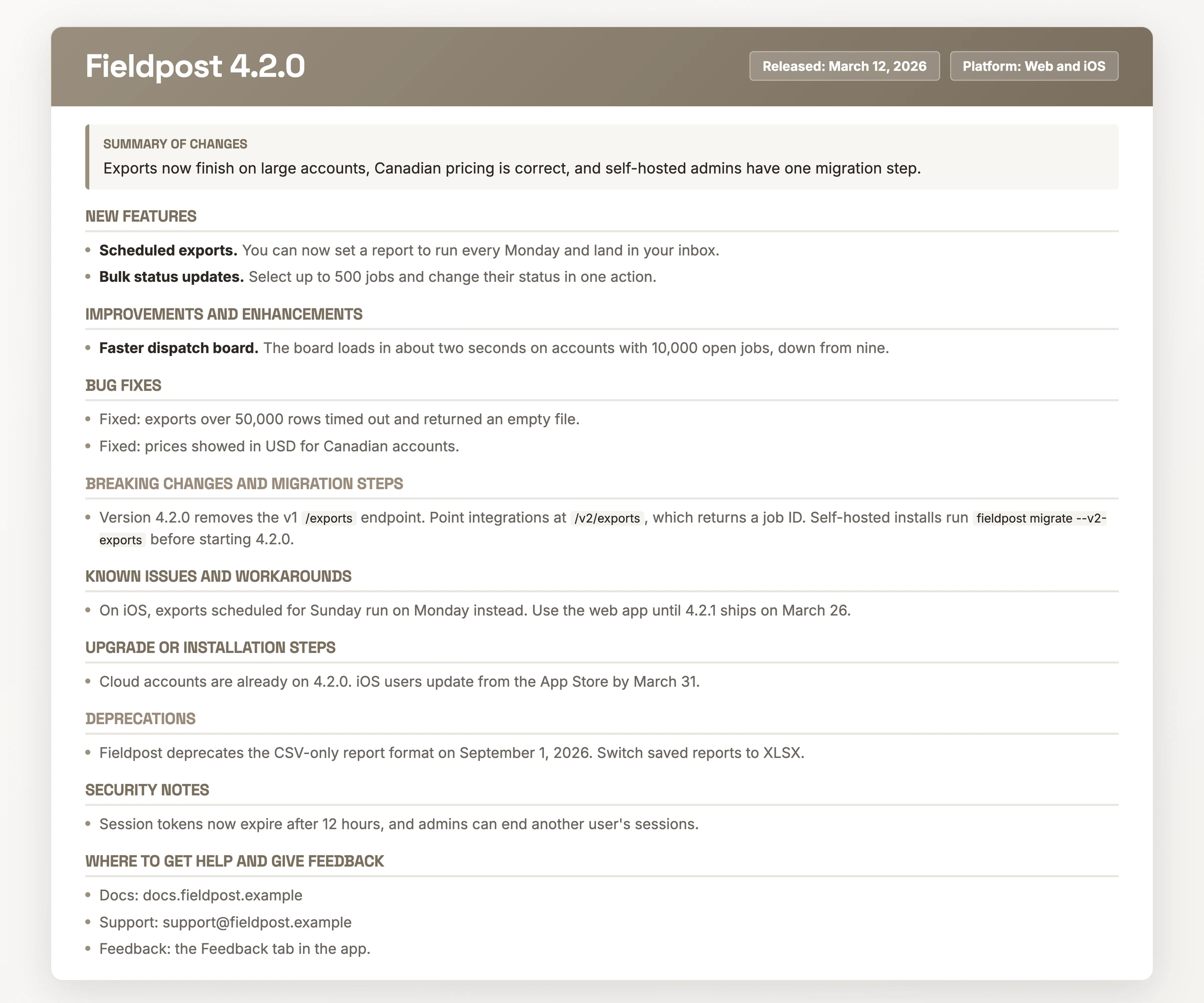
This is the same template, filled in for a fictional dispatch product shipping a feature release.
- Fieldpost 4.2.0 · Released: March 12, 2026 · Platform: Web and iOS
- Summary of changes: Exports now finish on large accounts, Canadian pricing is correct, and self-hosted admins have one migration step.
- New features
- Scheduled exports. You can now set a report to run every Monday and land in your inbox.
- Bulk status updates. Select up to 500 jobs and change their status in one action.
- Improvements and enhancements
- Faster dispatch board. The board loads in about two seconds on accounts with 10,000 open jobs, down from nine.
- Bug fixes
- Fixed: exports over 50,000 rows timed out and returned an empty file.
- Fixed: prices showed in USD for Canadian accounts.
- Breaking changes and migration steps
- Version 4.2.0 removes the v1
/exportsendpoint. Point integrations at/v2/exports, which returns a job ID. Self-hosted installs runfieldpost migrate --v2-exportsbefore starting 4.2.0. - Known issues and workarounds
- On iOS, exports scheduled for Sunday run on Monday instead. Use the web app until 4.2.1 ships on March 26.
- Upgrade or installation steps
- Cloud accounts are already on 4.2.0. iOS users update from the App Store by March 31.
- Deprecations
- Fieldpost deprecates the CSV-only report format on September 1, 2026. Switch saved reports to XLSX.
- Security notes
- Session tokens now expire after 12 hours, and admins can end another user's sessions.
- Where to get help and give feedback
- Docs: docs.fieldpost.example · Support: support@fieldpost.example · Feedback: the Feedback tab in the app.
Release Notes Template Variants
The five variants below sit on two axes: who reads the note, and what kind of release it covers. Each one keeps the header line and the summary of changes, then adds, drops or rewrites the other nine sections. The deltas are the useful part, because deciding what to delete for a small release is the call most teams get wrong.
Major Release Notes Template
This variant runs all 11 sections. Each new feature gets a paragraph plus a screenshot or GIF, you spell out migration steps rather than linking to them, and you write the summary of changes to stand alone, since it is the line teammates paste into Slack and quote back at you.
- Keeps: all 11 sections.
- Expands: new features, breaking changes and migration steps, upgrade steps.
- Watch: the summary has to make sense with no other section attached.
Patch or Hotfix Release Notes Template
Four sections do most of the work: header line, summary, bug fixes, and known issues if any remain. Lead with the fix, then who it affects, then whether the reader has to do anything. A hotfix note that opens with a version number and buries the fix in paragraph three defeats the point of shipping it fast.
- Drops: new features, improvements, deprecations, upgrade steps.
- Keeps: header line, summary, bug fixes, known issues.
- Watch: state explicitly when no action is needed.
Internal or Technical Release Notes Template
You write this one for the team that runs the system, so the benefit framing goes and the mechanics arrive. Name the services touched, the config that changed, and anything a teammate will hit at 2am.
- Adds: code changes, API and database changes, environment and configuration notes.
- Drops: user-facing benefit framing.
- Keeps: breaking changes, known issues, upgrade steps, which carry more weight in this variant than in the others.
Mobile App Store Release Notes Template
Store listings cap the character count, so the whole note compresses to a version line and a short "what's new" list. Write three to five bullets, each naming one thing the user can now do, ordered by what they care about most.
- Keeps: header line, a compressed new features list, one line for notable fixes.
- Drops: known issues, deprecations, security notes, migration steps.
- Watch: anything cut from the store listing still belongs in the full note you host yourself.
API Release Notes Template
You write this one for a developer integrating against you rather than for an end user. Each entry names the endpoint or parameter it touches, and each deprecation carries a sunset date the reader can put in a calendar.
- Adds: endpoint changes, parameter changes, a migration example with request and response.
- Expands: deprecations, with sunset dates, and breaking changes.
- Drops: screenshots and GIFs, which a developer reader does not need.
A security patch takes whichever variant fits the release, with one rule on top: keep the security note factual and do not describe the vulnerability itself.
When to Use a Release Notes Template
Reach for the template on any release a user can see or has to act on. The three most common triggers are a feature launch, a bug fix or hotfix, and an internal build. Security patches, API releases and store updates take the same structure with different sections in play.
Release notes, a changelog and patch notes answer different questions. Release notes are per-release and human-readable, written for the audience the change affects. A changelog is the complete chronological record, developer-facing and permanent. Patch notes are the short release note for a fix-only release. Publish release notes when someone outside the team has to act, and keep the changelog running underneath.
Ownership works as a handoff. Engineering supplies the ship logs, a PM or PMM translates them into user-facing entries, and one named person signs off before the note ships.
Skip the Blank Document: Record It Instead
Filling a blank template is the step most teams put off until the release is already out. The other route is to record the walkthrough you were going to give anyway and let it become the note.
Hinto AI takes any video source, a Loom, a Zoom call, a YouTube video or a local MP4, and records your screen from the web app or Chrome extension. Its AI action detection identifies UI state changes and button clicks, extracting screenshots and written steps. Those steps become the new-feature, improvement and bug-fix entries, and the GIF engine covers the fields where the UI changed. Hinto ships a "What's New" project template built for release notes from product demos.
From there you edit rather than draft: highlight a section and ask the AI to rewrite it, then host the result on a public URL with a custom domain, or sync it to Notion, Confluence, GitHub or GitLab.
Release Notes Template FAQ
What should release notes contain?
Eleven sections: a header line; a summary of changes; new features; improvements; bug fixes; breaking changes and migration steps; known issues; upgrade steps; deprecations; security notes; and where to get help. The summary is the line scanners read and agents quote.
How do you write good release notes?
Lead with what the reader can do now, and keep the implementation out of it. "Implemented batch processing" becomes "You can now export large datasets without the process timing out." Bold the feature name, use New, Improved and Fixed labels, and hold entries to two or three sentences.
Who typically writes release notes?
A product manager or product marketing manager, working from what engineering hands over. Engineering supplies the ship logs, the PM or PMM translates them into user-facing entries, and one named owner signs off before the note goes out.
What is the difference between patch notes and release notes?
Patch notes are the short form for a fix-only release. They drop new features, improvements, deprecations and upgrade steps, and lead with the fix, who it affects, and whether the reader must act. Release notes carry the full structure for a feature release.
What are release notes in Jira?
It is the same document, pasted into a specific surface. Searchers asking about Jira, Confluence, GitHub, Notion or Azure DevOps want the release note itself, so copy the template above into whichever surface your team already reads. Hinto publishes to Notion, Confluence, GitHub and GitLab.