Process Documentation Examples: 5 Filled-In Specimens
These process documentation examples are five real, filled-in documents, one each for ops, finance, warehouse, engineering and HR, with no blank fields left and a PDF you can hand to a colleague today.
Jump straight to the examples.
What process documentation is: a written record of how one recurring task runs: scope, owner, steps.
What a good example looks like: a stated start and end, an accountable role on the work, and an expected output on each step.
Strong specimen versus weak: the strong one carries a revision date and a named role per step, the weak one leaves both blank.
The five here: customer onboarding, invoice reconciliation, warehouse receiving, release deployment, employee offboarding.
What Makes a Good Process Documentation Example
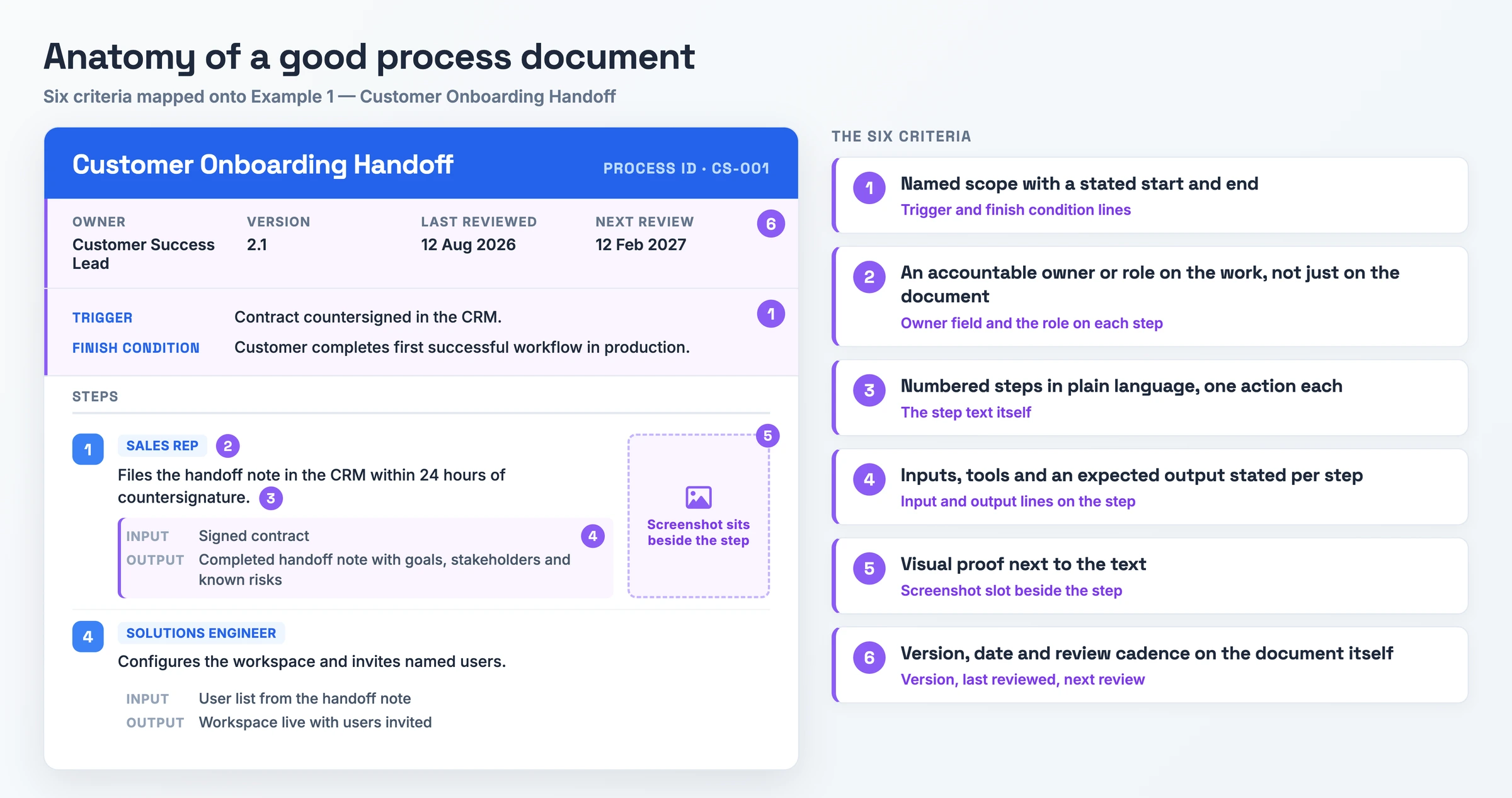
Six tests separate useful process document examples from decoration. The diagram maps them onto Example 1.
- Named scope with a stated start and end. Met: the document names the process, what triggers it and what marks it finished. Missing: you cannot tell where your responsibility begins or ends.
- An accountable owner or role on the work, not just on the document. Met: each step carries the role that performs it, and one named owner keeps the document current. Missing: passive steps with no role attached, so the handoff has no addressee.
- Numbered steps in plain language, one action each. Met: you can run each step first time without asking what a word means. Missing: jargon, or three actions folded into one sentence.
- Inputs, tools and an expected output stated per step. Met: each step says what you need to start and what exists when you finish, so completion is checkable. Missing: the step ends with no artifact, so nobody can tell it happened.
- Visual proof next to the text. Met: a screenshot or diagram sits beside the step it explains and shows the real screen. Missing: a wall of prose, or a hero image illustrating nothing.
- Version, date and review cadence on the document itself. Met: the header carries a version, a last-reviewed date and a next review date. Missing: an undated document you cannot date-check, the failure named on five of six reference pages.
5 Process Documentation Examples Worth Copying
Each of the five business process documentation examples is filled in end to end: header fields, trigger, numbered steps with owners and outputs, and the exception. Download all five process documentation samples as editable PDFs.
Example 1: Customer Onboarding Handoff
Copy this one if you are a customer success lead taking a signed account into implementation.
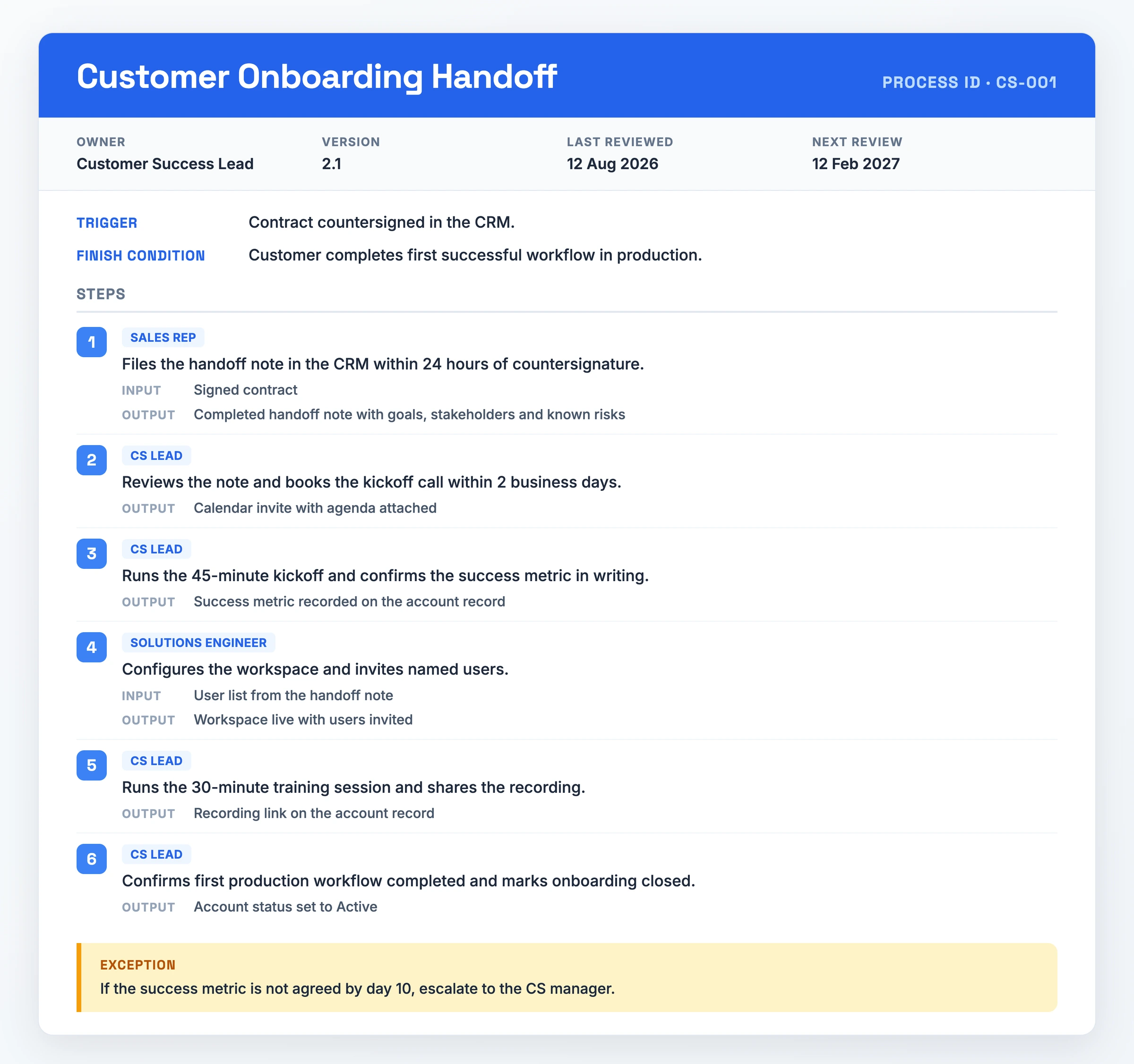
- Process ID: CS-001
- Owner: Customer Success Lead
- Version: 2.1 | Last reviewed: 12 Aug 2026 | Next review: 12 Feb 2027
- Trigger: contract countersigned in the CRM
- Finish condition: customer completes first successful workflow in production
- Step 1. Sales rep files the handoff note in the CRM within 24 hours of countersignature. Input: signed contract. Output: completed handoff note with goals, stakeholders and known risks.
- Step 2. CS lead reviews the note and books the kickoff call within 2 business days. Output: calendar invite with agenda attached.
- Step 3. CS lead runs the 45-minute kickoff and confirms the success metric in writing. Output: success metric recorded on the account record.
- Step 4. Solutions engineer configures the workspace and invites named users. Input: user list from the handoff note. Output: workspace live with users invited.
- Step 5. CS lead runs the 30-minute training session and shares the recording. Output: recording link on the account record.
- Step 6. CS lead confirms first production workflow completed and marks onboarding closed. Output: account status set to Active.
- Exception: if the success metric is not agreed by day 10, escalate to the CS manager.
What makes it work: "An accountable owner or role on the work, not just on the document": three roles own named steps, plus one document owner.
Watch out for: step 4 assumes a separate solutions engineer. Fold it into the CS lead's steps if one person does both.
Download PDF - Customer Onboarding Handoff
Example 2: Monthly Invoice Reconciliation
Copy this one if you are an accounts payable clerk closing the month.
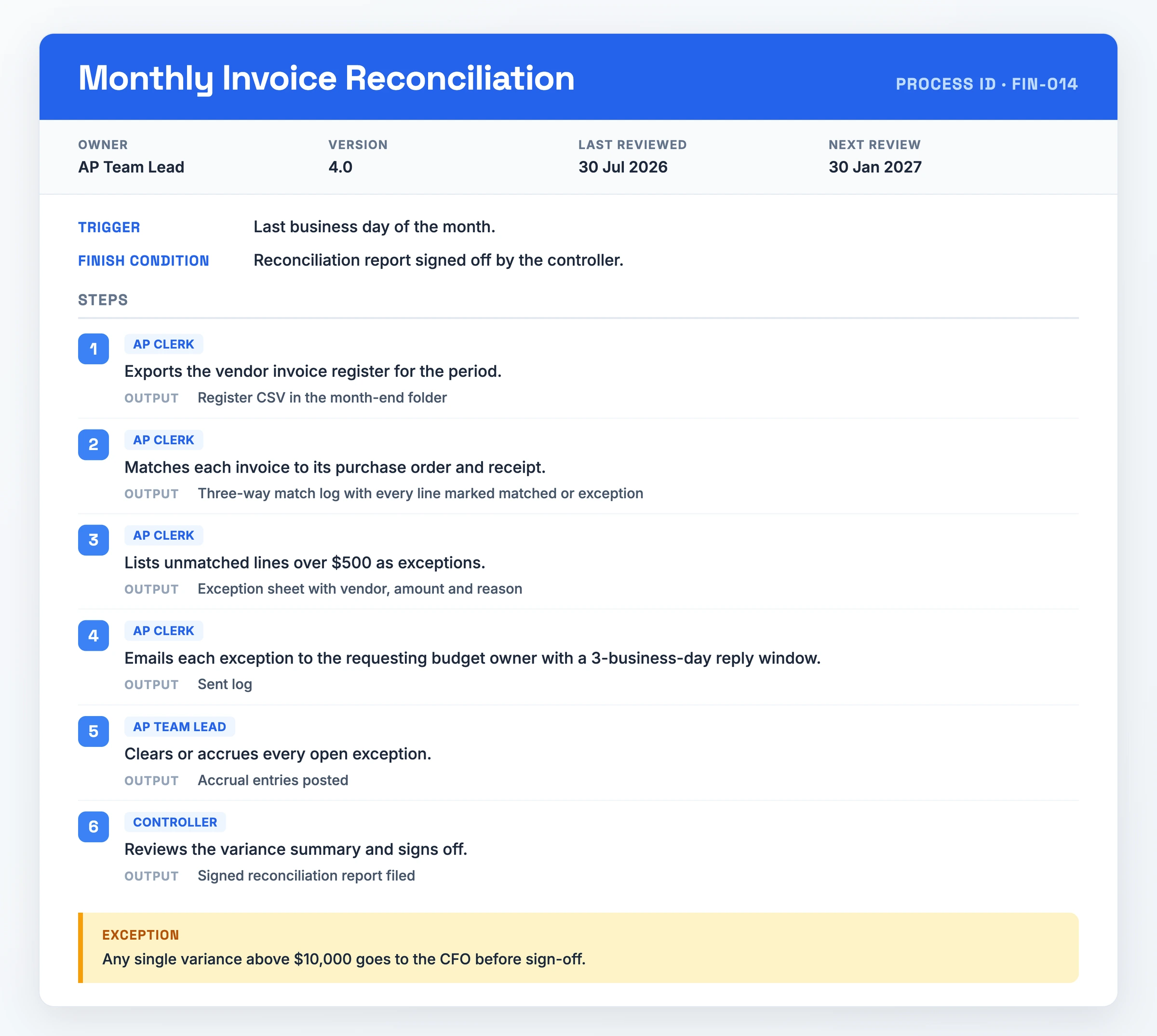
- Process ID: FIN-014
- Owner: AP Team Lead
- Version: 4.0 | Last reviewed: 30 Jul 2026 | Next review: 30 Jan 2027
- Trigger: last business day of the month
- Finish condition: reconciliation report signed off by the controller
- Step 1. AP clerk exports the vendor invoice register for the period. Output: register CSV in the month-end folder.
- Step 2. AP clerk matches each invoice to its purchase order and receipt. Output: three-way match log with every line marked matched or exception.
- Step 3. AP clerk lists unmatched lines over $500 as exceptions. Output: exception sheet with vendor, amount and reason.
- Step 4. AP clerk emails each exception to the requesting budget owner with a 3-business-day reply window. Output: sent log.
- Step 5. AP team lead clears or accrues every open exception. Output: accrual entries posted.
- Step 6. Controller reviews the variance summary and signs off. Output: signed reconciliation report filed.
- Exception: any single variance above $10,000 goes to the CFO before sign-off.
What makes it work: "Inputs, tools and an expected output stated per step": every step ends in a checkable artifact, and the $500 and $10,000 thresholds make the exception testable.
Watch out for: both dollar thresholds are tuned to one company's volume. Reset them against your own invoice values.
Download PDF - Monthly Invoice Reconciliation
Example 3: Warehouse Receiving and Putaway
Copy this one if you are a receiving associate working the dock.
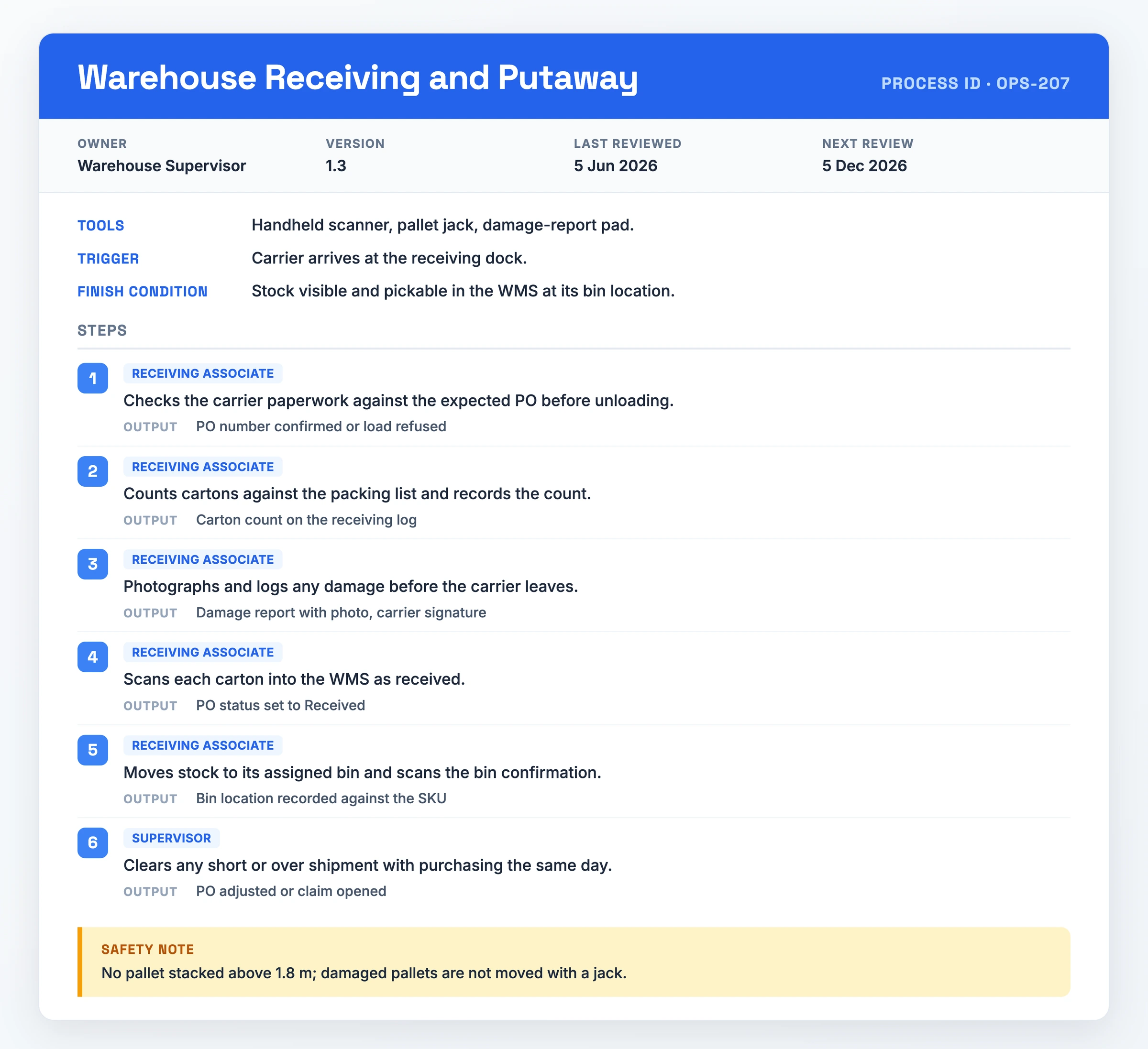
- Process ID: OPS-207
- Owner: Warehouse Supervisor
- Version: 1.3 | Last reviewed: 5 Jun 2026 | Next review: 5 Dec 2026
- Trigger: carrier arrives at the receiving dock
- Finish condition: stock visible and pickable in the WMS at its bin location
- Tools: handheld scanner, pallet jack, damage-report pad
- Step 1. Receiving associate checks the carrier paperwork against the expected PO before unloading. Output: PO number confirmed or load refused.
- Step 2. Associate counts cartons against the packing list and records the count. Output: carton count on the receiving log.
- Step 3. Associate photographs and logs any damage before the carrier leaves. Output: damage report with photo, carrier signature.
- Step 4. Associate scans each carton into the WMS as received. Output: PO status set to Received.
- Step 5. Associate moves stock to its assigned bin and scans the bin confirmation. Output: bin location recorded against the SKU.
- Step 6. Supervisor clears any short or over shipment with purchasing the same day. Output: PO adjusted or claim opened.
- Safety note: no pallet stacked above 1.8 m; damaged pallets are not moved with a jack.
What makes it work: "Named scope with a stated start and end": the carrier arriving opens it, a pickable bin location closes it.
Watch out for: it assumes a scanner and a live WMS; a paper-based dock needs different outputs on steps 4 and 5.
Download PDF - Warehouse Receiving and Putaway
Example 4: Software Release Deployment
Copy this one if you are the engineer on release duty.
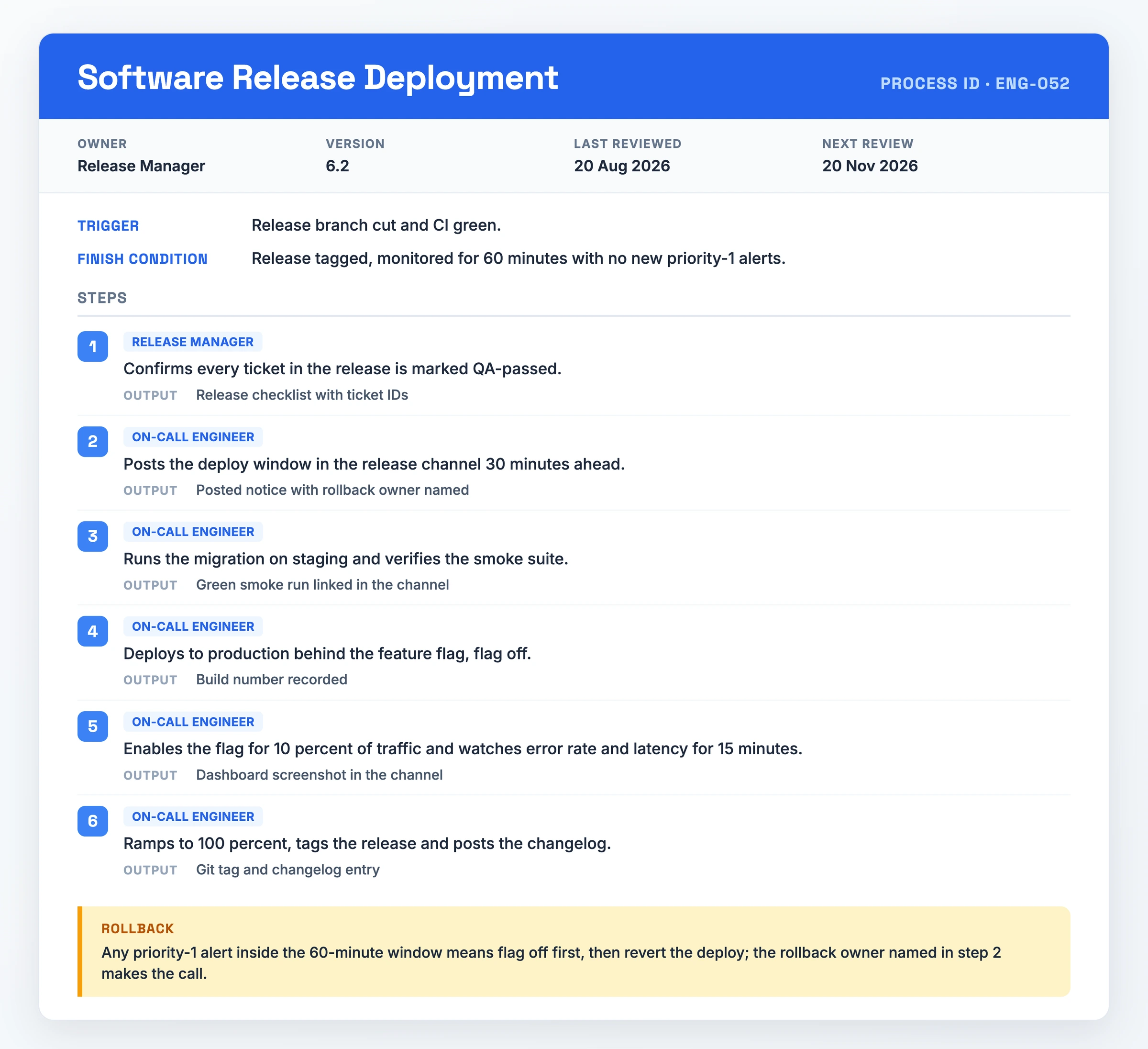
- Process ID: ENG-052
- Owner: Release Manager
- Version: 6.2 | Last reviewed: 20 Aug 2026 | Next review: 20 Nov 2026
- Trigger: release branch cut and CI green
- Finish condition: release tagged, monitored for 60 minutes with no new priority-1 alerts
- Step 1. Release manager confirms every ticket in the release is marked QA-passed. Output: release checklist with ticket IDs.
- Step 2. On-call engineer posts the deploy window in the release channel 30 minutes ahead. Output: posted notice with rollback owner named.
- Step 3. Engineer runs the migration on staging and verifies the smoke suite. Output: green smoke run linked in the channel.
- Step 4. Engineer deploys to production behind the feature flag, flag off. Output: build number recorded.
- Step 5. Engineer enables the flag for 10 percent of traffic and watches error rate and latency for 15 minutes. Output: dashboard screenshot in the channel.
- Step 6. Engineer ramps to 100 percent, tags the release and posts the changelog. Output: git tag and changelog entry.
- Rollback: any priority-1 alert inside the 60-minute window means flag off first, then revert the deploy. The rollback owner named in step 2 makes the call.
What makes it work: "Numbered steps in plain language, one action each", plus a rollback line naming who decides and in what order.
Watch out for: the 10 percent ramp assumes feature flags are wired in; without them, step 5 has nothing to enable.
Download PDF - Software Release Deployment
Example 5: Employee Offboarding
Copy this one if you are an HR partner closing a departure.
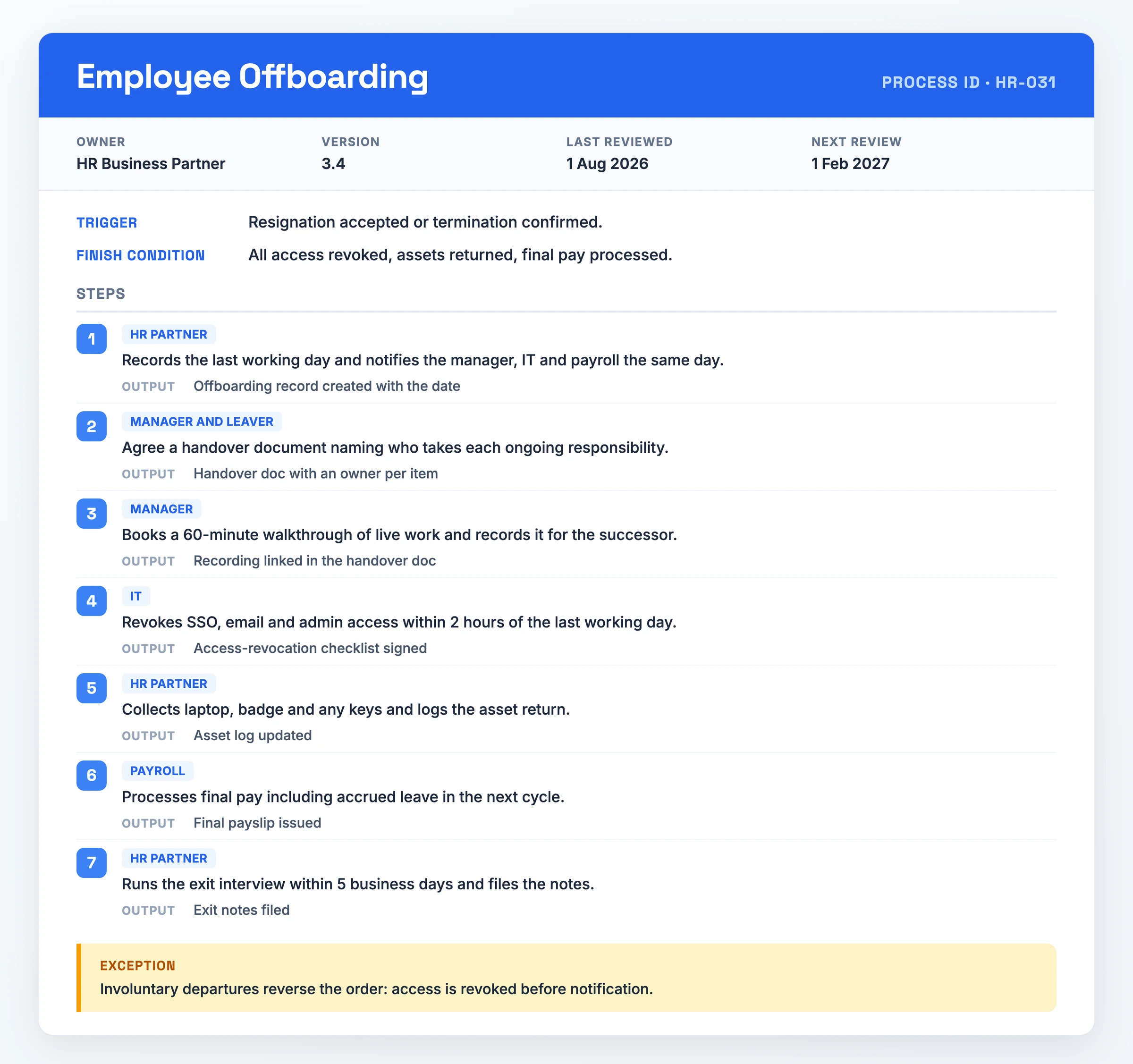
- Process ID: HR-031
- Owner: HR Business Partner
- Version: 3.4 | Last reviewed: 1 Aug 2026 | Next review: 1 Feb 2027
- Trigger: resignation accepted or termination confirmed
- Finish condition: all access revoked, assets returned, final pay processed
- Step 1. HR partner records the last working day and notifies the manager, IT and payroll the same day. Output: offboarding record created with the date.
- Step 2. Manager and leaver agree a handover document naming who takes each ongoing responsibility. Output: handover doc with an owner per item.
- Step 3. Manager books a 60-minute walkthrough of live work and records it for the successor. Output: recording linked in the handover doc.
- Step 4. IT revokes SSO, email and admin access within 2 hours of the last working day. Output: access-revocation checklist signed.
- Step 5. HR partner collects laptop, badge and any keys and logs the asset return. Output: asset log updated.
- Step 6. Payroll processes final pay including accrued leave in the next cycle. Output: final payslip issued.
- Step 7. HR partner runs the exit interview within 5 business days and files the notes. Output: exit notes filed.
- Exception: involuntary departures reverse the order, access is revoked before notification.
What makes it work: "Version, date and review cadence on the document itself": HR-031 carries version 3.4 and a February 2027 review date, so you can date-check it.
Watch out for: involuntary departures reverse the sequence. Copying only the happy path leaves your riskiest case undocumented.
Download PDF - Employee Offboarding
How to Adapt a Process Documentation Example
- Pick the gallery specimen closest to your process. Match on shape first, six or seven numbered steps with one owner each, rather than on industry, so the structure already fits before you edit a word.
- Rewrite the whole header block. Give it your own Process ID, Owner, Version 1.0, real Last reviewed and Next review dates, and a Trigger and Finish condition in your own terms.
- Put a real role on each step. Swap the specimen's roles for the ones on your team, and give any step with no addressee an owner before you go further.
- Restate each step's input and output as artifacts you can point at. Name a file, record, or message your team can open, so a reader can confirm the step ran.
- Add or cut steps, and update the Tools line. Delete what you do not do, add what the specimen left out, and name the systems your team opens.
- Rewrite the Exception or Rollback line for your worst case. The specimens escalate at day 10, at $10,000 and at a priority-1 alert; yours needs its own threshold.
- Test it on somebody who has not run the process. Watch them work through the document once and fix each step they had to ask about.
When You Need Process Documentation
Write the document the first time you hand a recurring task to a new hire. Onboarding someone onto work they have never run is the most common trigger across the sources we checked, and the Employee Offboarding specimen exists because the reverse is equally costly: the person who owns the task leaves and takes the sequence with them.
Reach for one when the same customer request has to come out the same way twice. The Customer Onboarding Handoff exists for that, and so does any support workflow that crosses from sales into implementation without a written addressee on each step.
Deployments and rollouts earn one too. Software Release Deployment names a 60-minute watch and a rollback owner because the cost of an unwritten step there arrives as an outage instead of a question.
Common Process Documentation Mistakes
- Letting the document go stale after the process changes. Five of six sources we checked name it. You cannot tell whether an undated document still matches the work, so your team stops trusting it and asks a colleague instead.
- Leaving a step unassigned, so the process breaks at the handoff. Two teams each assume the other ran the step, and it drops between them.
- Storing it where your team cannot find it. You lose the hours you spent writing it, and the process still runs on memory.
- Writing in jargon or vague wording. "Send a warm, welcoming, hearty email" stalls the reader; "Send a welcome email to all new hires" does not. Whoever stalls asks the person the document should have replaced.
- Writing it without the people who run the process. The result describes how the work is supposed to happen instead of how it does, so the steps that matter most go missing. Principles with no filled-in specimen fail the same way: the reader has nothing to copy.
Skip the Blank Page: Record It Instead
Retyping one of these specimens from scratch is the slow route. The recording you need often already exists inside the process: Example 5 asks the manager to book a 60-minute walkthrough of live work and record it for the successor. That video holds the steps, the owners and the outputs.
Hinto AI turns screen recordings and video walkthroughs into structured documentation and SOPs. Record your screen, camera and microphone in the browser or the Chrome extension, or bring a video you already have: Loom, Zoom, YouTube or a local MP4, MOV or WebM file. Hinto detects UI state changes and button clicks, pulls screenshots and written steps out of them, and turns one long recording into a table of contents with several organized articles. One click hosts the result on a public URL with your own domain.
Process Documentation FAQ
How to write process documentation?
Name the scope with a start and end, put an accountable role on the work, then write numbered plain-language steps, one action each. Give every step an expected output, plus a visual and a review date.
How to write good process documentation?
Good documentation passes tests you can run yourself: a visual beside the steps, version history, a review cadence, and a trial run by somebody new. Whatever they ask about is a step you have not finished.
How to write a simple process document?
Define the scope, start point and end point first. Then keep to plain language on one page, the shape of Example 2: six numbered steps, one owner and output each, one exception line.
How to create process documentation?
Name an accountable owner or role against the work first: unowned steps break at the handoff. Then write plain language, one action per numbered step, and adapt a specimen above instead of starting blank.
What is business process documentation?
It records a repeatable business process end to end: passing work between departments, or an order-to-cash cycle. One shape carries different domains, so the specimens above span ops, finance, warehouse, engineering and HR.
What is process documentation in project management?
It covers the repeatable procedures a project depends on, such as deploying software, plus the records that prove compliance. Example 4 closes only when the release is tagged and watched for 60 minutes.