5 Knowledge Base Examples Worth Copying
These knowledge base examples are five finished articles rendered in full on this page and downloadable as PDFs: customer-facing knowledge base article examples alongside internal knowledge base examples for a service desk and a new-hire wiki.
Jump straight to the examples.
A good knowledge base: one task per article, findable in the reader's words, screenshots at decision points, a named owner and a review date.
A knowledge base article: title, audience, owner, last reviewed, prerequisites, numbered steps, failures, a route to a human, the order these help center examples use.
The definition: a title naming one completable task, and a body ending there.
Leave out: credentials, personal data, anything owned outside your team. Five knowledge base samples, five PDFs.
What Makes a Good Knowledge Base Example
- One task per article, named in the title. Met: the title states a single completable task ("Reset a user's MFA device") and the article ends there. Missing: the title is a topic ("Account security") covering three unrelated tasks.
- Findable in the reader's own words. Met: the title repeats the phrase a reader would type, and the article carries alternate terms so search resolves it. Missing: the title uses internal vocabulary, so only the category tree leads to it.
- Visual proof at each decision point. Met: a screenshot appears at each step where the reader picks between options or confirms the right screen. Missing: the steps run as a wall of text, or one hero screenshot carries the whole article.
- Plain language, no internal jargon. Met: the article expands acronyms on first use and its verbs match what the reader sees on screen. Missing: the article uses the team's internal name for a screen the product labels differently.
- A named owner and a review date on the article. Met: the article names who maintains it and when that person last checked it. Missing: the article is undated and unowned, so a live procedure reads the same as a dead one.
- Stated prerequisites and an escape hatch. Met: it says what access the reader needs before step one, and what to do when the steps do not resolve it. Missing: the reader hits a permission wall three steps in with nowhere to go.
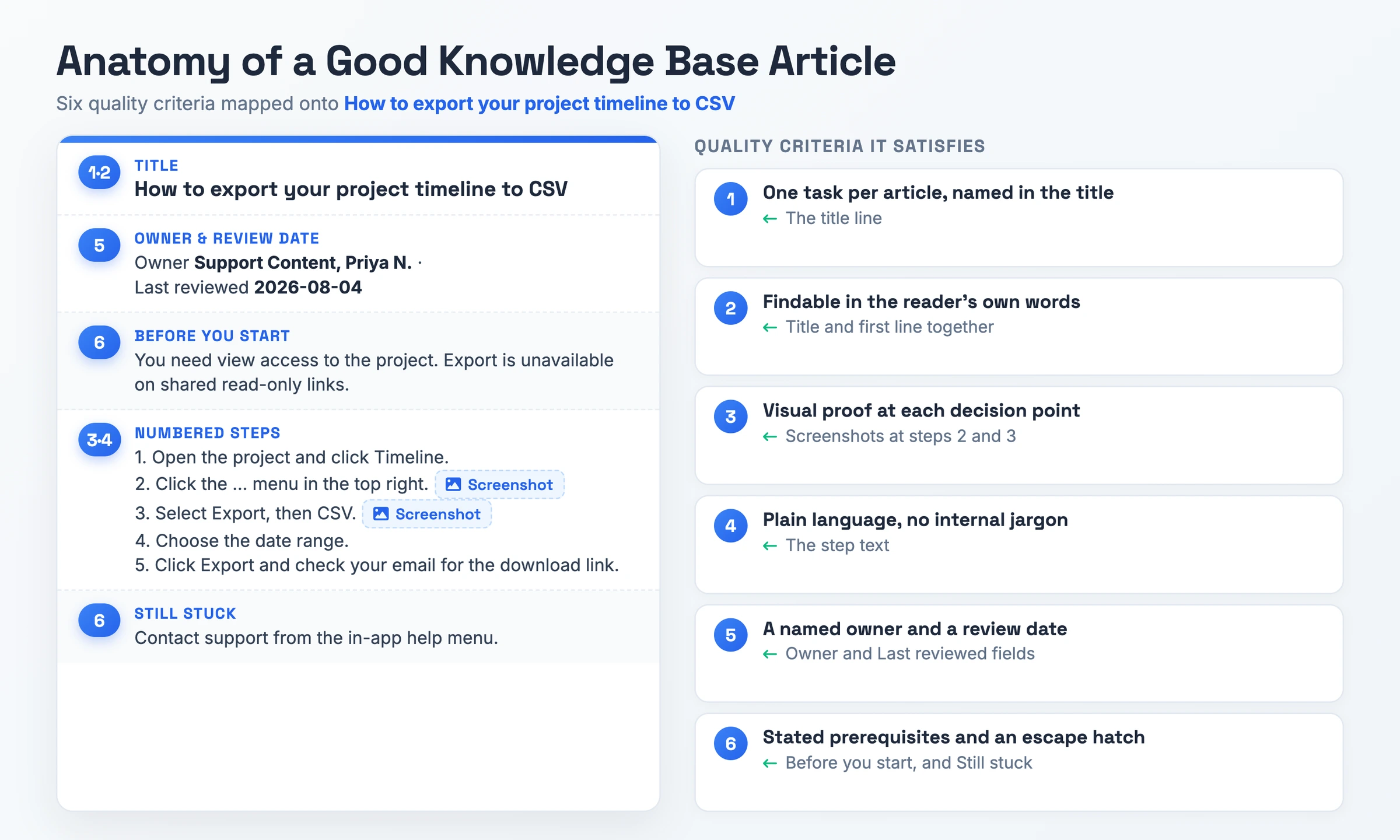
5 Knowledge Base Examples, Rendered in Full
Each of these knowledge base article examples is a complete article you can read end to end, with its own preview render and PDF. Two are customer-facing, two are internal knowledge base examples, and one an agency wrote for a client. Read the render, take the PDF, and swap the values.
Example 1: SaaS Product Help Center (customer-facing)
A support content team at a project-management SaaS wrote this for an end user who has no admin rights and wants one export done without opening a ticket.
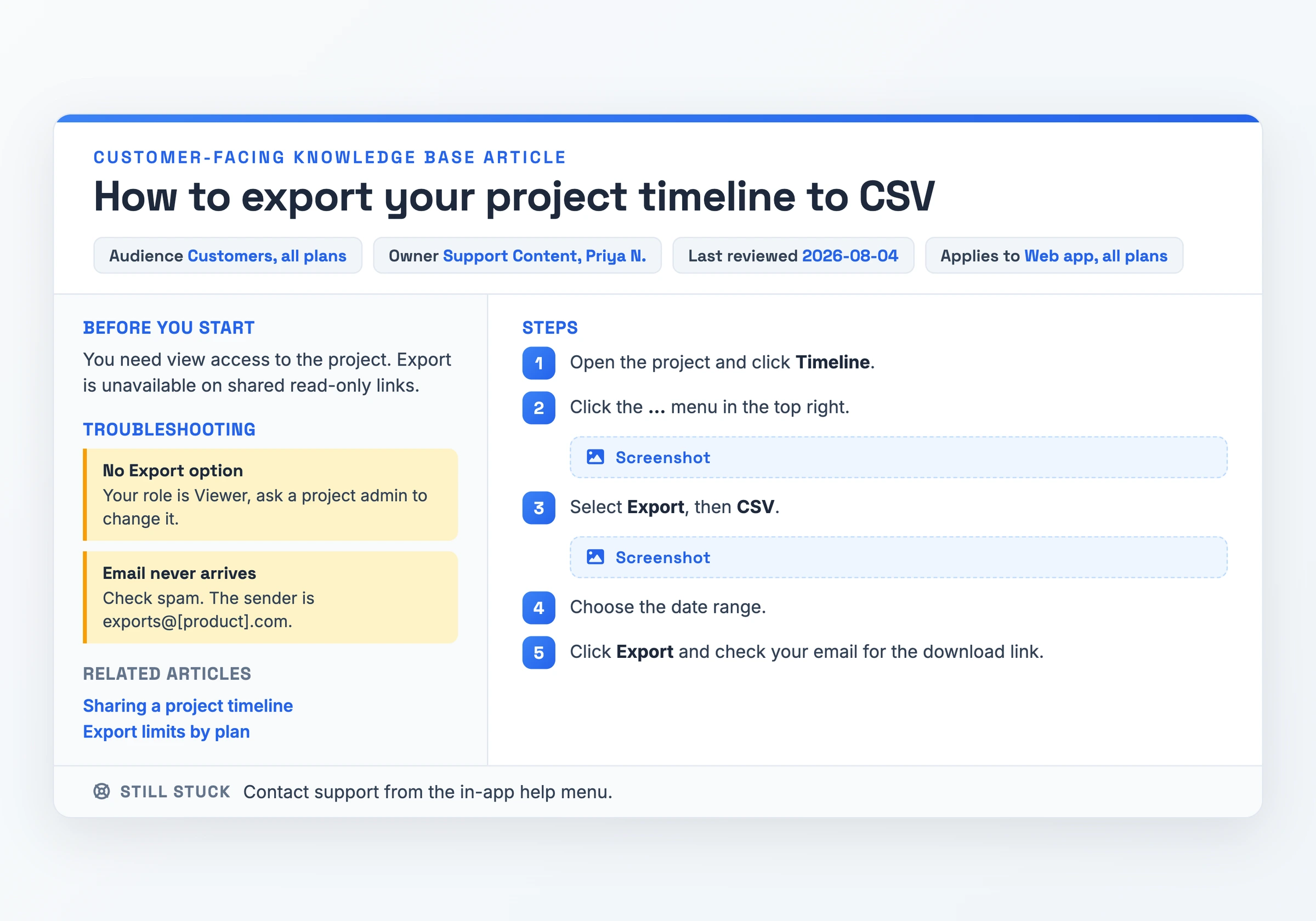
What makes it work: the title, "How to export your project timeline to CSV", names one completable task and the article stops once the file arrives, which is "One task per article, named in the title" done properly. Screenshots sit at steps 2 and 3, the only two points where the reader picks an option, so it also satisfies "Visual proof at each decision point" without padding the page with images.
Watch out for: the export lives behind a "..." menu, and the sender reads exports@[product].com, a placeholder. Both need swapping for your product before you publish.
Download PDF - How to export your project timeline to CSV
Example 2: Internal IT Support Knowledge Base (internal)
A tier 1 service desk agent uses this to reset MFA for a caller who replaced their phone, under a P3 clock with four business hours to resolve.
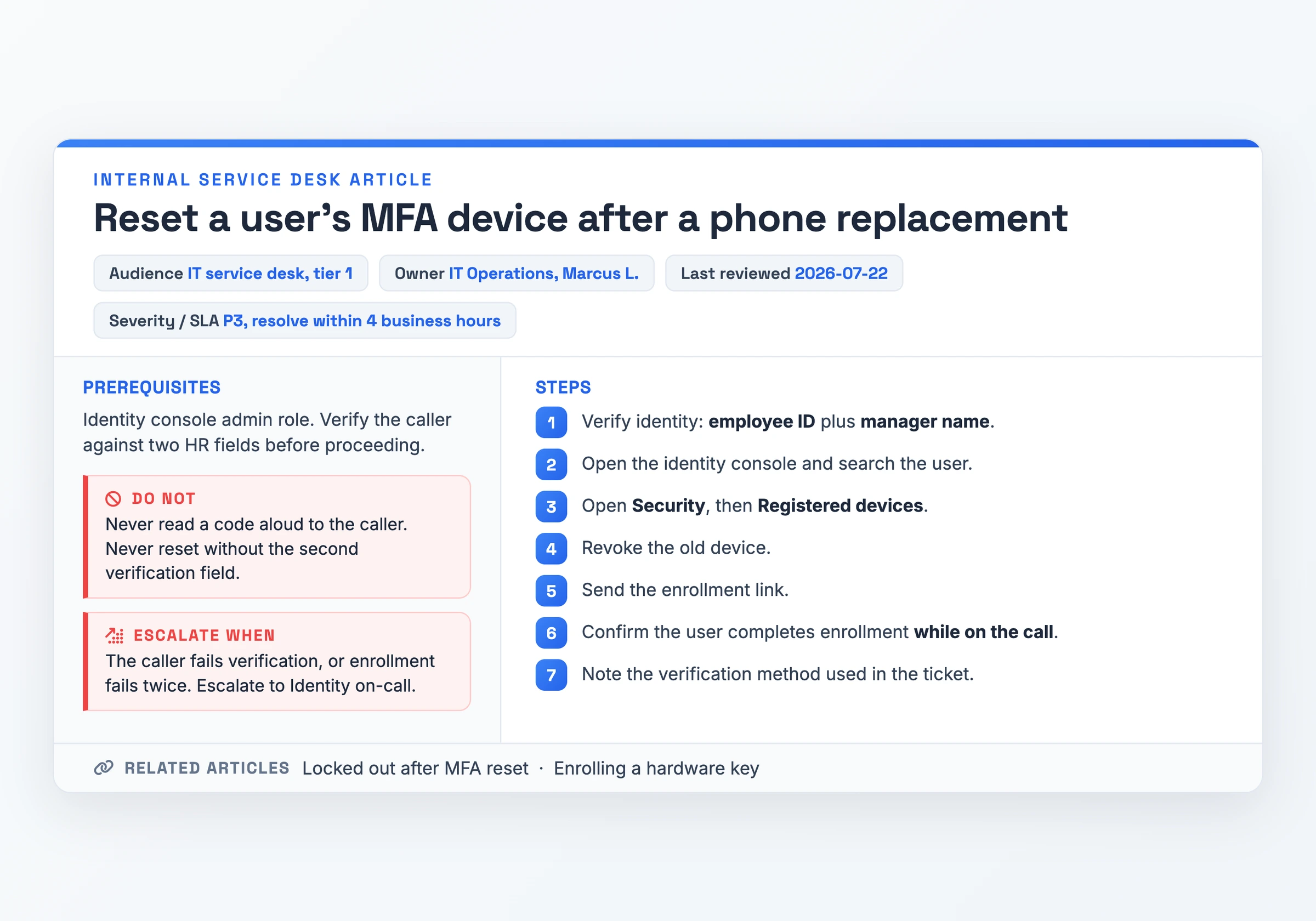
What makes it work: it opens with the access and the two HR verification fields the agent needs before step one, and closes with "Escalate when", naming the Identity on-call as the exit. That is "Stated prerequisites and an escape hatch" on an article where a missed check is a security incident. The separate "Do not" block keeps the two hard rules out of the step list, where they would read as optional.
Watch out for: the verification rules assume one identity console. A team on different tooling has to rewrite steps 2 to 5 rather than reuse them.
Download PDF - Reset a user's MFA device after a phone replacement
Example 3: New-Hire Onboarding Wiki (internal)
A developer experience team hands this to a new engineer on the first day, so the engineer can finish week one without interrupting anyone.
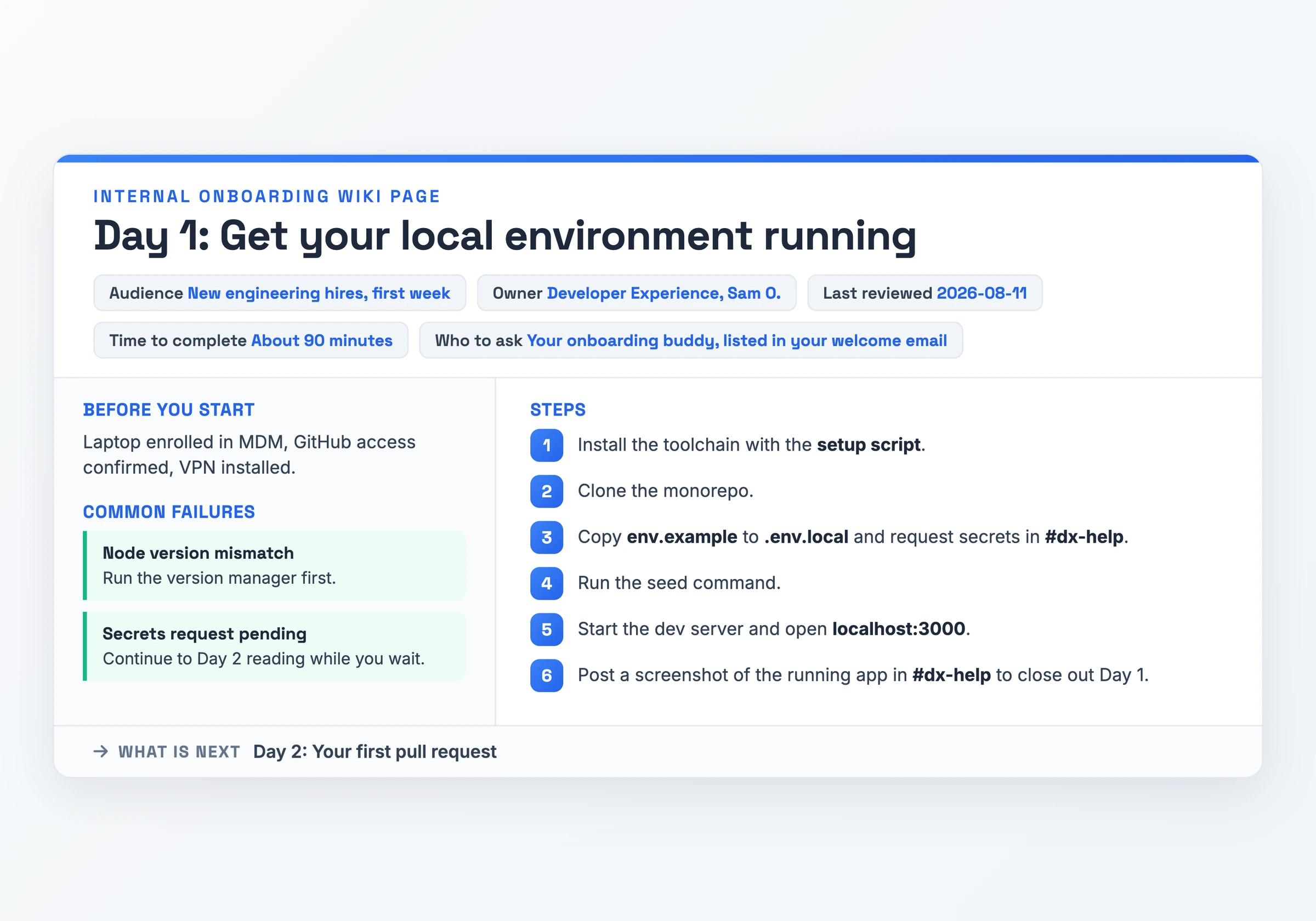
What makes it work: Sam O. owns the article and the last-reviewed field reads 2026-08-11, so a new hire can see the setup is current before trusting it. That is "A named owner and a review date on the article", and the 90-minute estimate plus the named buddy tell the reader what to do with the time and who to ask.
Watch out for: it leans on a #dx-help channel and an assigned onboarding buddy. A five-person team has neither, so those two references need replacing with a real person's name.
Download PDF - Day 1: Get your local environment running
Example 4: Customer Support Troubleshooting Library (customer-facing)
A merchant on an ecommerce platform arrives at this one with a symptom instead of a task: checkout is refusing payments and the cause is unclear.
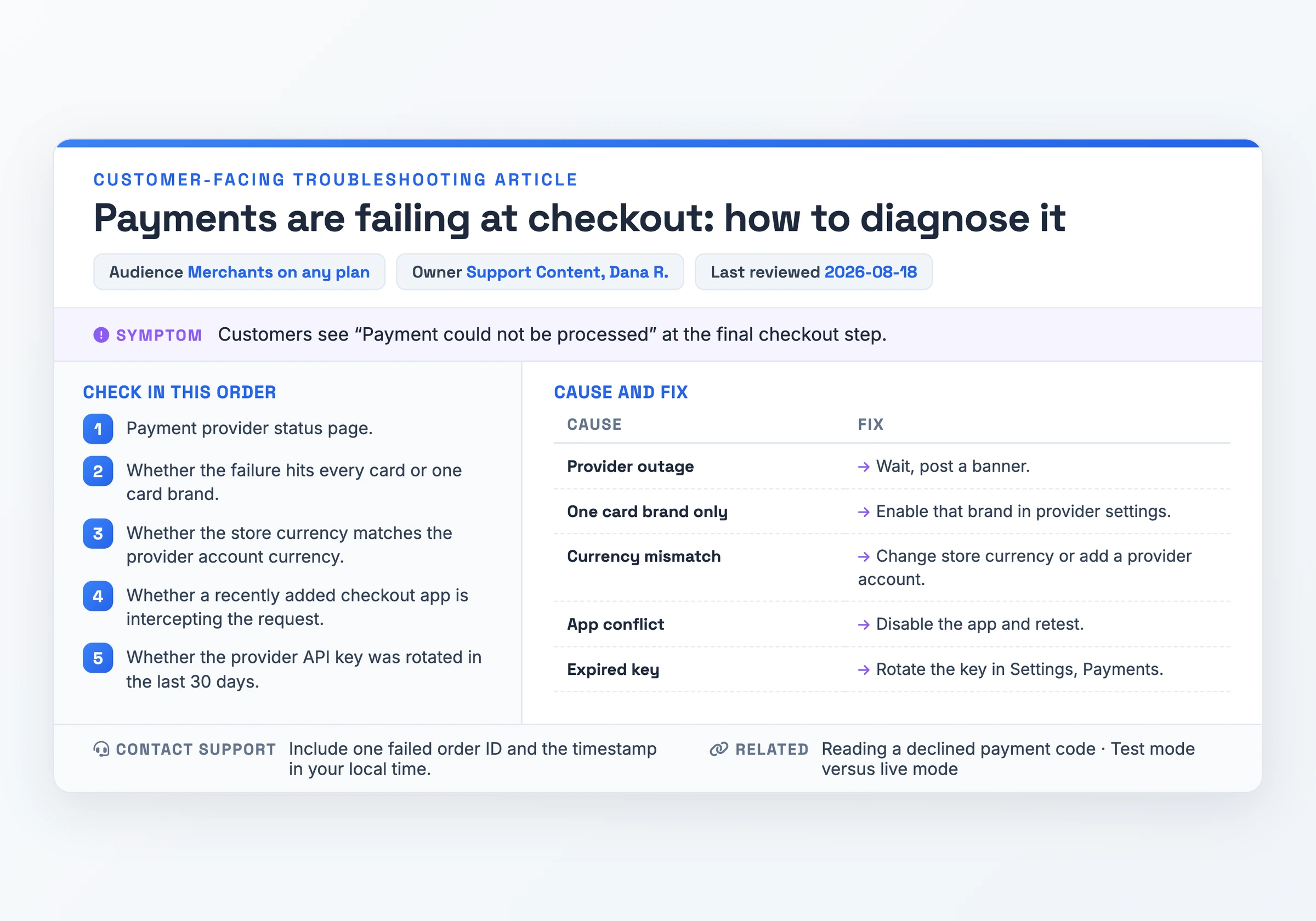
What makes it work: the title quotes the symptom in the merchant's language, "Payments are failing at checkout", and the symptom line repeats the exact error string customers see. Search resolves it on the words a panicking merchant types, which is "Findable in the reader's own words". The checklist runs cheapest check first, the provider status page, before anything that costs a config change.
Watch out for: the cause-and-fix table assumes one payment provider. A store running two providers needs a column for which one failed, or the currency and key rows point at the wrong account.
Download PDF - Payments are failing at checkout: how to diagnose it
Example 5: Agency Client Handoff Knowledge Base (client-facing)
An agency closing out a build wrote this for a client marketing team that now runs the site with no developer access.
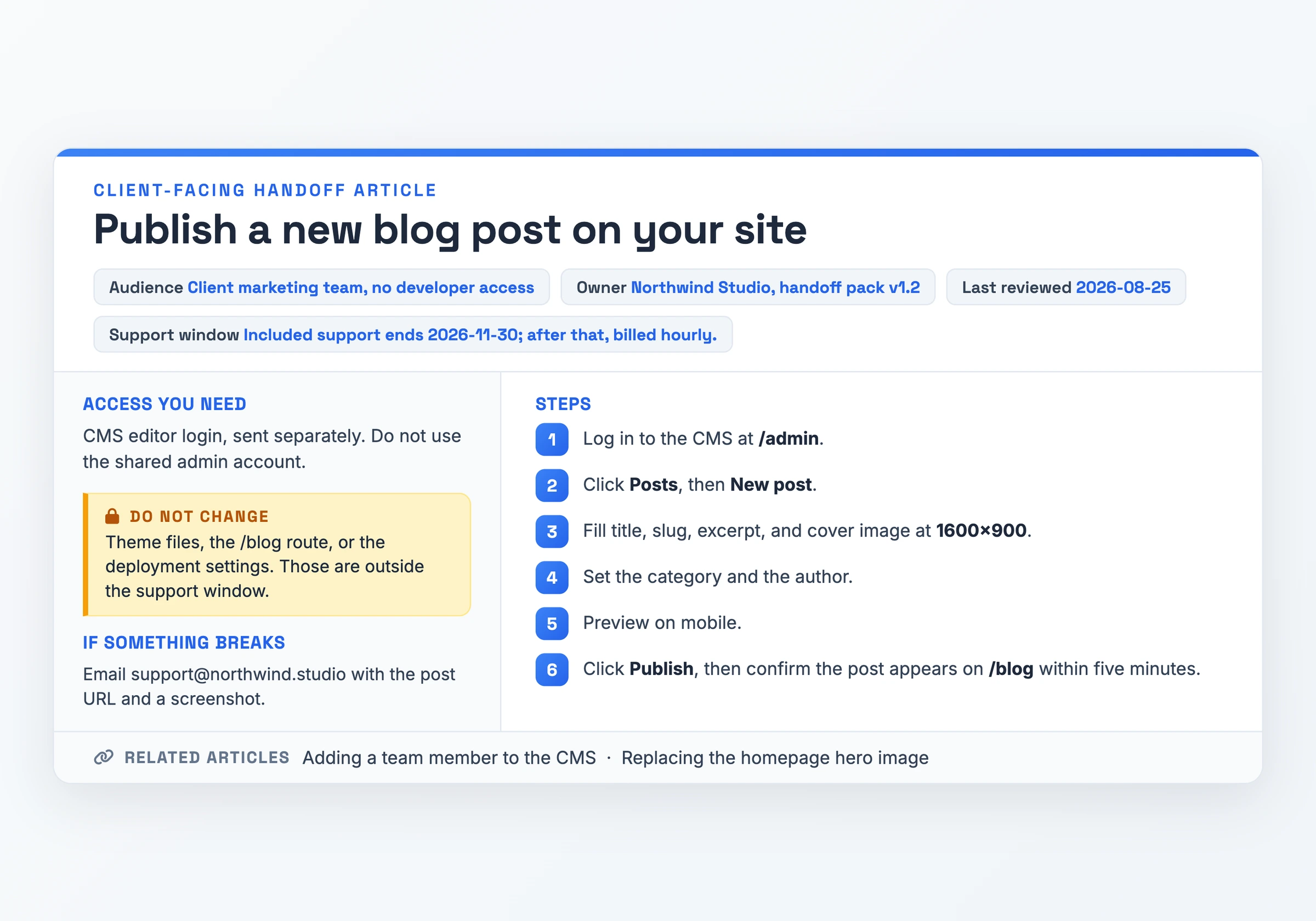
What makes it work: the steps name the buttons the client sees, Posts, New post, Publish, and give the cover image size as 1600x900 instead of "an appropriately sized image". That is "Plain language, no internal jargon" for a reader who has never opened a CMS. The "Do not change" block draws the scope boundary in the document, where the client will still find it after the handoff email is buried.
Watch out for: the support window is dated 2026-11-30 and goes stale the day the engagement ends, leaving a client following an article that promises help you no longer provide.
Download PDF - Publish a new blog post on your site
How to Adapt a Knowledge Base Example
Take Example 2, the internal MFA reset article, and turn it into your own. Each specimen doubles as a starting shape, so open its PDF beside your editor and copy the structure across.
- Rename the title after one task you support. "Reset a user's MFA device after a phone replacement" becomes the single job your article finishes, phrased the way a colleague would ask for it.
- Rewrite the fields block for your team. Audience, Owner, Last reviewed, and any severity or SLA line replace Marcus L. and 2026-07-22 with your own names and dates.
- Replace the prerequisites with your real access requirements. Name the console, the role, and the checks that happen before step one.
- Swap the steps for your own tooling, keeping one action per step. Walk the task once while you write, and record screen names as they appear.
- Mark the decision points that need a screenshot. Any step where the reader chooses between options gets an image beside it.
- Cut the sections your process does not have. An article with no severity level drops that field instead of leaving it blank.
- Write the failure section and the escape hatch last. State what to do when the steps stop working, and name the person or queue that takes it from there.
- Check the result against the six criteria above by label, then publish and set the review date.
When You Need a Knowledge Base
The trigger is the same question arriving a third time in your support inbox. Liveagent, citing Microsoft, reports that 66% of customers try to resolve their issues before reaching out to customer support teams, so a repeat question is a signal that the answer exists somewhere private. Example 1, the SaaS help center article, is what that answer looks like once someone writes it down.
Build one the week a new hire starts and you find yourself explaining setup at someone's desk. Example 3, the onboarding wiki, moves that explanation into a document the next hire can finish alone.
A service desk needs one the moment a procedure has a step an agent cannot skip. Example 2 exists because reading a code aloud to a caller has a cost, and an agent under a four-hour clock should not be reconstructing the rule from memory.
Common Knowledge Base Mistakes
- An article without a named owner goes unreviewed. Slite puts the cost at over 94% of a knowledge base's content going untouched in any given month, a library your readers stop trusting.
- The structure stops evolving, so knowledge ends up siloed. Swifteq cites Gartner's finding that 47% of digital workers struggle to find the information they need, and a rebuild costs more than the pruning you skipped.
- Overloaded design and text-only walls bury the answer. A cluttered page pushes the one paragraph that solves the problem below the fold, and your reader files a ticket anyway.
- No escape hatch to a human. A reader whose problem survives the article and finds no contact route leaves without an answer, and you lose a ticket you could learn from.
- Storing what does not belong there. Credentials, personal data, and anything owned outside your team turn a help article into a liability. The more common version is one article covering three tasks, useless for all three.
Skip the Blank Page: Record It Instead
Each specimen above started as a blank page once. The faster route is to record the task and let the recording become the article.
Hinto AI turns screen recordings and video walkthroughs into structured documentation, SOPs, and help centers, for teams that would rather show and tell on video than write guides by hand. Record with the built-in screen recorder in the browser or Chrome extension, or bring a video you already have: Loom, Zoom, YouTube, or a local upload.
From there, AI action detection identifies the UI state changes and button clicks in the recording and extracts the screenshots and written steps, exactly the kind of step list Example 2 carries. One long recording converts into a full table of contents with multiple organized articles, using help center or internal SOP templates. Blur anything sensitive in the image editor, then host the result on a public URL with a custom domain.
More Knowledge Base Examples Worth Studying
The specimens above are authored to be copied. These four are live, in production, and answering real users:
- Gentler Streak Documentation, a fitness app's whole public knowledge base, sorted into task-shaped categories and published in nine languages.
- How to Start a Workout on Your Apple Watch, one task, numbered steps, screenshots at the taps that matter.
- What is Heart Rate Variability (HRV)?, the explainer type, defining a metric the how-to articles lean on.
- Version 5.12.8 (July 9th, 2026), release notes kept inside the knowledge base, so a changed screen and its article stay together.
Already have the recording? Turn it into the written steps these articles are built from, then paste the result into your knowledge base.
Convert a video to textKnowledge Base FAQ
Where can I find templates and examples for knowledge base articles?
Use the five specimens above. Each renders in full here and downloads as a PDF, so you get the section order and step formatting rather than a link to a live help center.
What are some good knowledge base examples?
Judge one against six things: one task per article named in the title, findable in the reader's own words, visual proof at each decision point, plain language, a named owner and a review date, and stated prerequisites with an escape hatch.
What is an internal knowledge base and how to create one?
An internal knowledge base serves employees rather than customers, most often for onboarding and IT support and troubleshooting. Examples 2 and 3 are internal specimens. Start with the two articles your team explains out loud most often.
What is a knowledge base article?
A knowledge base article names one completable task in its title and ends when that task is done. The working shape runs title, audience, owner, last reviewed, prerequisites, numbered steps with screenshots at decision points, a failure section, and a route to a human.
Do these examples work in SharePoint, Confluence, or ServiceNow?
Yes. Each specimen is plain structured text: headings, a fields block, numbered steps, a table. Nothing depends on a platform feature, so it pastes into those editors and keeps its order.