The Free SOP Template
Start your next procedure from this SOP template instead of a blank page: it hands anyone documenting a repeatable process a pre-labeled structure. It works as a fill-in-the-blank standard operating procedure template, with no signup. Copy the full structure below, or download it as a PDF.
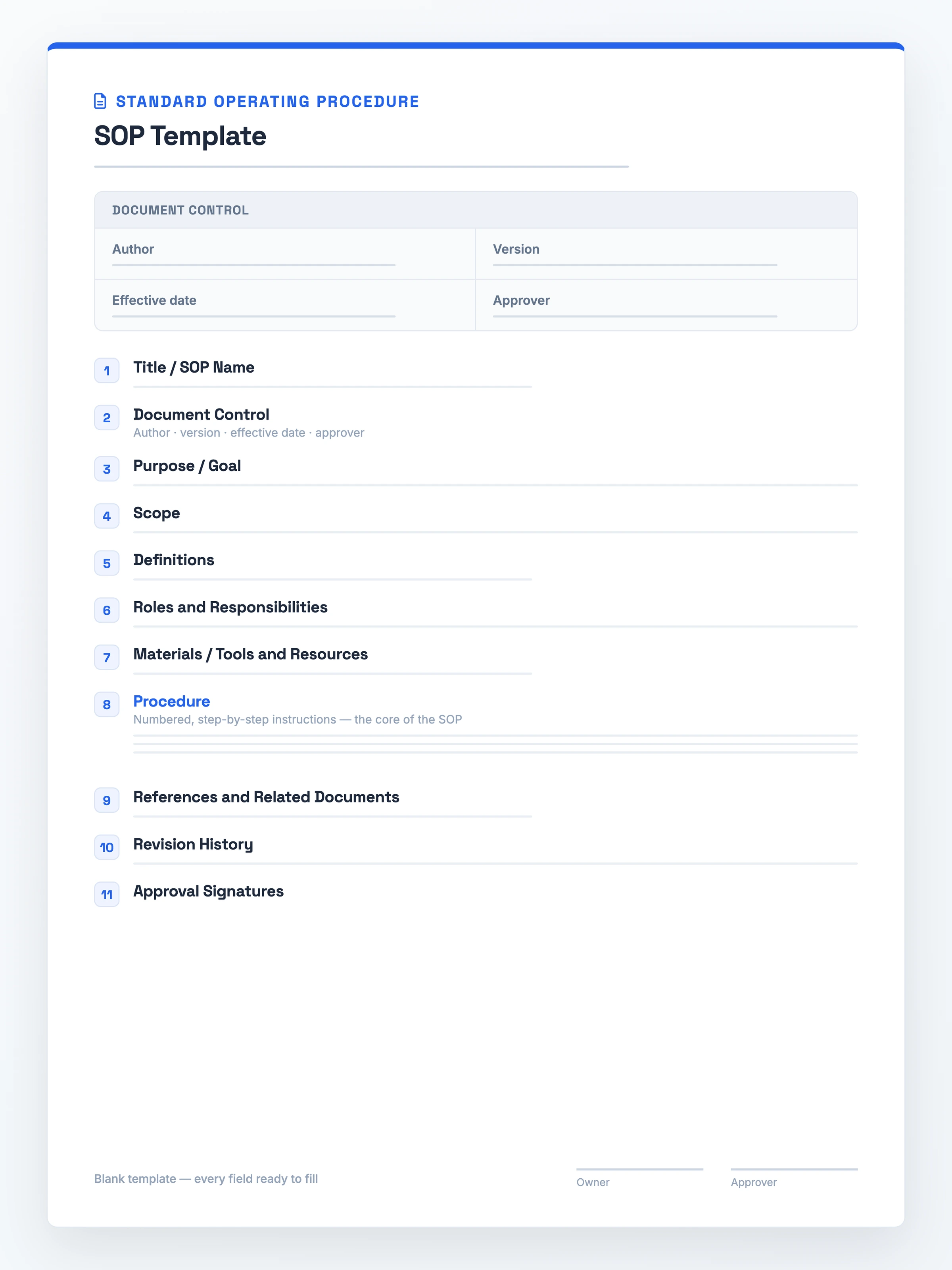
What it is: a reusable framework for documenting a repeatable procedure step by step, so anyone runs it the same way each time.
What it must contain: numbered Procedure steps at its heart, opened by a Title with its SOP ID, then Roles up front, a Scope and Purpose, plus Document Control and a Revision History log.
When to use it: onboarding a new hire, standardizing recurring tasks, or getting compliance sign-off.
The faster path: copy the full structure free on this page, or record the process and let Hinto fill it in.
The SOP Template (Copy-Paste Ready)
Copy this SOP template free of any signup or download: select the whole block and paste it into your own doc as your SOP document template, then fill each field.
STANDARD OPERATING PROCEDURE

1. Title / SOP Name: ____
   SOP number / ID: ____

2. Document Control
   Author: ____
   Version: ____
   Effective date: ____
   Approver: ____

3. Purpose / Goal: ____

4. Scope: ____

5. Definitions: ____

6. Roles and Responsibilities: ____

7. Materials / Tools and Resources: ____

8. Procedure
   Step 1: ____
   Step 2: ____
   Step 3: ____
   Step 4: ____

9. References and Related Documents: ____

10. Revision History
    Version | Date | Author | Change
    ____    | ____ | ____   | ____

11. Approval Signatures
    Owner: ____        Date: ____
    Approver: ____     Date: ____
What Goes Into an SOP Template
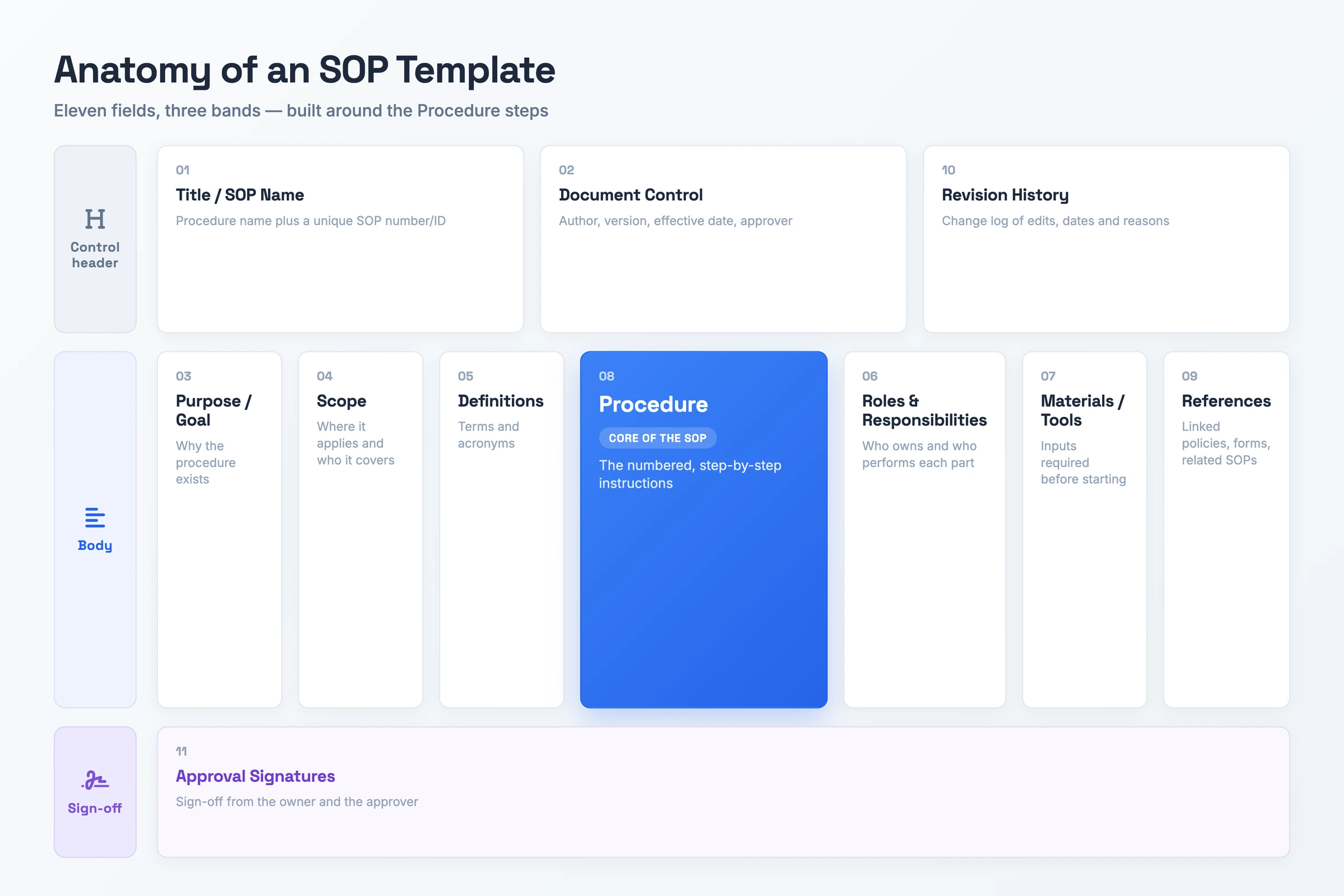
Solid SOP formats share the same backbone. Each of the eleven fields carries a specific job, shown below with a filled-in example.
- Title / SOP Name: The procedure's name plus a unique number that makes it easy to reference. A filled value reads "FIN-014: Monthly Payroll Run".
- Document Control: A small header table with author, version number, effective date, and approver. This is the change-tracking block for the doc.
- Purpose / Goal: One or two sentences naming the reason behind the procedure and the result it delivers, such as "run payroll accurately by the 28th".
- Scope: Where the SOP applies and where it does not, plus who it covers, for example "US salaried and hourly staff, excludes contractors".
- Definitions: Terms, acronyms, and abbreviations the reader needs before the steps, like "PTO = paid time off".
- Roles and Responsibilities: Who owns the procedure and who performs each part, naming the accountable role per task rather than an individual.
- Materials / Tools and Resources: The systems, inputs, or equipment required before starting, such as the payroll platform and the approved hours export.
- Procedure: The numbered instructions, the core of the SOP, written so anyone can follow them in order.
- References and Related Documents: Linked policies, forms, and related SOPs the reader may need.
- Revision History: A change log of edits, dates, and reasons. Readers see what changed and when.
- Approval Signatures: Sign-off from the owner and approver that marks the SOP as live.
How to Fill In the SOP Template
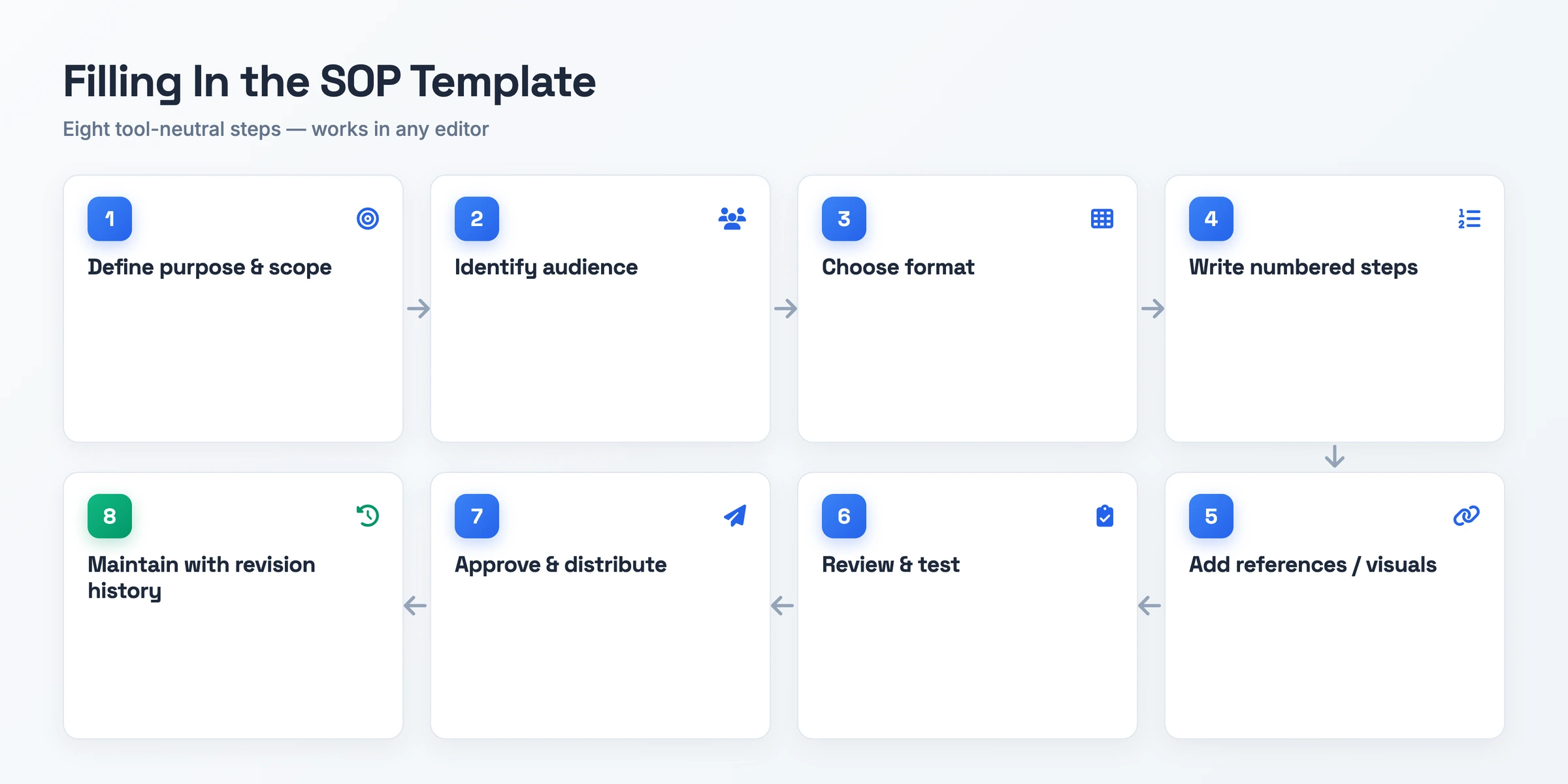
Work through this SOP writing template sequence and complete each field in turn. These same steps show you how to create SOP template drafts in a doc, a wiki, or a spreadsheet.
- Set the purpose and boundaries. State why the procedure exists and where it applies, so the reader knows what the SOP covers before the first step.
- Name the role that runs it. Pin down the job title performing the procedure rather than an individual, because naming a person breaks the document the day they leave. Note the experience level it assumes, since a new hire and a senior operator need different amounts of detail.
- Match the format to the work. Reach for numbered steps, a checklist, or a flowchart depending on how the work actually happens.
- Lay out the numbered actions. Break the procedure into one action per step, in the order someone performs them, with no gaps.
- Attach references and visuals. Link the related policies and forms, and drop in screenshots where a step is hard to describe in words.
- Test with a fresh reader. Have someone who has never run the procedure follow the draft, then fix the steps that trip them up.
- Sign off and share. Get the owner and approver to approve it, then post the SOP where the team already works.
- Keep it current with revision history. Log every edit with its date and reason. That way the document stays accurate instead of drifting out of date.
SOP Template: A Filled-In Example
The same SOP example template, filled in for a monthly payroll run:
- 1. Title / SOP Name: Monthly Payroll Run · SOP number / ID: FIN-014
- 2. Document Control: Author: Dev Shah · Version: 2.1 · Effective date: March 1, 2026 · Approver: Priya Nair
- 3. Purpose / Goal: Run monthly payroll accurately and pay every employee by the 28th.
- 4. Scope: US salaried and hourly staff. Excludes contractors, who are paid through the invoicing process.
- 5. Definitions: PTO = paid time off. Cutoff = the last day hours are accepted for the cycle.
- 6. Roles and Responsibilities: Payroll analyst runs the cycle. Finance manager reviews and approves. HR confirms new hires and leavers.
- 7. Materials / Tools and Resources: Payroll platform login, approved timesheet export, current benefits deductions file.
- 8. Procedure:
- Step 1: Pull the approved hours export on the 24th.
- Step 2: Reconcile new hires and leavers against the HR list.
- Step 3: Enter deductions and confirm net pay totals.
- Step 4: Submit for finance approval, then release payment on the 28th.
- 9. References and Related Documents: Expense Reimbursement SOP, Benefits Enrollment Policy.
- 10. Revision History: v2.1 · Feb 20, 2026 · Dev Shah · Added contractor exclusion to Scope.
- 11. Approval Signatures: Owner: Dev Shah, Feb 21, 2026 · Approver: Priya Nair, Feb 22, 2026
SOP Template Variants
The eleven-section base works for most procedures. These four flavors are common enough that teams reshape a few fields for them. Each one shows only what changes from the base structure.
IT SOP Template
Adapt the Procedure and Materials sections to cover system access, incident response, ticket handling, and escalation paths. The Materials field becomes a systems and tools list, and Roles and Responsibilities carries escalation contacts, so an on-call engineer knows who to page when a step fails.
HR SOP Template
Reframe the Procedure around onboarding, offboarding, leave requests, or policy sign-off. Add an acknowledgement field where the employee confirms they read the policy, and a record-keeping field that names where signed copies live, since HR procedures usually leave an audit trail.
Restaurant SOP Template
Add hygiene, food-handling, delivery-receiving, and equipment-sanitation steps to the Procedure. Extend the base with monitoring, corrective-action, and record-keeping fields. A line cook then logs fridge temperatures and records the fix when a reading falls out of range.
Manufacturing SOP Template
Center the Procedure on equipment operation, safety checks, and quality control. Add materials, PPE, and pass/fail acceptance criteria, which let an operator confirm the required gear and the tolerance a part has to meet before it moves down the line.
When to Use an SOP Template
Reach for the template the moment a new hire joins a team's recurring workflows. Onboarding is the point where undocumented steps hurt most, because the new person has no memory of the process to fall back on. A filled-in SOP hands them the sequence the team already trusts.
Use it again when people run a recurring task inconsistently. If two people run the same monthly process differently, the template turns their habits into one agreed procedure, so the result stops depending on who happened to do it.
It also earns its place when an auditor asks for sign-off. Compliance and regulatory work needs a documented procedure with an owner, a version, and an approval signature. The template gives you that record in a shape a reviewer can follow without a walkthrough.
Skip the Blank Document: Record It Instead
Filling a blank template is the step you keep putting off. The alternative is to record the process once and let the recording become the document.
Hinto AI transforms screen recordings and video walkthroughs into structured documentation and SOPs. You click record in the browser, capture your screen, and Hinto analyzes the recording, extracting screenshots, GIFs, and structured steps to produce the doc. Hinto supports common sources such as Loom, Zoom, YouTube, MP4, MOV, and WebM, subject to file-size and access requirements.
The result is an Internal Workflow SOP, a detailed process guide for team operations, built from what you did on screen instead of typed into an empty page. From there, one-click live hosting puts the finished SOP on a public URL with a custom domain and SSL included. Your team reads the same procedure the moment it is done.
SOP Template FAQ
What are the key elements of an SOP?
The numbered Procedure steps are the core. Framing them, a Title paired with its SOP ID opens the doc, Roles and Responsibilities assign ownership, and a Scope plus a Purpose set the boundaries. Document Control, References, a Revision History log, and Approval Signatures round it out.
What does an SOP actually do?
An SOP writes down a repeatable task, with a title, a purpose, and step-by-step instructions, so every person runs it the same way instead of leaning on one colleague's memory.
How do you write an SOP from scratch?
Start by setting why it exists and where it applies, name who will run it, then capture the work as numbered steps in the order they happen. Ask a fresh person to test the draft before the owner and approver sign off.
What types of SOP are there?
SOPs come in three formats: step-by-step lists, checklists, and flowcharts. Teams also shape industry flavors such as IT, HR, restaurant, and manufacturing SOPs, each keeping the same backbone while adjusting the Procedure.
Why not just use a blank page?
A blank page forces you to remember every required section yourself. A template already includes document control, scope, responsibilities, revision history, and approvals, so nothing gets left out.
Can I generate an SOP template from a video?
Yes. With Hinto AI you record the process on your screen, and it extracts screenshots and structured steps into a filled-in SOP. Hinto supports common sources such as Loom, Zoom, YouTube, MP4, MOV, and WebM, subject to file-size and access requirements.