
How to Create Effective Quick Reference Guides & Job Aids (Templates Included)
The reason why people send in support tickets is due to the same three questions. Onboarding drop-off is happening when new hires are on page 47 of the manual. In 43% of cases, nurses do not complete step 4 of the process; this is because the procedure is in a binder that no one opens. The issue is not that there isn't enough documentation available; rather, there is too much information for people to remember at one time since they cannot remember 12 steps, 5 exceptions, and 2 decision branches, especially with their hands busy.
This guide does not have the usual fluff you'd find on blogs. We base everything on the methodology of ATD and EPPIC, as well as actual federal examples (i.e. FEMA and the IRS). You'll find templates you can download, a way to systematically gather content, and science on why job aids work when training/hands-on practice does not. For teams planning a knowledge management strategy, these quick reference guides will help turn "We documented it" into "People use it."
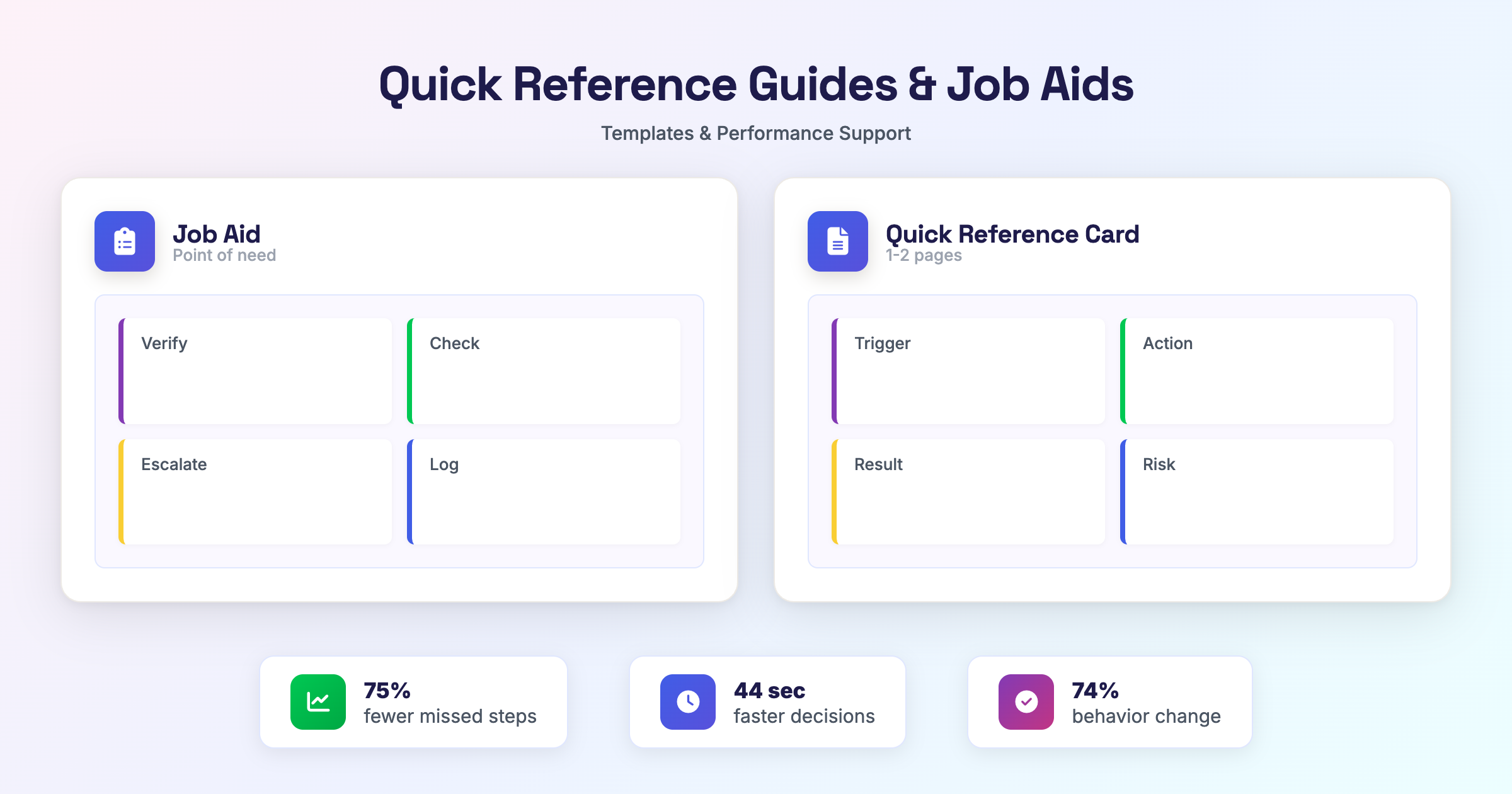
The Performance Support Science: What are Job Aids?
A systematic examination of 13 randomised studies in Anaesthesia found a lack of effective memory reliance and accuracy for care delivery in critical care (43.3% of outcomes missing, compared with 11% respective outcomes using cognitive aids - checklists, flow charts and one-pagers)[1]. Therefore, the difference determining whether or not the care has been delivered correctly, regardless of how many people received proper training, is performance support and delivering what you teach.
Job Aids (or 'job aides' - both spellings can be found in the literature) are not training. They are a form of performance support given at the time of need. When an action is complex, performed infrequently or bears a high-risk outcome, there is a chance that memory will not serve well. ATD's framework as well as EPPIC's examples of 'Flow versus Memory' explicitly indicate that some of your work needs to be stored in your thoughts, while most of your work needs to be stored in your hands. Teams who develop employee onboarding best practices must find Job Aids as a means to bridge the divide between training and sustaining competencies.
The Cognitive Load and the "Memory Gap"
Why do we forget? The working memory has a capacity of about 7 "chunks"; once this limit is reached, performance can suffer. Adding stress, interruptions or new material reduces this limit. This is why job aids have meaning; they are tools designed to take the burden of remembering away from the user so they can concentrate on performing. In other words, a performance enhancer does not require additional training to expand the cognitive capacity of a worker.
Data from 2025 demonstrates this principle very well. Workers faced with high-stress decisions reduced their decision time by more than 44 seconds (a cut of more than 30%) due to the use of a visual cognitive aid[2] (e.g., page 103 of the memorandum). When the cognitive aid is well designed, there is no trade-off between speed and accuracy (the worker who checks the branch quickly knows what to do next, and there is no need to remember whether to follow step 4 or step 5 of the procedure).
The EPPIC framework designates this as a "Flow" task; the operator knows what to do next, they just need the path to follow, not the theory. The job aid directs them along that path. Training provides the foundation for the worker; the job aid maintains the foundation in stressful performance situations.
SOPs and Job Aids
The way in which documents are utilized is fundamentally different between job aids and standard operating procedures (SOPs) despite both documents providing instructions on how tasks should be accomplished. An SOP is an official record of how to do a task; it lists how to accomplish that task for purposes of compliance, audit, and onboarding. A job aid will be used at the time of performing the task.
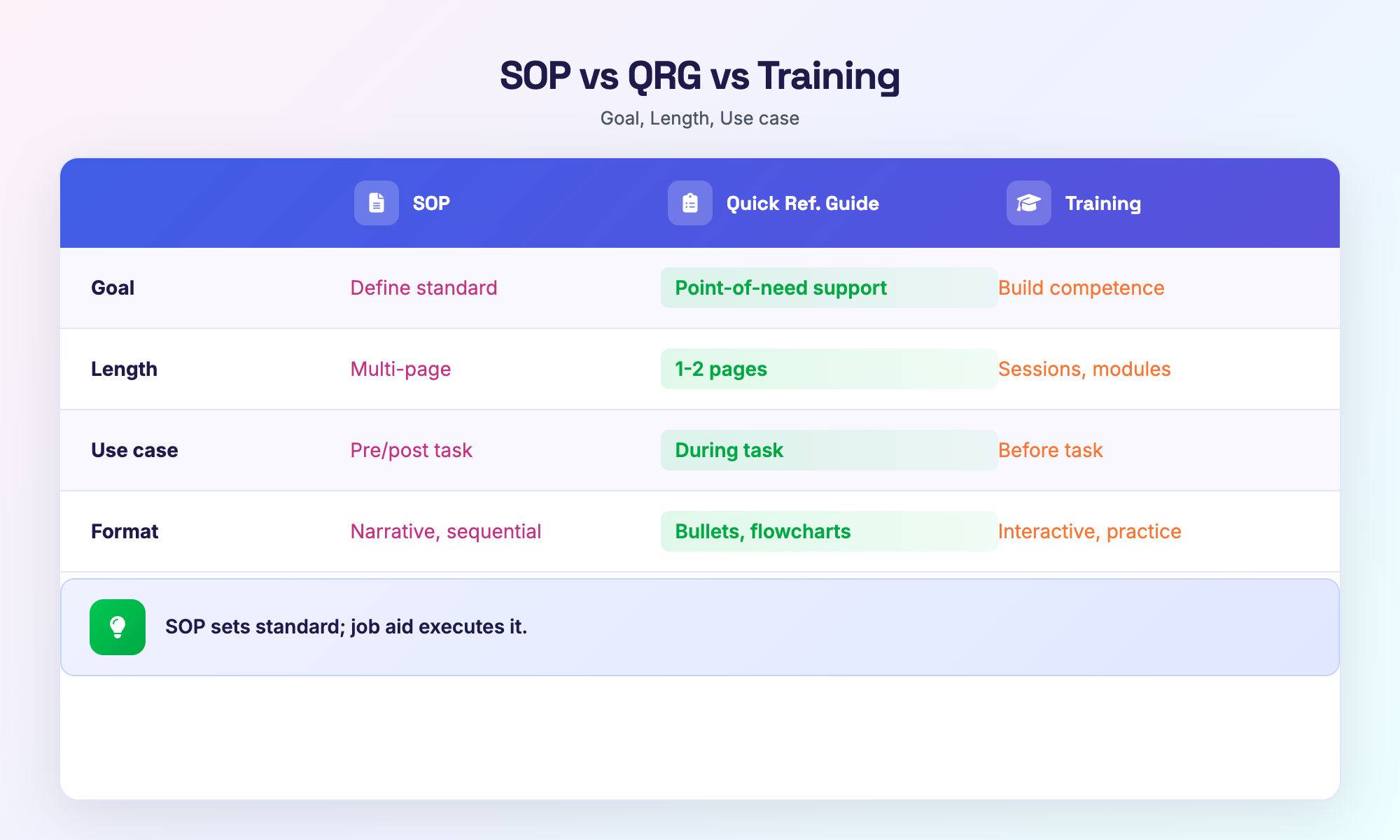
The HPOG methodology categorizes the differences between SOPs and Job Aids based on goal, length, user state, and format as follows:
| SOP | Quick Reference Guide (QRG) | Training | |
|---|---|---|---|
| Goal | To document the standard of how to do a task; to support compliance. | To support executing the task at the point of need. | To build competence before performing the task. |
| Length | Multi-page and comprehensive document. | 1 to 2 page scannable document. | Variable length depending upon method to deliver training; can be delivered in sessions or modules. |
| User State | Pre-task (study) or post-task (audit). | During task (glance). | Before task (learning). |
| Format of Document | Narrative, sequential, and includes full context. | Bullets, charts, and flow charts. | Interactive (practice and receive feedback). |
Job aids and training do not need to be considered an either/or situation. A research project conducted in 2025 studied 200 surgeries and found a significant improvement in the reduction of adverse events when an SOP was utilized as a foundation document with active checklists; that combination produced better results than SOPs alone.[3]
To clarify, an SOP is a standard to follow; a Job Aid is how to achieve that standard. Think of an SOP as a contract and a Job Aid as a cheat sheet.
Moreover, Safety Work Procedures (SWPs) are focused solely on hazard control and personal protective equipment (PPE). SWPs are not intended to improve efficiencies, therefore, they should be separated from other documentation of processes used to maintain compliance.[5]
Choosing the Right Format for Your Duty: A Quick Reference Guide Template
The format of a Quick Reference Guide is determined by the type of work being performed. Before opening a template or creating one, determine whether the work requires decision-making (branching) or an action sequence (non-branching). This distinction will ultimately dictate how you format your Quick Reference Guide.
If the worker has two choices for action ("If X, then do A; if Y, then do B"), then a decision structure must be incorporated into the Quick Reference Guide. Conversely, if the worker is executing instructions in a linear fashion, then a non-decision structure (i.e., list) should be used. There are examples of how a Quick Reference Guide format differs within federal and industrial sectors, typically occurring because of the mismatch between work and the formatting of the guide. It is believed, through studies, that the majority of users (74%) change their behavior after using a simplified one-page guide[4]. In essence, the key to successful adoption of your Quick Reference Guides is based on the match of the format to the work, not the visual design of the Guide.
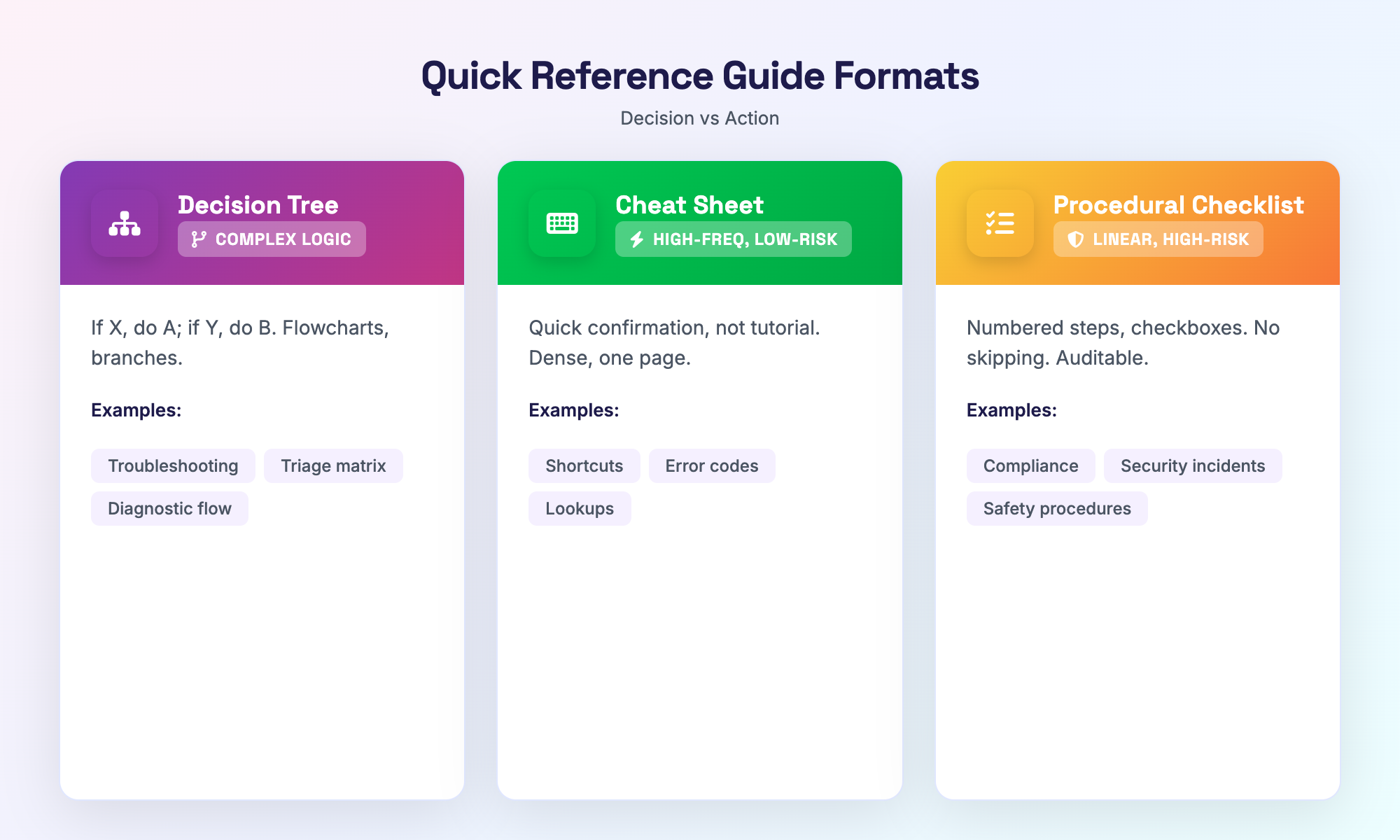
Complex Logic - Use of Decision Trees
When there are multiple paths based on certain criteria, a decision tree template is the most effective. This includes flowcharts, yes/no branches and "jump to step X" style of logic where the user wants to navigate (not read). These would include a troubleshooting guide for equipment, a triage matrix for support tickets and a "which form do I need?" selector.
Download: QRG Format Selector: Which Template Do You Need? - A one-page flowchart that maps your task type (decision vs. action, high vs. low risk) to the recommended format. Use it before you design.
A format selector will ask for how many branches exist, how frequently users do this, and the consequences of making a wrong turn; all work that is done in high seriousness at multiple branches should belong in a decision tree and all work that is done in a low seriousness manner on one line should not belong in a decision tree.
The Quick Reference Card
High frequency Low risk. Keyboard shortcuts cheat sheet. Login information required on the Staging Environment. Commonly used error codes and resolution methods. The user is performing this task frequently enough that they likely already have a firm grasp of how to do the task and can read quickly to confirm that they're still capable of completing the task as expected. For example, the user will need a quick reference card template (note: there may be others as well) and/or quick start guide examples to assist them in this process.
Get as much information in as little space as possible—one page. Use graphics as much as possible—the user should simply glance at the information, find the row and move on to the next row of information. If your user is reading blocks of text, then you built the wrong reference card.
The Checklist Used for Compliance
Linear/higher risk/auditable. CDSE job aids (examples of industrial security incidents, examples of healthcare compliance) show the pattern in numbered steps, checkboxes, signoffs. The user completely follows each step in order; they will not skip a step. A compliance checklist is not optional; it is a control.
In many examples of industrial usages, a two column layout is used: action is on left, verification is on right. "Did you do X?" "Initial here." This format provides evidence for both execution and audit processes. Audit or regulatory bodies will use the checklist as evidence of what was done.
Investigating Ideal Job Aids (Industry and Government)
The volume of online quality job aid examples are pretty; colourful and useless when stressed. Federal government and regulatory compliance foremost design for glanceability vs aesthetic appeal. Here’s how the design should work - and the ones that wouldn’t work in your case.
Analyzing FEMA's EOC Quick Reference Guide
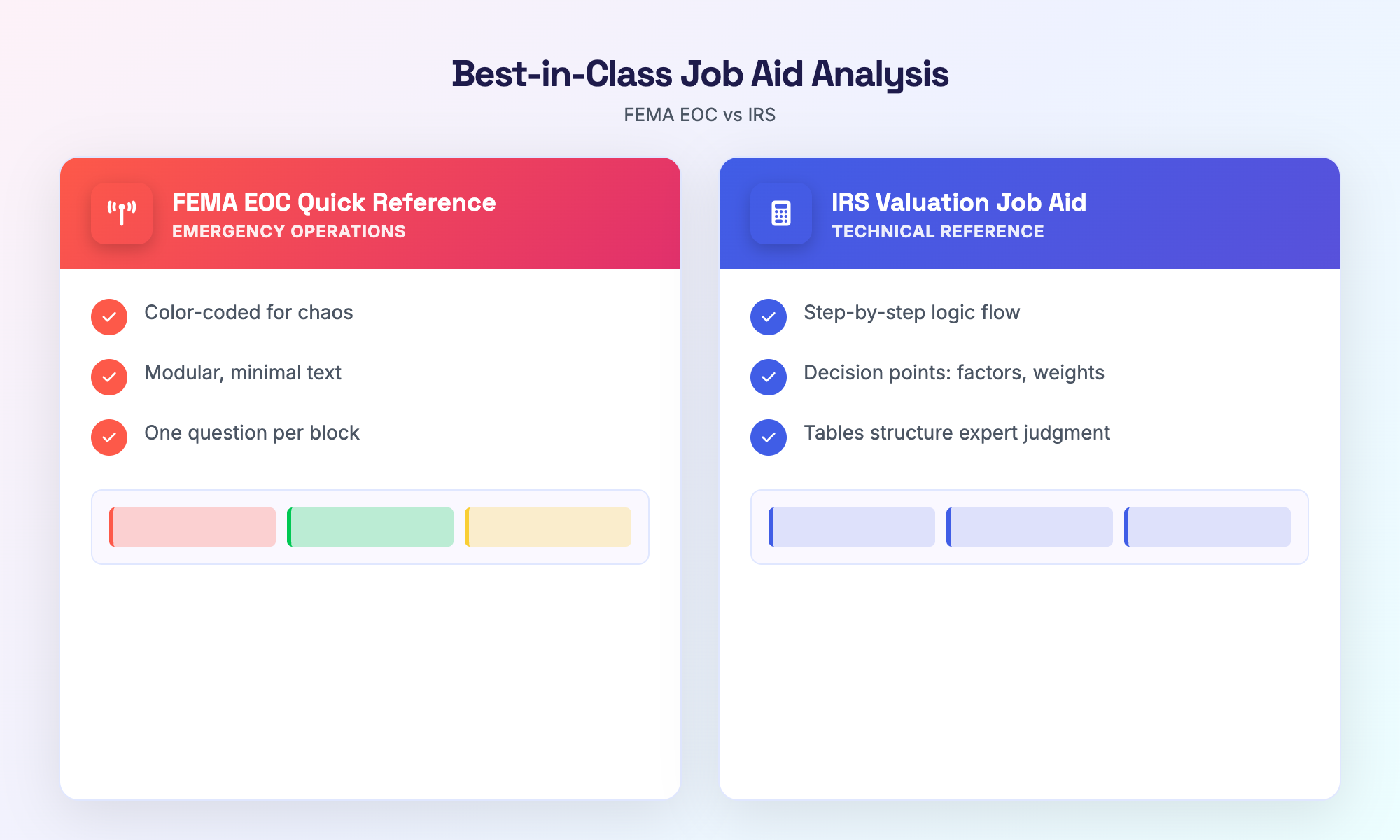
The FEMA EOC Quick Reference Guide was designed for chaos: emergency operations centers require rapid decision making. The layout supports that: color-coded areas, modular blocks, minimal text. The visual hierarchy of documentation here means “Find the section, scan the bullets, act.” No paragraphs. No “This is how the concept works.”
What makes this a professional reference guide rather than some posters: Information density is calibrated so that each block answers only one question. Users don’t search. They drop into the box. In a high-stress EOC, the key is having the density between “We have a plan,” and “We executed the plan.”
Note: FEMA's audience is trained; they understand the EOC framework. Therefore, if you are developing for a beginner, you will need additional layers of scaffolding – a brief "what this is" section before the boxes. You can replicate the density, but not the expectation of expertise.
The IRS Valuation Job Aid: Managing Complexity
Job aids that involve subjective reasoning? If you are looking to create a job aid for the IRS Valuation Job Aid Process, you can transform this judgement-based area into a logical step by step process or flow of logic using a job aid format in which you have identified the decision points as to what factors will apply to their own situation, the weight of those factors, and how they will document their determination of value.
A Job Aid for Data Analysis does not replace the subject matter expert; it is intended to structure the workflow of the subject matter expert so that nothing can be missed. For example, you can create tables (like the one in the IRS Valuation Job Aid), create checklists (like the one in the IRS Valuation Job Aid) and then create 'if this' criteria branches (like the one in the IRS Valuation Job Aid). The IRS Valuation Job Aid is much longer than a one page document (which is correct). You need to give more and more space to complex or difficult tasks. Use the same principle - use minimal prose and maximum structure.
The Federal Compliance Job Aid has the same basic pattern as the IRS Valuation Job Aid (in terms of the document length, each page serves a single job). Federal Job Aids vary widely regarding their format because they are built for consistency and audit trails, not marketing or to sell something.
Creating a Quick Reference Guide: A Methodical Process
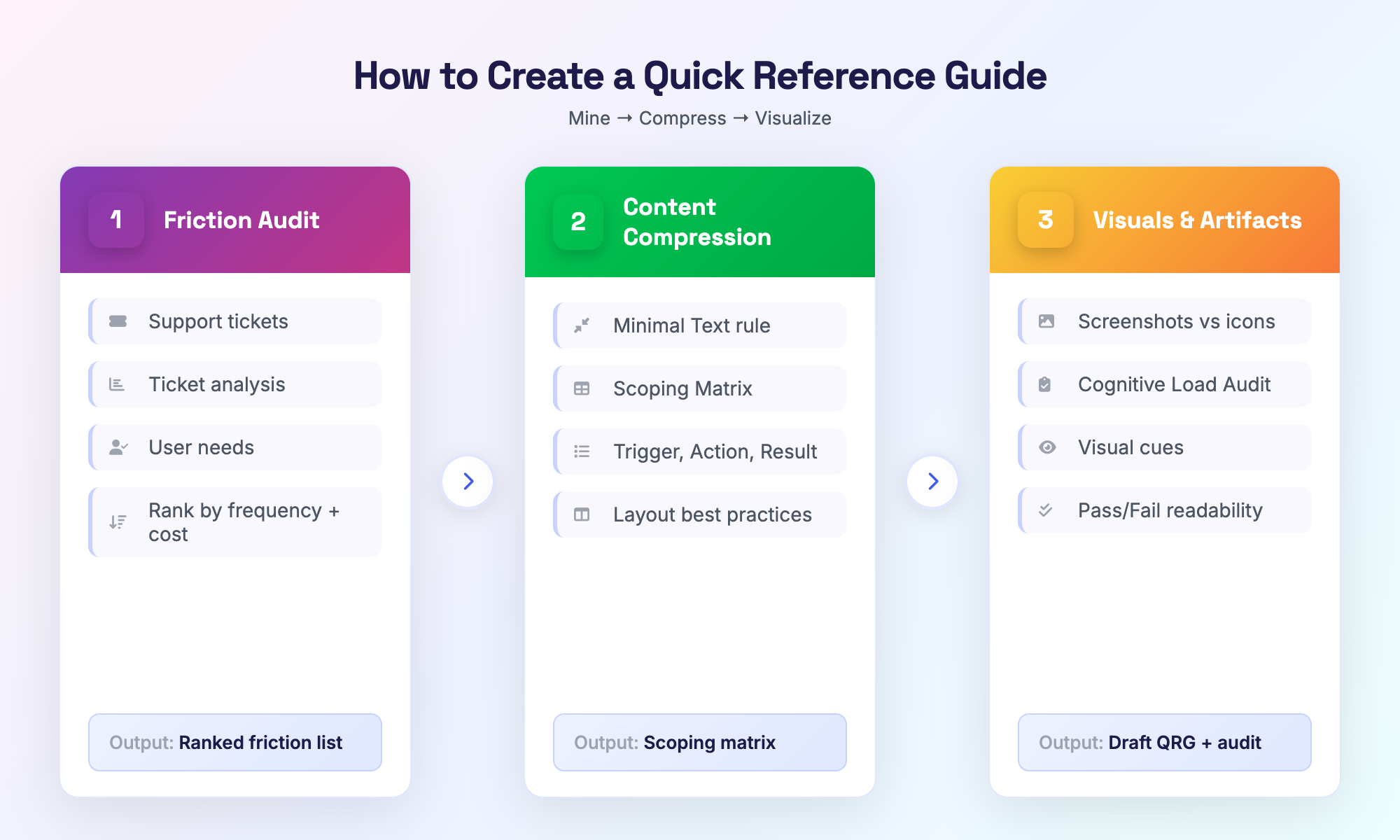
Creating a quick reference guide isn't initially about graphic design; rather, it's discovery. Determining where on your team's portfolio or organization's services there is a breakdown in workflow should be the first step. For example, audit findings, support tickets or reiterated questions to the same staff member can all be used as the obvious (or uncontrolled, but we prefer the former) items for you to use as fuel to create your Quick Reference Guide. Some teams will report that 80% of all writing requests within their team are related to less than a dozen common procedures, therefore it is essential to identify these friction points before developing the outline for your writing guide template.
Friction Audit - 1st step - Audit of Friction in an Organization (Data Mining)
A user needs assessment does not need to be done with a survey. This can be achieved through spreadsheets. Perform a data mining process on help desk support tickets for the previous 90 days. Each support ticket should be tagged by topic. Then count the number of times each topic occurs. After the counting phase is complete it will expose large numbers of “I can’t reset my password,” “What form should I complete if my expense exceeds $500,” “When should I escalate an incident of severity 2.”
Support ticket analysis is very useful in verifying and identifying where people stall in an organization, as well as the point when the issue is causing frustration.
Forum activity (e.g., Reddit) as well as other forums (industry) are useful in obtaining additional feedback, which provides signals that practitioners vent about unclear processes, ambiguous workflows, and why the issue is not documented. The sentiment is the actual map. You can tell by where the complaints occur that is where you would put your job aid.
The output of the Friction Audit process will be a ranked list of processes by two criteria, (1) how frequently do they create confusion and (2) what is the consequence of the confusion when the process fails (or goes wrong). High frequency + high consequence = build this process first.
Phase 2: Information Condensation and Presentation
After acquiring all the content you'll be developing into a job aid, your next step is to condense content. Remember the rule of Minimal Text. If a word does not modify behavior, eliminate it! When developing a job aid, use bullets instead of sentences for written instructions, and use tables instead of paragraphs for written instructions. Your quick reference is basically a skeleton... what you are providing is the minimum amount of information necessary to complete the task.
The design of the job aid starts with scoping. To scope your job aid use a Job Aid Scoping Matrix. The matrix clearly defines the Trigger, Action, Result and Risk Level on the job aid before creating it.
| Procedure # | Trigger | Action | Result | Risk Level |
|---|---|---|---|---|
| 1 | User needs to reset the password | Follow 5-step process | The user has access again | Low |
| 2 | User needs expense form over $500 | Complete Form X, get manager approval | Reimbursement processed | Medium |
In the Columns of the Matrix, you describe the Trigger (Who/what triggered the need for the job aid?), Action (What action will the User take in order to use the job aid?), Result (What will happen when the job aid has been used/they have completed the job?), and Risk Level (Low-Medium-High?). You should have one row for each procedure used to create the job aid. If you are unable to complete the question for one of the column sections of any of the procedures, you have not yet developed a complete enough understanding of the procedure to be able to complete the job aid yet.
Additionally, the best-practice layout guidelines stem from this one-row-per-screen or section approach and do not allow mixing and matching of job aid sections.
Download: Job Aid Scoping Matrix (Excel/Google Sheet) - Columns: Trigger, Action, Result, Risk Level. Use for each procedure before drafting.
Phase 3: Visuals and Artifacts
Should you use screenshots or icons? It depends. A job aid with screenshots is useful when the user must be able to identify a specific interface - "click the blue button located in the upper-right corner." On the other hand, icons are useful for abstract concepts - "Decision Point or Verification Step." You can use both techniques or do away with long passages of text.
Visual cues should: be redundant with the text, rather than purely decorative; If the icon adds no additional value, remove it. The enemy of cognitive load is cognitive load. A 10 Point Cognitive Load Audit determines whether a document passes or fails any criteria established for establishing the readabilty of an QRG document and will help you to eliminate the cognitive load prior to publishing the document.
Checklist: The 10-Point Cognitive Load Audit - Criteria: Can the user find the answer in under 10 seconds? Is each section under 50 words? Are there more than 3 bullet levels? (Pass/Fail for each.)
Design Principles for a Professional Reference Guide - Use of White Space, Hierarchy & Consistency. An example is if Section A of the document has used Bold font for its Section Headers then Section B should not use Italics in their Section Headers. The user's brain relies on patterns to establish reference and these patterns should only be broken sparingly.
AI-Enhanced Documentation Available Faster than Ever
When it comes to creating quick reference guides, many people think that the bottleneck is creativity. But in reality, it's extracting the information contained in long SOPs, recorded walkthroughs or internal knowledge that's challenging to convert to a Scannable Aid This process used to take hours! Thanks to AI-Based Documentation tools, the math has changed. You provide the source, the system will compress and structure it, and instead of having a person create the document, a person reviews it.
To manually convert a 40-page SOP into a two-page QRG you would have to read the SOP, highlight the relevant information, condense the content, and reformat it. With an Auto-Generate QRG Workflow, the order of events is reversed; the AI will create a skeleton for your QRG and you just have to make changes to it. The Friction Audit will still identify what should be created, and the AI will assist in accelerating that build process.
Transforming how we create step-by-step guides from video tutorials
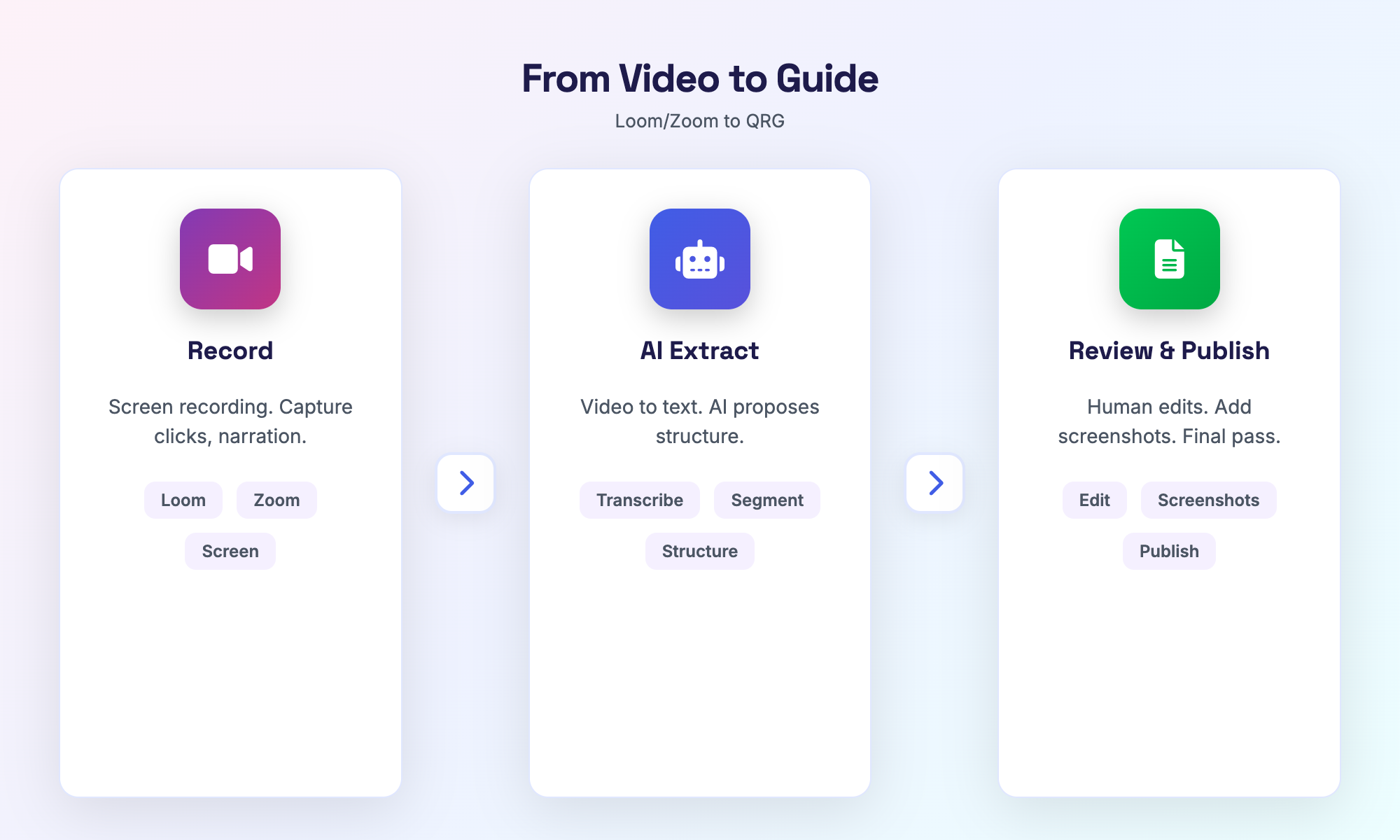
A video to step-by-step guide conversion is the most efficient way to produce a documented process. A Loom or Zoom screen recording shows the exact steps that were taken while completing the task – including clicks, pauses, and "You need to do this first." Converting video to text extracts the audio narration and timestamp. Then the AI can create the steps from the flow of the video and number them. The end result is not a publishable document, but rather a draft that has been created in minutes instead of hours.
To complete the workflow, record the task in video format, upload it to the video-to-text converter and the AI will then segment the video and transcribe the audio. Next, review the transcript to determine if there were any steps that were missed, or if any two steps should be combined into one. Finally, add any screenshots or graphics that you would like to use to illustrate the steps. The final draft will be an accurate representation of what you did to complete the task. The total time involved is significantly less than creating a document from scratch. For teams with more processes than they have capacity to develop documentation for, using this method is a game changer.
Trade Tools: Software and Templates
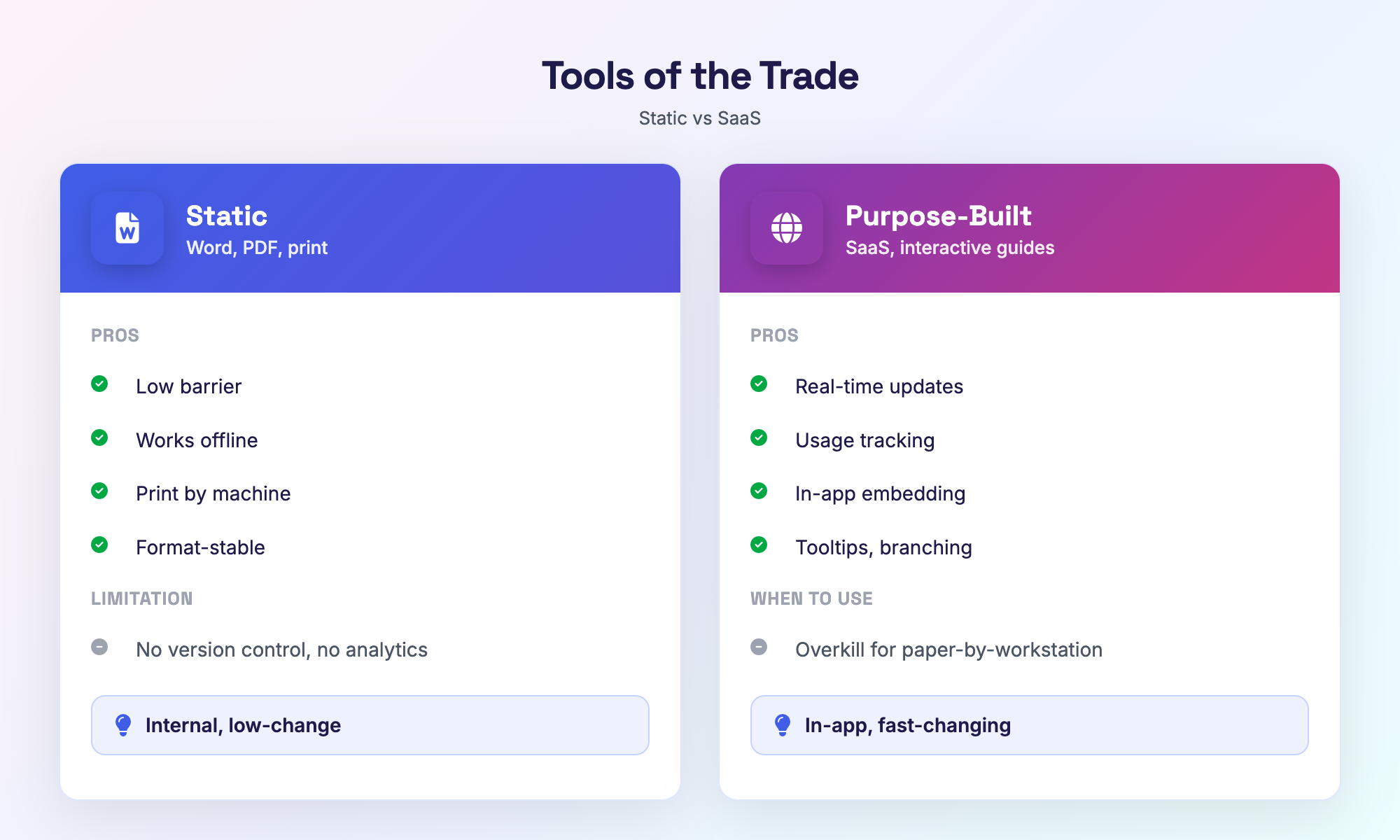
Templates for quick reference guides include Word documents and PDFs. The tools available to you do not determine the best option. Instead, you should begin with what is happening in your context. Static outputs (Word & PDF) are produced quickly, allow offline access, and withstand changes in format. Dynamic tools are (SaaS & interactive)** continuously linked (in real time), continually tracked, and embedded in the workflow. Both value types are important.
Comparison of Microsoft Word and Other Solutions Specific to Purpose
The starting point for a job aid template word is the easiest to establish as most users currently have a copy, can use tables and styles, and require a reasonable structure to build.
Using Microsoft Word for exporting to PDF provides a means to distribute, however, there is no version control other than 'v2finalFINAL.docx', no methods for using analytical or in-app methods to embed.
For non-complex, internal processes, these limitations may result in more than adequate support.
Using interactive guide software adds additional layers, which could include tooltips and branching logic, along with providing video content embedded in the application.
Complex and costly when users require context and reference to the application.
Conversely, it fails as a viable support method when users are required only to print a sheet of paper and use it as a point of reference when outputting on paper.
Consider the quick reference guide templates to be utilized. The delivery method may require drawing information from the application or printing a document for reference.
If printed and provided by the workstation, Microsoft Word works well. If used as an in-app method guide, interactive guide software works best.
The options for reference guide template vary significantly based on price, usability and development. Sources vary from free to paid based on both individual and a company's needs. Starting with an adequate and basic solution that meets your needs is important; however, upgrading based on pain (i.e., version chaos, update lag, adoption tracking) should occur when the pain justifies upgrading.
Lifecycle Management: How to Maintain a QRG
Reference guide maintenance is where the majority of effort dies... A job aid gets shipped and everyone says "yes" and then 6 months later it is no longer accurate. The process has changed. The software has been updated. The guide hasn't. Document versioning is not sexy, but it defines the difference between a one-time project and a live resource.
The ultimate question is, who owns the current updates? The answer is the person who notices when something has changed... If nobody knows, the content will become stale. Documentation governance defines roles. A simplified RACI for documentation can reduce the matrix to 3 basic roles:
| Role | Responsible | Accountable | Consulted |
|---|---|---|---|
| Subject Matter Expert | Draft, validate | ||
| Department Head | Approve, sign off | ||
| End Users | Test, report |
Content ownership is with the SME. They have a good understanding of the process and the implications when the process is not accurate. The Department Head has responsibility for the approval of the document before it may be published. The End Users will be consulted prior to any significant revision of the reference guide since they will be the first to notice "that step is no longer accurate."
The frequency of updates to a reference guide depends on how frequently the process changes. For example, stable processes should be reviewed every year. Processes that change frequently, such as through a software update, should be reviewed on a quarterly basis. Processes that are affected by regulations or compliance issues should be reviewed in conjunction with the corresponding reports or audits. The bottom line is that if the process has changed and the reference guide has not, the reference guide is a liability. Reference guide maintenance should be part of the overall planning process and therefore not reactive.
Simplified RACI for Documentation:
| Responsible | Accountable | Consulted | |
|---|---|---|---|
| Who | SME | Department head | End users |
| What | Write, Update, Validate | Approve, Publish | Review, Provide Feedback |
The Friction Audit tells you what you need to make; Hinto AI does all of that faster. To use Hinto AI, you upload a video (like a Loom, Zoom or any other Video of a person performing the process) and it will automatically generate a structured outline, step-by-step instructions, and images based on what you did in the video. It normally takes hours to manually get all of this information out of a video, and Hinto will provide you with everything you need in just a few minutes. The AI does all of the transcription, action detection, and layout work; you need to ensure that everything is accurate and complete.
After Hinto generates the documents, it provides a Rich Text Editor (with image tools like Crop, Focus and Blur), the ability to keep a Version History (so you can roll back when needed) and provides a way to publish the documents to a live URL with just a few clicks. Additionally, if you want to embed the guides somewhere else, they can be exported in Markdown or HTML format.
The Hinto AI Workflow is the second part of the lifecycle we have discussed: Find the friction, compress it into usable content, and maintain the content through Governance. Hinto helps you to accelerate the compressing process so that you can stay focused on the Friction Audit and the Maintenance of the process. Check out Hinto AI to learn more about how to create video to documentation workflows with it!
Frequently Asked Questions
What does QRG mean in Business?
QRG means Quick Reference Guide, which is an abbreviated document used as a support tool when performing work-related tasks (i.e., "how to do it" vs. "why to do it"). A quick reference guide will typically be a two-sided document containing information in a condensed format with little or no written instructions. A quick reference guide may be as simple as a one-page/one-sheet document containing only key points, or it could be as complex as a multi-page flowchart or step card with considerable amount of detail providing users with sufficient amount of time for task completion. The terms job aide and performance support tool are generally but not always interchangeable with a quick reference guide.
Job Aid vs. Procedure
The procedure (standard operating procedure or SOP) is the legal authority for carrying out a process as developed by compliance, audits and new employee training. The job aid is used by the operator to complete a task by providing instruction and guidance; therefore, it will typically be referred to during task completion rather than prior to performing the task. The procedure defines the standard; the job aid provides a means by which to execute it. A person studying the procedure would read the entire document from beginning to end while a person completing the work would read the job aid as required for continuous reference. Therefore, there are many companies who create both: a formal record of the procedure (SOP), and an informal record of assisting the employee to complete the specific task (checklist or flow chart).
What are the three most frequently used forms of job aid?
The three primary types of job aids correspond to the type of task performed: Decision Trees, Cheat Sheets/Quick Reference Cards, and Procedural Checklists.
- Decision Trees (e.g., troubleshooting, triage, determining which form to use, etc.) follow branching logic.
- Cheat Sheets/Quick Reference Cards (e.g., providing shortcuts for commonly performed low-risk tasks, codes for identifying specific types of items, and rapid access to information) are used for high-frequency/low-risk tasks.
- Procedural Checklists (e.g., outlining steps required for compliance, creating audit trails, and developing sequences for obtaining sign-off) are related to linear high-risk activities.
The format utilized should match how an individual processes information to solve the task at hand.
What is the ideal length of a Quick Reference Guide (QRG)?
The answer is dependent on the type of task. For instance, keyboard shortcuts can be provided on a single page while a complex compliance workflow may need between three and four pages of information for the user to receive complete instructions. The rule of thumb would be to keep it as short as possible but also complete enough to give the user an answer to their question in less than 10 seconds. The average length of most procedures is 1-2 pages. If your QRG exceeds this limit, consider whether you are creating a mini-manual or QRG.
Is it Possible You Could Use Your Checklists As Job-Aids?
Absolutely. Checklists are considered top-quality types of job aids adjunct to other references (standard operating procedures, etc.). Proven research demonstrates that combining an SOP with a checklist reduces errors more than using an SOP alone; the use of a checklist decreases the need for a person to remember whether they have completed all required actions. They are used in aviation, health care, and industrial compliance. The most important aspect of checklist design is to ensure there is one action in each line item on your checklist and clear verification that the action has taken place; additionally, checklists must not be used as generic "to do" lists.
Which software is ideal for developing technical quick reference guides?
There is no definitive "best" answer; it depends on your limitations. Microsoft Word and PDF files work well for creating static, print-based reference guides, with low barriers to use and universal accessibility. Tools designed specifically for creating interactive, Software as a Service (SaaS) or web-based reference guides have the advantage of providing version control, user analytics, and embedding in an app. If your intended audience is technical, you will want to determine if they require printed copies, the ability to work offline, and/or real-time access to updates. Begin with the simplest option that will address your audience's requirements; upgrade to a more sophisticated option when you begin to encounter issues with versioning and/or have trouble keeping your references up to date.
References
The following authoritative sources were cited in this article:
- Greig, P. R., Zolger, D., Onwochei, D. N., & Higham, H. (2023). Cognitive aids in the management of clinical emergencies: A systematic review. Anaesthesia, 78(3), 343-355. https://associationofanaesthetists-publications.onlinelibrary.wiley.com/doi/10.1111/anae.15939
- Abdel-Meguid, T., et al. (2025). Emergency Airway Management: A Systematic Review on the Effectiveness of Cognitive Aids in Improving Outcomes and Provider Performance. Clinics and Practice, 15(1), 13. https://www.mdpi.com/2039-7283/15/1/13
- Wang, L., & Zhang, Y. (2025). Impact of Implementing Checklist Management Combined with SOP on Nursing Quality Among ENT Surgery Nurses. Computational and Mathematical Methods in Medicine. https://pubmed.ncbi.nlm.nih.gov/38800537/
- Thompson, A., O'Sullivan, P., Banham, E., & Peterson, G. (2016). Assessing the uptake and effectiveness of a quick reference guide to antibiotic prescribing in Australian general practice. Australian Journal of Primary Health, 22(6), 565-568. https://pubmed.ncbi.nlm.nih.gov/27377148/
- HSE Study Guide. (2025, October 17). SWP vs SOP: Safe Work Procedure vs Standard Operating Procedure. https://www.hsestudyguide.com/swp-vs-sop/
