
Mastering How-To Guides and Work Instructions: A Comprehensive Step-by-Step Guide
Introduction
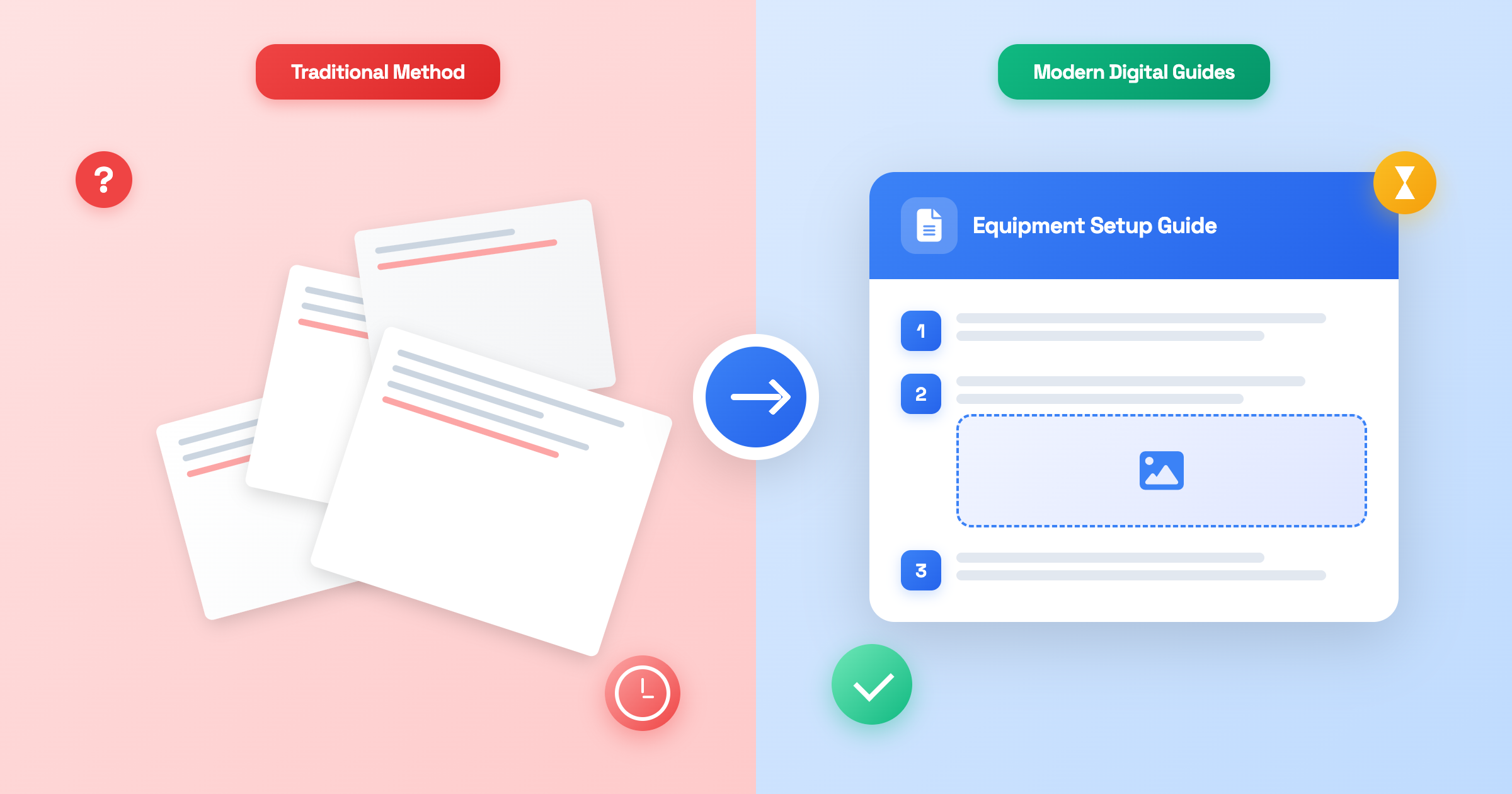
Every organization faces the same challenge: how do you ensure tasks are completed correctly, consistently, and efficiently across your entire team? The answer lies in creating clear, visual step-by-step guides and work instructions that anyone can follow
Whether you're training new employees, standardizing processes, or simply trying to reduce the number of "How do I do this?" questions your team asks daily, well-crafted how-to guides are essential tools for success. Yet, many organizations still struggle with inconsistent documentation, outdated manuals, and processes that exist only in the minds of a few key employees.
This comprehensive guide will teach you exactly how to create a how to guide that actually works. You'll learn the difference between how-to guides, work instructions, and visual step-by-step documentation. More importantly, you'll discover a proven process for creating guides that reduce errors, save time, and empower your team to work independently.
In this article, you'll learn:
- What how-to guides and work instructions are (and why they matter)
- The key benefits of step-by-step documentation for your organization
- Common pitfalls of traditional documentation methods
- An 11-step process for creating effective guides
- Best practices and common mistakes to avoid
- Answers to frequently asked questions about guide creation
By the end of this guide, you'll have everything you need to transform tribal knowledge into accessible, visual documentation that drives real results.
What Are How-To Guides and Work Instructions?
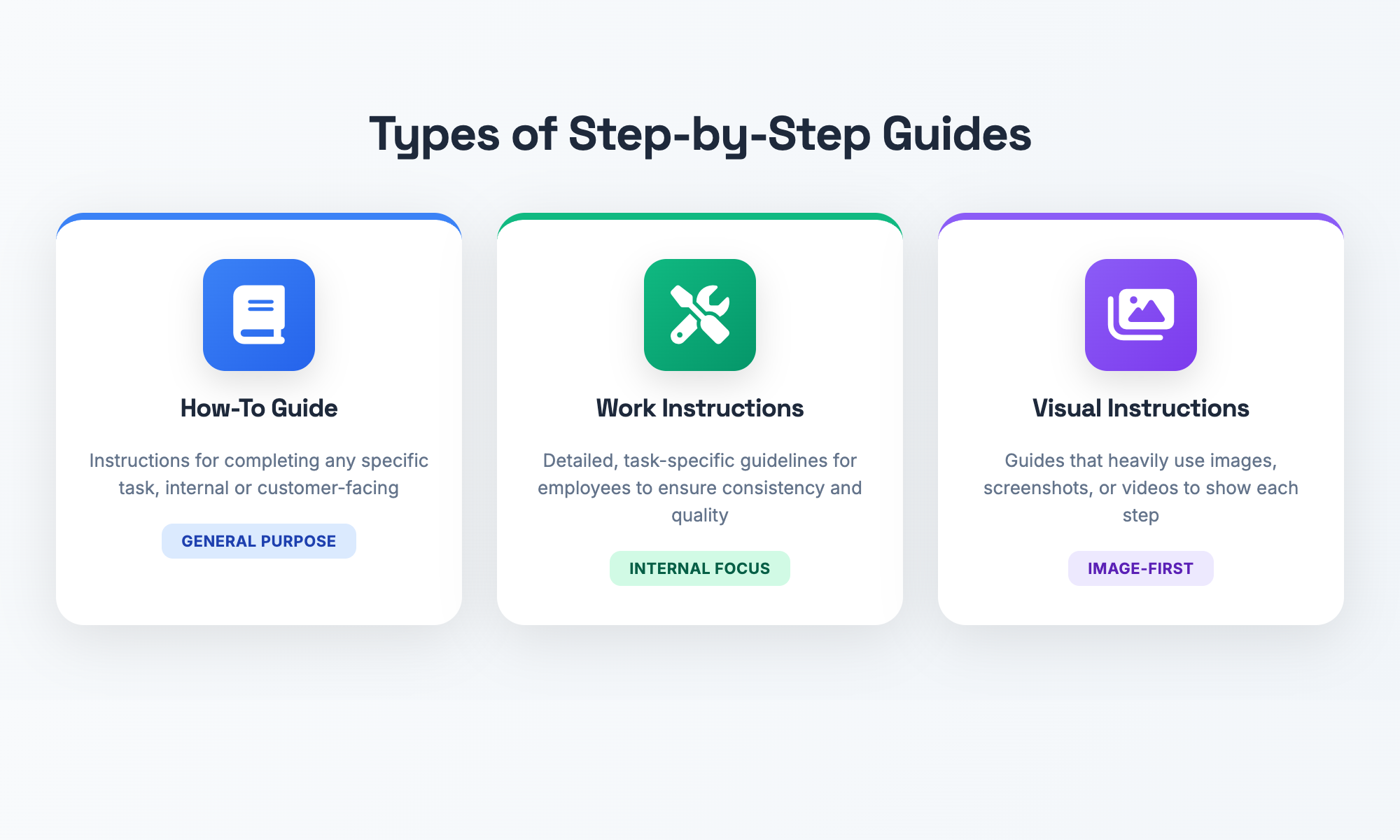
Before we dive into our guide on how to write a guide that gets results, let us define our terms. How-to guides and work instructions are frequently used as synonyms. They are not quite the same thing, but overlap considerably. Both depend on clear step-by-step instructions that help users complete various objectives.
Definition of a How-To Guide
The name says it all: a how-to guide describes how to do something—more specifically, how to do it in step-by-step sequence (we all love sequence!). How-to guides can be anything from employee-facing to customer-facing. "How to Submit an Expense Report" is an example that springs to mind, as is "How to Export Your Data" for software users. Most great how-to docs add screenshots, diagrams, or photos to clarify the text further.
Work Instructions
"Work instructions are job-aid type documents designed for use by employees actually performing operational work," says the American Society for Quality. While they often mirror how-to guides, work instructions are usually more formal, more concerned with keeping things internally consistent and correct. They're the official "the right way to do a job task" that the organization sticks to to guarantee that everyone on the team does things the same way, and correctly, including things like quality assurance and safety. Work instructions are common in manufacturing and healthcare settings, and in any industry where everything needs to be done according to standard procedures. They're the detailed playbook that ensures successful athletes operate safely and effectively.
Step-by-step guides + visuals
"Step-by-step guide" is a broad category that includes both how-to guides and work instructions. When you throw in the word "visual," we're in the territory of visual work instructions, which use charts, pictures, diagrams, videos, or screenshots to supplement the first three steps. Studies show that visual work instructions significantly increase retention and decrease mistakes because we process images faster than words. If you are creating tutorials or internal instructions, using visuals takes your documentation from average to excellent.
Now that you know what the different types of guides are, why are they so important to organizational success?
Why Are Step-By-Step Guides Important?
Writing standardised work instructions and how-to guides won’t just feel like busywork. These guides provide benefits that make their way down to your bottom line, your employees, and the quality of your operations. That’s why clear documentation is worth your time.
Less Variation, More Consistency
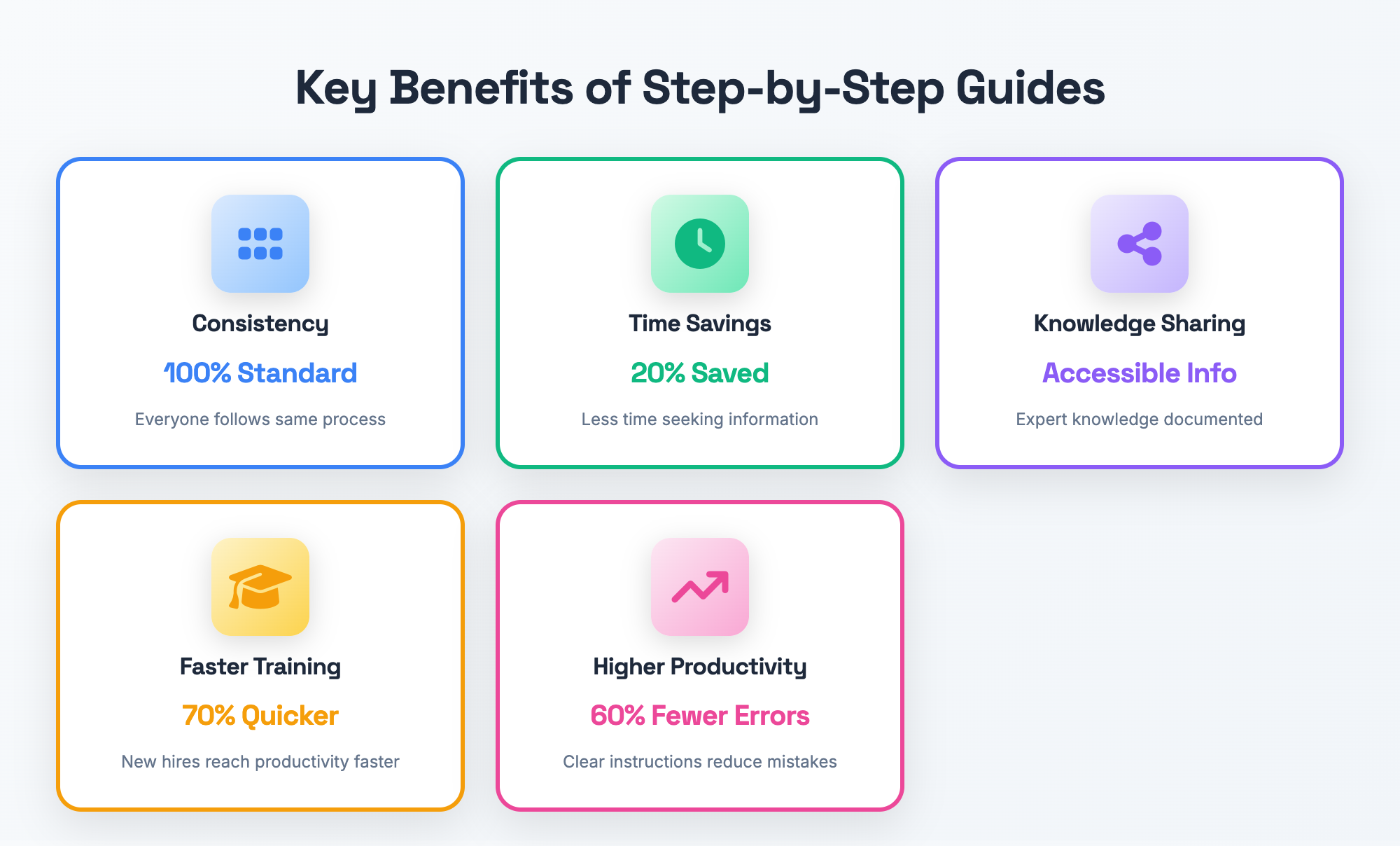
Clear guides mean we're all rowing in the same direction—no one takes a different fork that ends up with a mistake. When you write down how to do something "the right way," there's no question left on whether to do step A or C first. Nissinboim and Naveh (2018) explain that because standardized SOPs provide a common, fixed sequence of steps, this leads to consistency[2] in the organization: "Standardization is effectively an organizational memory repository that curtails employee confusion and forgetfulness." With that consistency comes higher quality, better safety, and fewer screw-ups in your business.
Time and Cost Savings
How much time does your team spend hunting down the answers to common questions? Employees toss aside 20% of their work time tracking down the information they need, according to research by the McKinsey Global Institute (2012)[4]. Their study estimates that employees spend somewhere between 25%-30% of their time, or around 1.8 hours a day, searching for information and documents. Think about it – nearly one day of work lost each week for each employee. When you create how-to documentation accessible to people so they don’t have to hunt answers through a maze of emails and colleagues, you stop the wasteful searching. They get answers, make fewer errors that they then have to fix, and can function more independently instead of constantly bugging coworkers with questions.
Knowledge Sharing
Documentation turns an expert's knowledge from something rattling around in their head into something the organization can share. When you write up your process, you capture tacit knowledge[3]. Haddadpoor et al. (2015) did just that in their study of Isfahan University of Medical Sciences faculty and staff. By documenting everything one person does when they do a certain task, you turn that know-how into something more easily shared. Now your organization’s know-how doesn’t lie, dependent on that one lucky person, with a few key employees, but can survive employees leaving!
Training & onboarding
New hires ramp up dramatically faster when they have clear step by step guide templates to follow. “Onboarding—that’s where the gains are.” A strong onboarding process positively impacts performance [5]. So found the Brandon Hall Group (2015), who disclosed that organizations with “high quality, formal” onboarding processes saw employee retention go up by 82% for new hires, and they reached full productivity 70% faster if the organization had standardized onboarding. Well documented guides give junior team members the confidence they need to complete the tasks themselves, and remove them from constantly sitting at the feet of the busy senior people on the team.
Get More Done, Lose Less
The right instruction set prevents “what now?” slow-downs that disrupt your flow. Interactive digital guides cut errors nearly in half (43%) in a 2022 controlled experiment by Letmathe and Rößler. Workers completing assembly tasks 20% faster with 60% fewer errors on their first try than those using paper manuals. And even after repeated attempts, they still outperformed that group. Clear, visual work instructions let your team work more autonomously, fewer errors, and better results overall.
Now we know these benefits, but what about the other side? Let’s see why many documentation fails.
Wrangling with Tape-Destruction
Most organizations realize they need documentation, and unfortunately, many organizations stick to some outdated methods that create more headaches than they solve. Paper manuals on paper docs with long paragraphs are not the way to go in today’s world of work.
It’s almost comical: a giant binder full of procedures sitting on a shelf, or an online system which you could use to upload documents but is “very securely” password-protected. And then, when you do open it, there are shades of black and white, no diagrams, no pictures, and pages written in ridiculously technical terms which jump right over the stuff you do and fit best with the PhD. who has taken a few too many blows to the head downloading. Assume you’ve got some knowledge of things, but not too much of it. What do I do? Typical faults of old-school documentation:
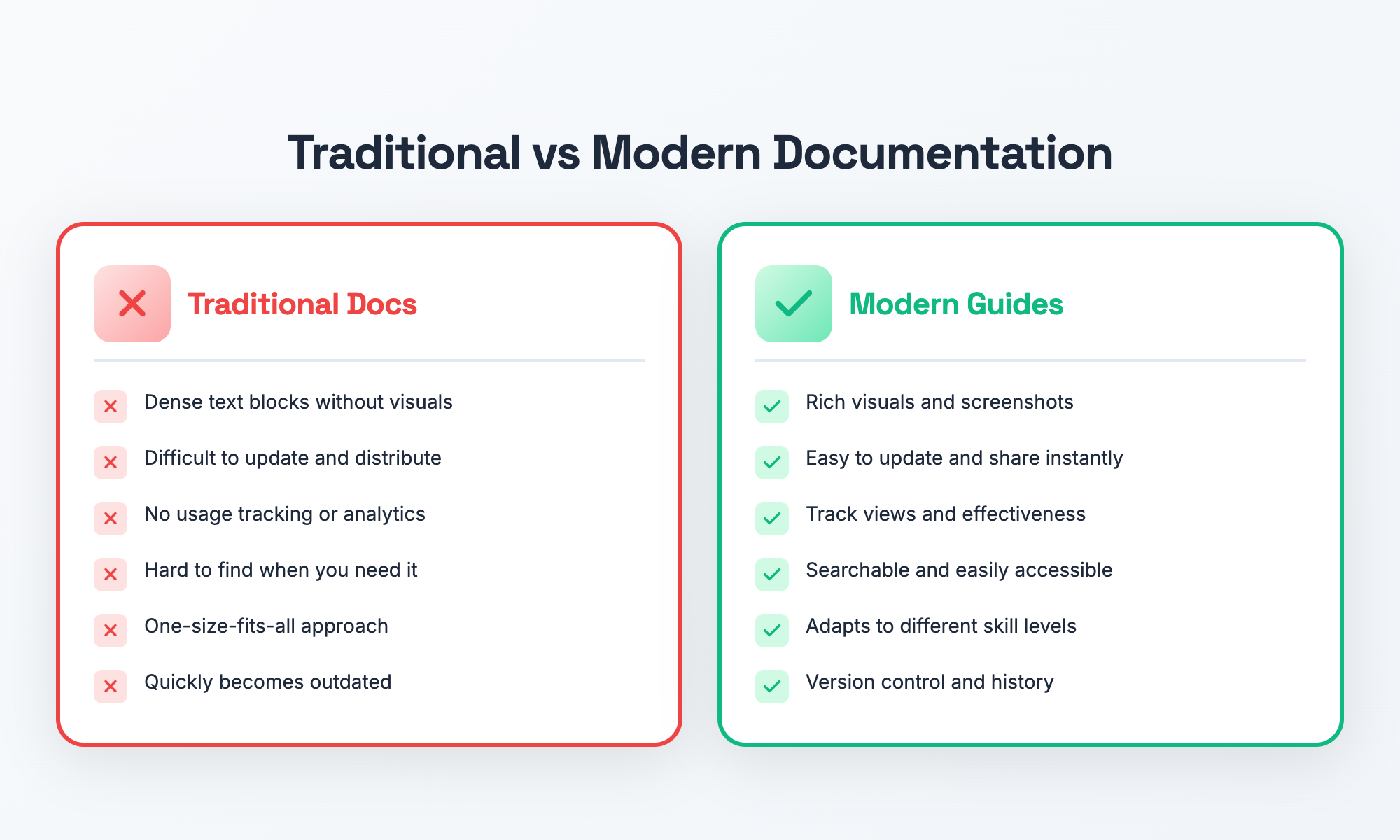
- Text overload: Long blocks of text without visuals or clear formatting are hard to follow and easily ignored
- One-size-fits-all approach: Printed manuals can't adapt to different learning paces or skill levels
- Difficulty updating: Paper and PDF documents become outdated quickly, and distributing updates is cumbersome
- No usage tracking: You have no way to know if anyone actually reads or uses the documentation
- Accessibility issues: Finding the right information when you need it becomes a time-consuming treasure hunt
The result? All the things we’ve talked about. Confusion. Mistakes. People so disengaged with their documentation, they revert back to asking a colleague instead of following the manual. Wasted time and knowledge “trapped in the heads of experts.” The answer? Exciting, visual, user-friendly step-by-step instructions nobody will have to beg people to use. Let’s get into how!
Getting Started: How to Make a “How to” Guide
The practical part: how to make a how to guide that truly works. Try this tried and true 11-step method for creating documentation your team will actually use. Whether you’re creating work instructions for manufacturing, or a customer tutorial, follow these steps to success.
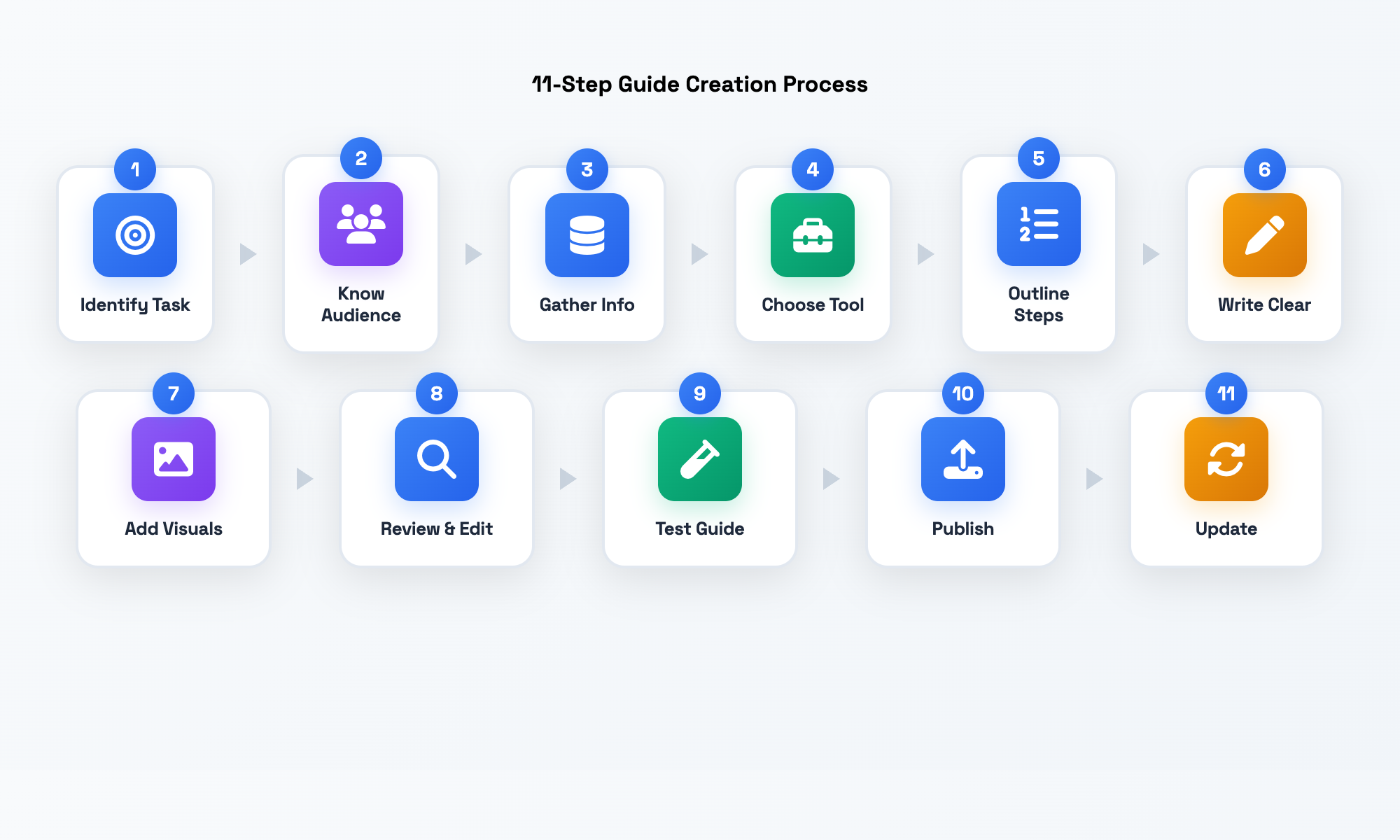
1. Identify the Task or Process
What are you going to document? Identify the specific task or process. Know the scope of what you are documenting, and know where it begins and ends. What is the outcome? What do you want someone to be able to do after reading this? Be specific. Don’t document email management, document “How to Set Up Email Filters in Outlook.” This scope keeps you on task and helps you get things done. Consider why this task should be documented now. Is it being done incorrectly too often? Does it slow down new employees? Document the things that will have the most impact.
2. Know your audience
Who are you writing for? Are you writing work instructions for seasoned technicians, training materials for new hires or customer tutorials for people that have never used your product? Their level of expertise informs the detail and language you will employ. Focus on where they’re at, what’s their baseline understanding of what is essential and related to what they need to know, and adjust from there. Tip: When you need to make assumptions about your audience, assume that they don’t know anything—no point leaving beginners behind. Also consider where they’ll be solving the issue you’re writing about—on a phone, tablet or desktop? In a noisy factory, or in a quiet office?
3. Gather Information (SME Input & Research)
“Documenting processes collects tacit knowledge,” Haddadpoor et al. (2015) explain. Work with the subject-matter expert (SME) or research the correct steps. Walk through them yourself, or shadow the expert. Record every action, no matter how obvious or trivial it is. “Do not skip ‘obvious’ things that experts do automagically.” D. Allen. “Getting It Done”—sampling. Collect information about necessary tools and materials, prerequisites, and safety precautions. Take notes, or screenshots, or record the expert walking through the process to collect the information.
4. Choose the Write Tool/Format
Decide how you’ll create and distribute the guide. You can go simple (Word doc, Google doc) to sophisticated (writing and delivery tools, specialized applications for documentation). What do your audience members have access to? If they work on the factory floor, do they need printed laminated cards or web pages optimized for their phones? Do office workers prefer things in the company intranet? There are even shareware-type tools that will automatically capture the screenshot of what you are doing in the split-second the mouse button is pushed. People will invent a better wheel than you ever thought possible when it comes to documentation. Choose what fits your needs in terms of use, access, and updates.
5. Outline the Steps
Now, without filling in the details, draft an outline for your instructions. List the major steps, in correct order. If any are complex, break them into sub-steps. Lengthy steps should be kept to a minimum, and single steps should usually describe a single action or decision point. (Instead of saying “configure the system,” you might say: “Click Settings > Preferences” (step 1), “Check the ‘Enable notifications‘ box” (step 2), “Click Save” (step 3) Review your draft outline to see that no steps have been left out and that they are in logical order. This draft outline will become the outline for your instructions and will prevent you from launching into writing the instructions, only to discover later that a step has been overlooked.
6. Write Clear Instructions
Again, expand the outline into plain words. Use the active voice. Be direct: “Click the File menu” rather than “File menu should be clicked.” Be brief (write sentences of less than 15 words if possible). Avoid jargon and describe it when you use it. Use consistent vocabulary - if it’s a “dashboard” in step 1, make sure it stays a “dashboard” in step 5. Number steps sequentially. For steps with multiple actions, use sub-steps or bullets. Write for your reader - personally, directly.
7. Add visuals for each step
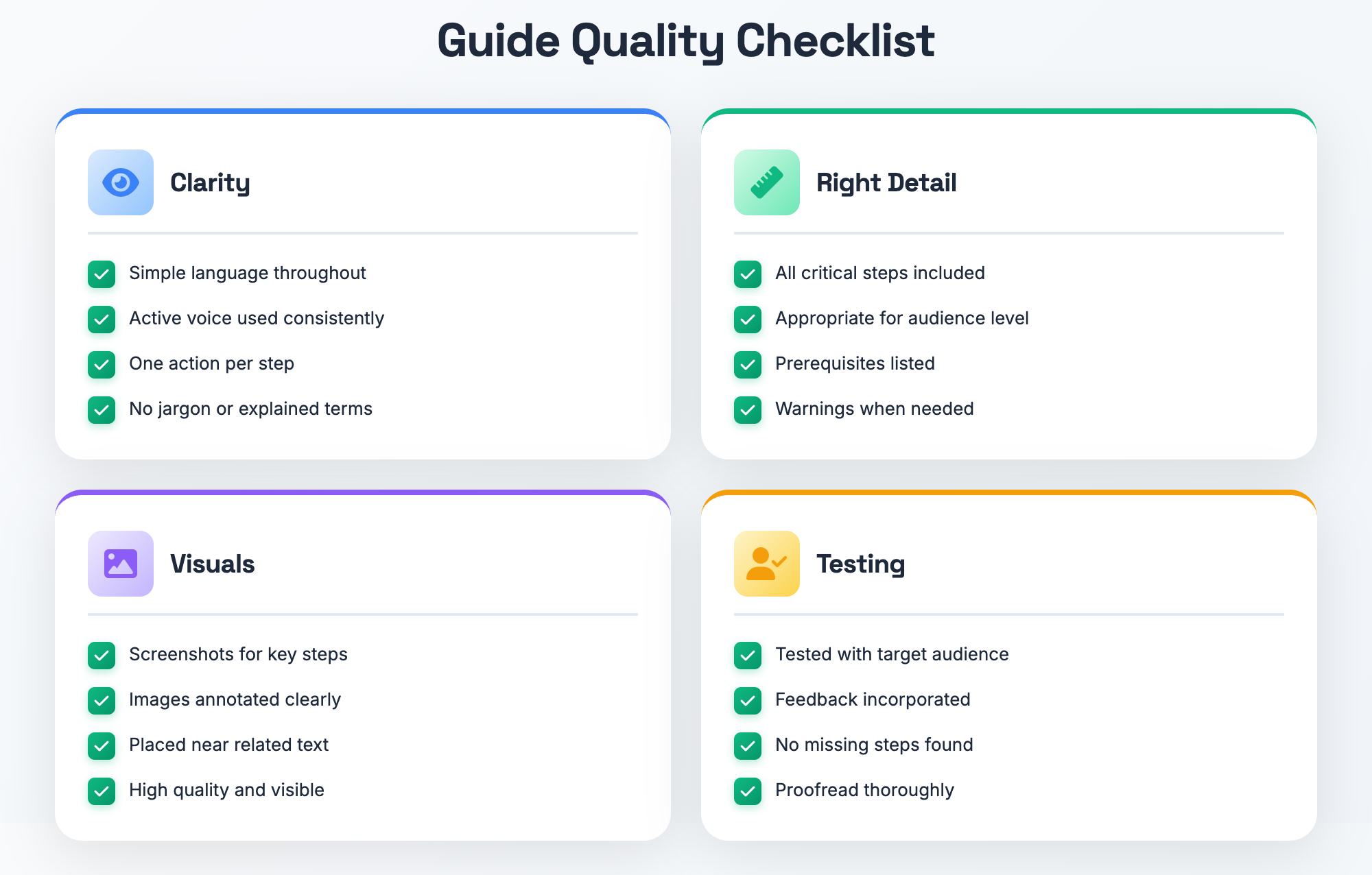
Pair your written instructions with helpful visuals. Screenshots, photos, diagrams, GIFs, or short videos make instructions much easier to follow. Research shows that visual work instructions significantly increase understanding and reduce errors. After you’ve written your steps, take images that show what the user should see or do as part of each step. Place the image close to the related text. Annotate with an arrow, highlight, or callout box to draw attention to specific buttons or fields those are important for the user. No visuals? A simple visual is better than none. Remember: one clear screenshot can sometimes say in seconds what it might take a paragraph to explain.
8. Review and Edit
Proofread your entire guide. Read it through with fresh eyes (meaning, after you’ve taken a break). Make sure every step is completely clear on first reading. Verify that you haven’t skipped steps, and that you’re not including distracting asides. Map out and simplify convoluted sentences. Remove any jargon or buzzwords unless the audience you’re supporting is steeped in lingo. Make sure you format everything consistently, and apply the same heading styles, bold keywords, and structure, across the board. Make sure all visuals are in the right place, clearly labeled, and large enough to be read. I generally find that this editing step is where I discover more ways to make instructions simpler, or where I reveal areas that are rather confusing.
9. Test the Guide (Feedback Loop)
Share your guide with someone in your target audience, and have them use it to complete the task from scratch. Pick a level-headed person who represents a typical user, preferably someone who is unfamiliar with the system you’re explaining. Watch carefully without intervening yourself (no jumping in to help!). Notice the points where the user hesitates, where they need to reread a part of the guide, or where they ask a question. Use these points of friction to identify places that need clearer guidance or more info. After they’re done testing the guide, ask them directly for their feedback: Was anything confusing? What could be clearer? Let their likes and dislikes inform your revisions. They’ll spot things you assumed about the task that you weren’t aware you thought.
10. Publish and Distribute
When the guide is ready, make it easy to find for everyone who needs it. Upload it to your team's knowledge base, intranet, or shared drive. For guides that will be customer-facing, make them publicly available on your website or help center. Ensure they're easy to find. Name them clearly, add helpful tags, and put them in the right category so people can search for and find them. Introduce new guides over email, and at team meetings or in chat channels. For web-based guides that customers will search for, optimize them for search engines so they can be discovered. A brilliant guide is useless if no one knows about it, or can't find it when they're looking for help.
11. Regularly Update
Treat your guide like a living thing. Rather than haphazardly throwing together a document that will never be touched again, schedule a quarterly review (or after every time a process changes) to keep your instructions current. When software updates, process improves, or feedback reveals flaws, update your guide. Encourage users to report bugs or unclear spots. Include a “Last updated” date so it’s clear how old your information is. Regularly maintenancing your guides will help them remain trustworthy and accurate. An outdated guide is worse than no guide at all: it destroys the trust your documentation has built.
Ready to try this out? Pick one simple process and write a guide using these 11 steps. You’ll be shocked by how easy it is to come up with a worthwhile guide, and even more shocked by how much time it saves your team. But before that, here are a few tips to help your guide make the most impact.
Best Practices for Effective Work Instructions
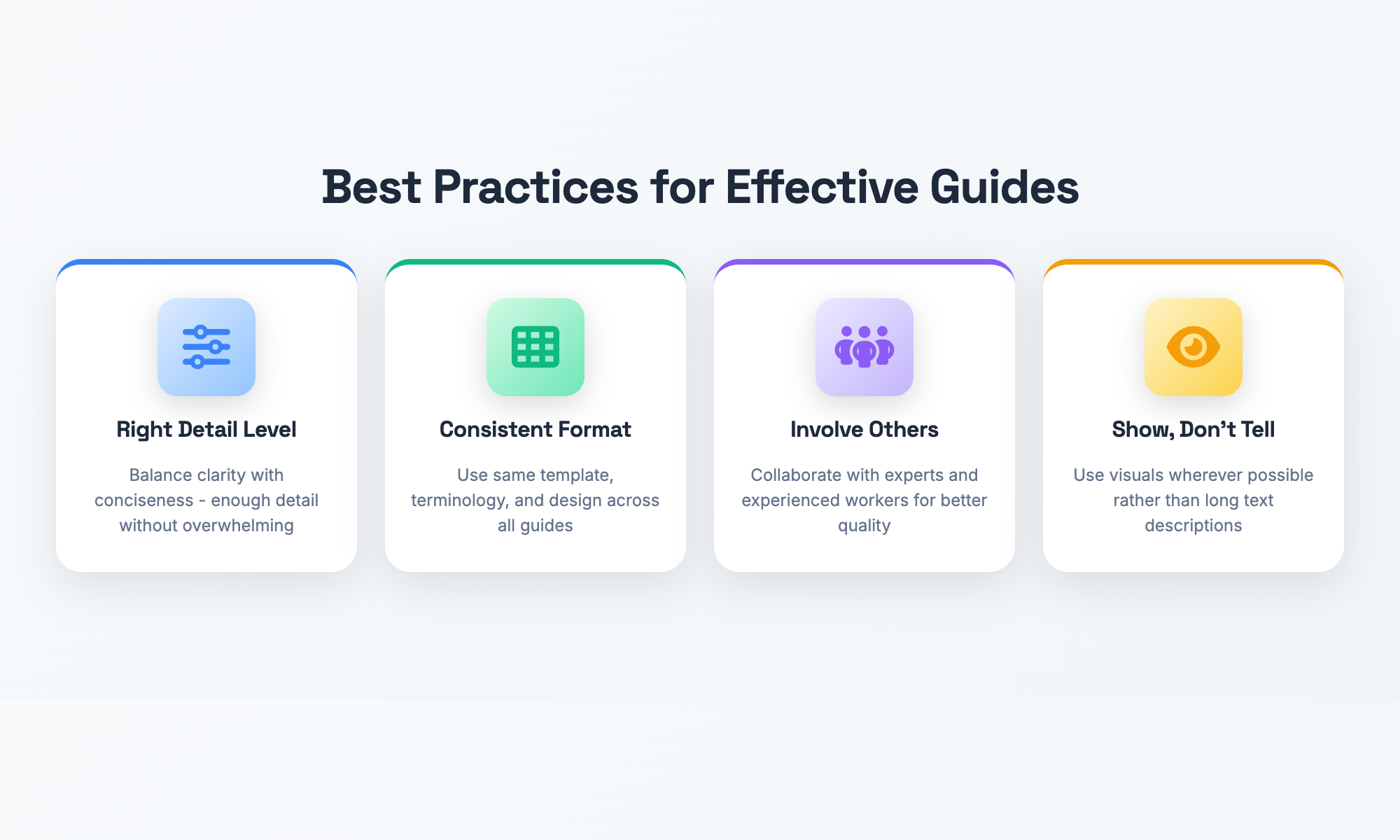
Now you understand the basics of writing effective step-by-step guides. To create excellent documentation, apply these best practices:
- Find the sweet spot. You want guides that are crystal clear but not too dense. If you tell the reader everything they need to complete the task, that’s the sweet spot. If you describe trivialities to death, that’s too many details. Office workers probably know what “click” means. They probably don’t know which little button to click or where to find it. Avoid lecturing to your audience. Assume a good baseline level of understanding, but don’t go overboard with assumptions.
- Keep format consistent. Use the same template, same terms, and same design across all your organization guides. Reducing the cognitive load helps the reader determine which guide to click and builds reader confidence. If each guide is organized the same way (overview, prerequisites, steps, troubleshooting), identifying information is as simple as remembering where each guide would keep it. Standardize how you format step numbers, headings, warnings, and tips. Create a how-to-guide template everyone uses. You want visual and structural consistency across your library of documentation.
- Involve stakeholders and seasoned workers. Don’t create documentation in isolation. Grab the people who do this work and know the ins and outs of edge cases and common mistakes. They’ll also be the best reviewers—do you really want to miss something that may knock 50% of your documentation users out of the game? Plus, the more people involved, the more of a sense of buy-in there is and the more likely folks will use and maintain it.
- Focus on clarity and visual communication. No step should be ambiguous, and instructions should be written in the order tasks are performed. Readers should never have to guess what comes next or jump back in the flow three steps. And remember: show, don’t tell. Whenever possible, choose visuals over written descriptions. Often, a single annotated screenshot is more effective than writing a paragraph. Think about text and visuals as partners in communicating information.
Best Practice Tip: Before publishing any guide, ask yourself: "Could someone with zero experience follow this successfully?" If the answer is no, you need more clarity, more detail, or better visuals.
Adhering to these principles will substantially improve the usability and effectiveness of your documentation. But even the best intentions can go awry. Let us see what to avoid.
Common Missteps to Avoid
Even the best intentions with documentation can lead to failure if you fall into these frequent error traps. Knowing where people trip up can help you write guides that people actually use and appreciate. Not knowing your audience. Writers who speak too technically for newbies—and too patronizingly for experts—frustrate their audience. A guide bubbling over with obscure terms makes newbies feel dumb; a guide that explains the very basics in detail seems condescending to the more knowledgeable. Think of the audience as your specific audience, and tailor your words, detail, and personality to suit.
Not updating. If a screenshot is worth a thousand words, an old one is worth zero. Documentation is perishable well-hidden documentation can be worse than no documentation at all. Certain outdated documentation can hurt your credibility, wasting everyone’s time. Don’t just assign someone to write it; make someone responsible for active maintenance. Put documentation on a review schedule.
Poor storage, or none at all. Having beautifully written guides locked up on an IT guy’s C drive benefits no one. Keep documentation centralized, easy to find, and closely located to where you do your daily work. Do not let your guidelines get lost in a labyrinth of folders, or the hidden hierarchy of someone’s cab certified.
Text overload. Loads and loads of densely packed text intimidate readers and bury key information. Use headings, bullet and numbered lists, and pulls, especially if you fail to make helpful use of lots of empty space. People scan—they don’t read up and down the lines, make it easy to see what’s key.
Writing about things you aren’t sure are really the way they are. Never write through a guide walkthrough until you’ve actually walked through it yourself (or until you’ve thumbed through a precise walkthrough from someone who has). Best guess, even educated guess, isn’t enough—make sure you hang out with someone on the same path or road to know for sure.
Warning: These pitfalls are surprisingly common even in large organizations with dedicated documentation teams. Review your existing guides against this list and identify areas for improvement.
Being conscious of these errors will save you a lot of rework and help your documentation efforts actually be worthwhile. Now let’s tackle some common questions people have when it comes to creating guides.
How Tools Like Hinto Ai Solve These Documentation Challenges
If your organization struggles with inconsistent documentation, outdated manuals, or the difficulty of keeping guides current, modern documentation platforms can remove much of that friction. A tool like Hinto AI helps teams create clear, visual step-by-step guides dramatically faster by capturing knowledge directly from videos, screen recordings, or expert walkthroughs.
Hinto AI automatically converts videos into structured guides, complete with screenshots, annotations, and organized step-by-step sequences.This removes the burden of manual screenshotting, formatting, and rewriting instructions from scratch. You can also record your screen or upload existing video demos, and generate fully formatted knowledge-base articles or SOPs in minutes.
For teams that need to maintain accuracy over time, Hinto AI provides version control, seamless updates, and publishing tools that ensure documentation stays current as processes evolve. Organizations can publish guides through a public URL, connect custom domains, manage SEO settings, or export content for use in other platforms. Multi-language support makes it easy to localize guides for global teams.
By combining video capture, automated content generation, visual instruction tools, and built-in publishing workflows, Hinto AI allows organizations to replace outdated manuals with dynamic, visual, easy-to-maintain documentation that team members will actually use.
Frequently Asked Questions
What's the difference between a work instruction and an SOP?
A Standard Operating Procedure is a higher level document that describes what needs to be done, and when, and by whom at a glance. SOPs are often used to explain policies, responsibilities, or similar tasks in an overall workflow. A work instruction is usually very granular and focused on how to perform one specific task within that overall process. For example, the SOP might include a section on quality control in manufacturing. But the work instruction is going to get into the weeds about how to calibrate a specific instrument used in that procedure.
How is a how-to guide different from a training manual or user manual?
These terms are closely related, though not identical. A how-to (or step-by-step) guide is typically a subject-specific tutorial on how to do one thing. It’s read at the moment you need to do that specific thing. On the other hand, a training manual or user manual is usually a larger collection of guides, overviews, concepts and procedures about a product, system or job function, presented in one longer document, book or section. A software user manual might contain dozens of individual how-to guides covering different features, insights about how things are conceptually organized, and so on. You can think of how-to guides as modular building blocks that could work on their own or be compiled into the larger manuals.
What makes work instructions "visual" and why use them?
Visuals could be images, screenshots, diagrams, videos, or photos used in addition (or even instead) of text. Rather than telling someone about something, they show. And that’s important—research shows us quite clearly that we learn better and faster from visuals. When we can see an example (like a screenshot with an arrow pointing to the exact button I’m supposed to click), we just get it. This reduces mistakes and confusion, and no one has to re-read the directions. They are excellent for complicated software tasks, manufacturing instructions, and anything that may have a language barrier. Visually instructive documentation is infinitely more usable.
How much detail should each step contain?
Your guide should contain enough detail that without asking questions someone with the expected baseline of knowledge can successfully complete the task. Include all critical steps and decisions, and all warnings or advice that prevent common mistakes, but avoid spelling out so much obvious information that the reader feels patronized. A good rule of thumb: Assume the reader is doing the task for the first time and spell everything out in the right order. If you’re not sure you should include something, include it, then err toward the other side if users say it’s too detailed. It’s easier to swing in the other direction than to fix missing steps later. Test your guide with someone in your target audience to see what the right level of detail is.
What tools do I need to create how-to guides quickly?
You have options, depending on your needs. For simple guides, plain old Microsoft Word, Google Docs, or Notion works just fine. Insert screenshots by taking them yourself if you’re already comfortable. For more advanced use cases, specialized documentation platforms like Confluence or Guru, or even knowledge base software, may fit your needs. Some tools automatically capture what’s happening as you maneuver through your screen. Then with a bit of clickable outlining, your step-by-step guide is ready and rolling, complete with helpful screenshots as you worked, saving you loads of time. Even wiki-style self-help sites can provide easy updates by everyone’s participation. Most of all, you want a tool that’s easy to create and access while being able to be updated as things change. The best tool is the one your team will consistently use!
How often do we update our work instructions?
At the very least, you should review your work instructions quarterly or anytime the process that’s described in them changes. A software update, an equipment swap-out, a policy change, or users expressing confusion will all mandate a new update. Some companies assign an owner to each guide whose job it is to keep the guide fresh. You’ll get feedback when users see something that’s wrong, dated, or murky. Change it as soon as you notice it! Put a “Last reviewed” or “Last updated” on the guide so users know when it was last checked for accuracy. You need to maintain your documentation; an old piece of documentation is worse than no documentation at all (it’s time consuming to wade through to find what you’re looking for, it encourages bad habits and really damages trust in the whole knowledge base).
Who should review guides before publishing?
Who should review? Expert plus audience at a minimum. Get at least two people reviewing each guide before publication — one subject-matter expert (to confirm accuracy), and one person from your target audience (to confirm clarity and usability). The SME makes sure you’ve got the steps right and covered, and the audience representative makes sure the instructions actually make sense and are easy to follow. For top quality, find someone who will check your writing and formatting as well and make sure you’re sticking to your documentation standards. This multi-layered review catches different types of problems and drastically improves the quality of a guide. Don’t skip the audience testing phase — that’s where you’ll find your hidden assumptions!
Can I use the same guide template for different types of tasks?
Yes, and using a consistent template across the board is generally a best practice. Keeping to the same structure helps readers find what they need quickly and minimizes the burden of learning a new format every time. Your instructions template might include sections like: title, overview, prerequisites, estimated time, step-by-step instructions, troubleshooting tips, and related resources. You can (and should) adjust the template a little for different contexts, though. A manufacturing work instruction may need safety warnings front and center, while a customer software tutorial may require screenshots. The key is to maintain consistency and clarity overall, while providing a little flexibility.
Common mistakes include: using jargon with no definitions.
Skipping an “obvious” step that isn’t obvious to beginners, writing in passive voice and not stating who does what, not including visuals, not testing the guide with real users before you hit publish, and failing to update guides when your process changes. Other common mistakes are inconsistent terminology (calling the same thing different names), poor formatting that makes a guide impossible to scan, and storing documentation not where people can find it. Awareness of these pitfalls and user testing of your guides and regular guide reviews will help you avoid the vast majority of documentation failures.
Are visual guides effective for any process?
Visual guides are effective for almost any process, although the visual different kinds of visuals are most useful for manufacturing tasks require pictures of equipment, assembly or screenshots or screen recordings. Even a conceptual guide could benefit from flowcharts showing the decisions made in steps, decision trees, or inifographics that show the flow. The key is that some guides won’t require as many visuals as others. For example, a guide to a decision-making process would use visuals to show relationships rather than step-by-step photos. The same principle applies: the presence of visuals makes it easier to understand and remember than simply text. Just find the right kind of visual based on your content and audience. Those should answer your questions about creating guides. Let’s finish up with some final thoughts on putting this knowledge to work.
Conclusion
How to guides and work instructions aren’t just about “putting a check in the box.” They should be about empowering your team to work more efficiently, consistently, and confidently. If you take the time to create clear, visual step-by-step guides, you are creating something of huge value to your organization — less errors, faster onboarding, more effective knowledge sharing, and time saved!
The 11-step process you’ve just learned is all that you need to produce documentation people will actually use! Find one single task that bedevils your organization frequently and walk it through the steps outlined here. Get to know your audience. You talk an expert into lending their expertise. Write your step-by-step, clearly. Capture visuals and screenshots. Test it out with users who work with it. Publish it where they can find it.
Try not to make the perfect guide the first time. Even a simple guide, written with basic documentation practices and screenshots, will produce value for the organization. The more you do, the more of a documented knowledge base you build each week, the more you will learn template practices and improve your own process.
As the saying goes, the most expensive knowledge is what’s in your people’s heads. Each undocumented task is a risk, a weak link, and a barrier to improvement. Start your documentation today. You’ll be glad you did! What's one simple process you could document this week? Pick one, and get started with this process. With documentation, you’re picking up speed across the whole of your organization.
References
The following authoritative sources were cited in this article:
- Letmathe, P., & Rößler, M. (2022). Should firms use digital work instructions? Individual learning in an agile manufacturing setting. Journal of Operations Management, 68(1), 94–109. DOI: 10.1002/joom.1159. Available at: https://publications.rwth-aachen.de/record/834069/files/834069.pdf
- Nissinboim, N., & Naveh, E. (2018). Process standardization and error reduction: A revisit from a choice approach. Safety Science, 103, 43–50. DOI: 10.1016/j.ssci.2017.11.015. Available at: https://www.sciencedirect.com/science/article/pii/S0925753517306689
- Haddadpoor, A., Taheri, B., Nasri, M., Heydari, K., & Bahrami, G. (2015). Process documentation: A model for knowledge management in organizations. Materia Socio-Medica, 27(5), 347–350. DOI: 10.5455/msm.2015.27.347-350. Available at: https://pmc.ncbi.nlm.nih.gov/articles/PMC4639364/
- Chui, M., Manyika, J., Bughin, J., Dobbs, R., Roxburgh, C., Sarrazin, H., Sands, G., & Westergren, M. (2012). The social economy: Unlocking value and productivity through social technologies. McKinsey Global Institute. Available at: https://www.mckinsey.com/industries/technology-media-and-telecommunications/our-insights/the-social-economy
- Brandon Hall Group. (2015). Employee Onboarding: A Process for the Future of Work. Research report. Available at: https://www.allencomm.com/wp-content/uploads/2021/10/eBook_DevelopingOnboardingModernWorkplace.pdf

Product updates, feature announcements, and best practices from the Hinto product team.
Ready to Build a Better
Knowledge Base, Faster?
Get Started Free & Create Your First Article in Minutes